Azure Integration Services: Production Patterns
Logic Apps Workflow Orchestration
Azure Logic Apps Standard represents a fundamental architectural shift from the consumption-based model, introducing single-tenant isolation, VNet integration, and a workflow runtime built on the Azure Functions extensibility model. As the orchestration backbone for enterprise integration scenarios, Logic Apps Standard bridges the gap between lightweight event-driven automation and durable, stateful workflow execution that spans hours, days, or even weeks. This chapter examines the production-grade architectural decisions that determine whether a Logic Apps deployment delivers the reliability, performance, and operational characteristics that mission-critical integration workloads demand.
Foundations: Logic Apps Standard Architecture and VNet Integration
Single-Tenant Runtime and the App Service Plan Model
Logic Apps Standard runs on a dedicated single-tenant runtime hosted on an App Service Plan (Workflow Standard tier), which distinguishes it fundamentally from the multi-tenant Logic Apps Consumption model. The runtime is built on top of the Azure Functions v4 extensibility host, meaning the workflow execution engine shares the same underlying process model and extension infrastructure as Azure Functions. Each Logic Apps Standard resource hosts one or more workflow definitions within a single application boundary, allowing multiple workflows to share the same compute resources, connection credentials, and deployment pipeline.
The App Service Plan hosting model introduces resource governance concepts absent in the consumption tier. Workflows compete for CPU and memory within the bounds of the chosen plan SKU, and the plan's scaling behavior—manual, auto-scale, or zone-redundant deployment—directly affects workflow throughput and availability. For production deployments, the WS2 or WS3 SKU is typically appropriate for workflows processing more than a few hundred concurrent instances, while WS1 provides an economical starting point for lower-throughput scenarios. Unlike Azure Functions Premium plans, Logic Apps Standard plans do not support consumption-based billing; capacity planning and cost forecasting are therefore more predictable but require upfront sizing analysis.
The App Service Plan also governs the filesystem and storage behavior of Logic Apps Standard. The runtime writes workflow state to Azure Storage (Blob, Queue, and Table Storage) rather than to local disk, ensuring that workflow state survives instance recycling and scale-out events. However, the plan's local storage is used for artifact caching, extension assemblies, and log buffering. Teams migrating from Consumption Logic Apps must account for the shift in operational responsibility: the hosting plan, storage accounts, and runtime health become first-class infrastructure concerns rather than fully managed platform details.
Note
Logic Apps Standard supports zone-redundant deployment when deployed to an App Service Plan with zone redundancy enabled. This requires at least three instances and is available in regions that support Availability Zones. Zone redundancy is configured at plan creation and cannot be changed post-deployment.
VNet Integration Patterns and Private Connectivity
VNet Integration is one of the primary motivations for choosing Logic Apps Standard over Consumption. Regional VNet Integration allows outbound workflow calls to traverse the Azure virtual network, enabling connections to resources that are not exposed to the public internet: on-premises systems via ExpressRoute or VPN, Azure PaaS services with private endpoints (Azure SQL, Service Bus, Storage, Key Vault), and internal microservices running in AKS or Container Apps.
Outbound VNet Integration is enabled at the App Service Plan level and uses a dedicated subnet within the target VNet. The subnet must be delegated to Microsoft.Web/serverFarms and sized appropriately to accommodate the maximum number of plan instances. A /26 subnet (64 addresses) is the minimum recommended allocation for production plans that may scale beyond a handful of instances, as each plan instance consumes one private IP address. Failure to reserve adequate subnet capacity is a common cause of scale failures in VNet-integrated deployments.
Inbound traffic isolation requires deploying Logic Apps Standard in an App Service Environment (ASE) or using Private Endpoints. With Private Endpoints, the Logic Apps management plane and the HTTP trigger endpoints are assigned private IP addresses within the VNet, preventing exposure to the public internet. The combination of Private Endpoints for inbound and Regional VNet Integration for outbound creates a fully network-isolated Logic Apps deployment suitable for environments governed by strict network segmentation policies. For the highest-security workloads, routing all outbound traffic through an Azure Firewall using UDR (User Defined Route) with a 0.0.0.0/0 default route forces inspection of all workflow-generated network calls before they reach their targets.
Important
When using Regional VNet Integration with forced tunneling (UDR to route all traffic through Azure Firewall or NVA), you must ensure that the Azure Storage accounts used by the Logic Apps runtime are accessible via private endpoints or service endpoints within the routed path. Blocking access to runtime storage accounts will prevent workflow execution entirely.
Tip
Use separate storage accounts for the Logic Apps runtime (system storage) and for workflow-level data operations. This separation simplifies firewall rules, enables independent storage tier selection, and prevents workflow data operations from interfering with runtime storage throughput limits.
# CE-06-INFRA-01: Deploy Logic Apps Standard with VNet Integration
# Resource group and networking foundation

SUBSCRIPTION_ID=$(az account show --query id -o tsv)
LOCATION="eastus2"
RG_PROD="rg-logic-apps-workflow-orchestration-prod-001"
RG_DEV="rg-logic-apps-workflow-orchestration-dev-001"

# Create resource groups
az group create \
  --name $RG_PROD \
  --location $LOCATION \
  --tags environment=production workload=integration-orchestration

az group create \
  --name $RG_DEV \
  --location $LOCATION \
  --tags environment=development workload=integration-orchestration

# Create VNet with dedicated Logic Apps subnet
az network vnet create \
  --resource-group $RG_PROD \
  --name vnet-integration-prod-eastus2-001 \
  --address-prefix 10.10.0.0/16 \
  --location $LOCATION

az network vnet subnet create \
  --resource-group $RG_PROD \
  --vnet-name vnet-integration-prod-eastus2-001 \
  --name snet-logicapps-prod-001 \
  --address-prefix 10.10.4.0/26 \
  --delegations Microsoft.Web/serverFarms

# Create storage account for Logic Apps runtime (system storage)
az storage account create \
  --name stlogicappsprodruntime001 \
  --resource-group $RG_PROD \
  --location $LOCATION \
  --sku Standard_LRS \
  --kind StorageV2 \
  --allow-blob-public-access false \
  --min-tls-version TLS1_2

# Create App Service Plan (Workflow Standard WS2)
az appservice plan create \
  --name asp-logic-apps-prod-eastus2-001 \
  --resource-group $RG_PROD \
  --location $LOCATION \
  --sku WS2 \
  --is-linux false

# Create Logic Apps Standard resource
STORAGE_CONN=$(az storage account show-connection-string \
  --name stlogicappsprodruntime001 \
  --resource-group $RG_PROD \
  --query connectionString -o tsv)

az logicapp create \
  --name logic-apps-prod-eastus2-001 \
  --resource-group $RG_PROD \
  --plan asp-logic-apps-prod-eastus2-001 \
  --storage-account stlogicappsprodruntime001 \
  --location $LOCATION

# Enable VNet Integration
az webapp vnet-integration add \
  --name logic-apps-prod-eastus2-001 \
  --resource-group $RG_PROD \
  --vnet vnet-integration-prod-eastus2-001 \
  --subnet snet-logicapps-prod-001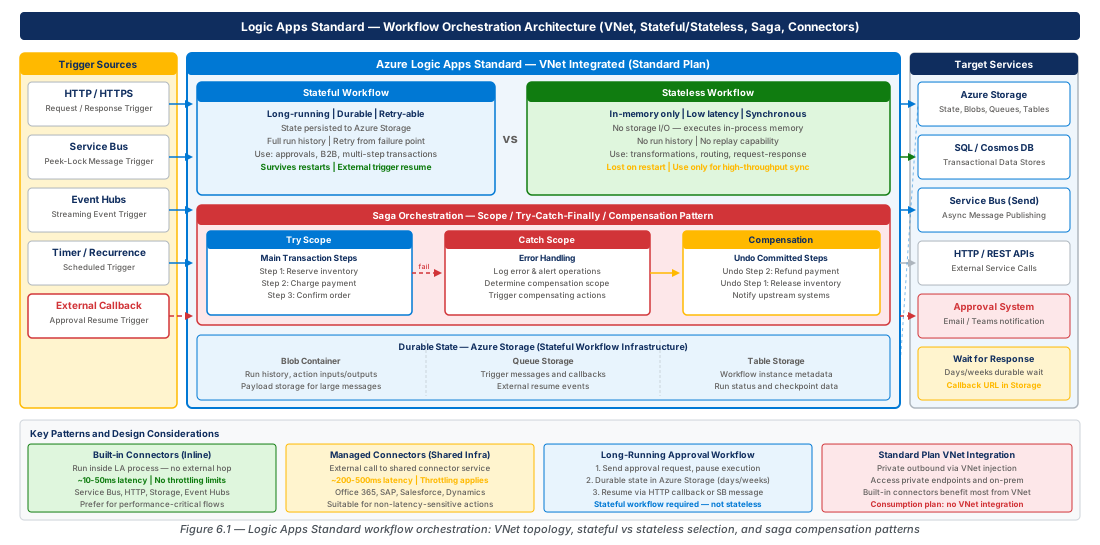
Built-in Connector Performance Characteristics
Built-in connectors (also called in-app connectors or in-process connectors) run within the Logic Apps runtime process itself, rather than making outbound HTTP calls to Microsoft-hosted connector infrastructure. This architectural difference has profound implications for latency, throughput, and VNet behavior. Built-in connectors for Azure Service Bus, Azure Event Hubs, Azure Storage, HTTP, SQL, and several others execute as code within the workflow host, eliminating the round-trip to the managed connector API layer.
The latency difference between built-in and managed connectors is measurable and in some scenarios architecturally significant. A managed connector operation—even a simple Service Bus peek-lock—traverses the public connector endpoint (connectors.azure.com), applies throttling policies, and returns over HTTPS. End-to-end latency for managed connector operations typically ranges from 50 to 200 milliseconds under normal conditions and can spike significantly under throttling or regional connector infrastructure pressure. Built-in connector operations for the same Service Bus call complete in single-digit milliseconds, as the SDK call executes in-process against the directly-bound namespace endpoint. For workflows processing thousands of messages per hour, this latency reduction compounds meaningfully into per-workflow and per-hour throughput improvements.
Built-in connectors also behave differently within VNet-integrated deployments. Because they run in-process, their network calls use the VNet Integration outbound path automatically, without requiring any special configuration. A built-in SQL connector call to a private Azure SQL Database uses the VNet Integration interface to reach the private endpoint. A managed connector call to the same database would require the managed connector service to reach the database, which typically requires granting access to managed connector IP ranges or using a hybrid connection, significantly complicating network architecture. Teams with strict network isolation requirements should treat built-in connector availability as a selection criterion when evaluating whether Logic Apps Standard is the right integration platform for a given scenario.
Tip
Use the Logic Apps built-in connector for Azure Service Bus in high-throughput message processing workflows. The built-in Service Bus trigger supports session-enabled queues and can process multiple sessions concurrently within a single workflow instance, a capability not available in the managed connector trigger.
Stateful vs. Stateless Workflow Selection
Execution Model Differences and State Storage Implications
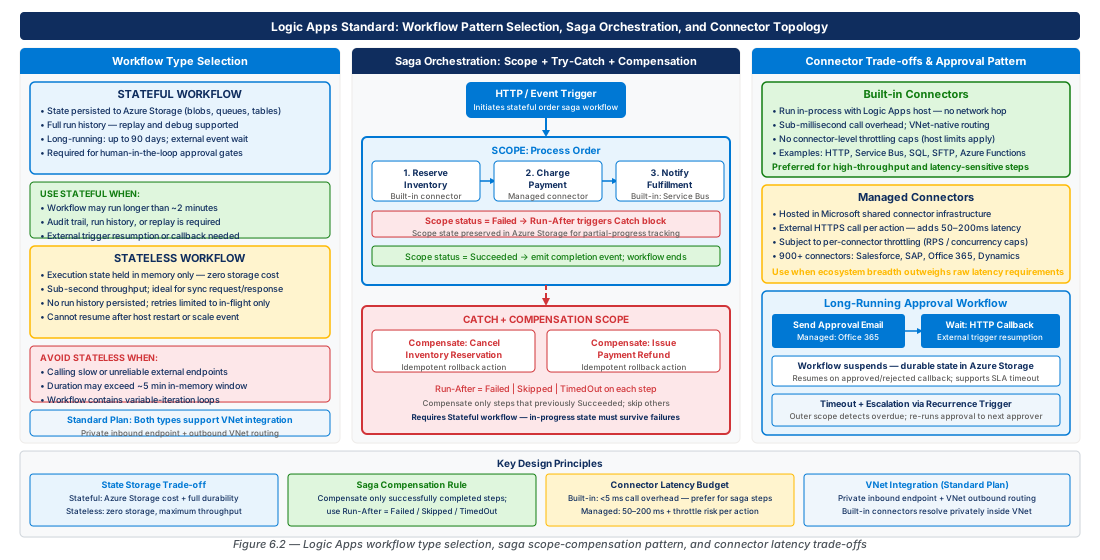
The choice between stateful and stateless workflow types is among the most consequential design decisions in a Logic Apps Standard deployment, with direct implications for cost, performance, debuggability, and the range of patterns a workflow can implement. Stateful workflows persist their execution history, inputs, outputs, and intermediate state to Azure Storage at every action boundary. This persistent checkpoint model enables the runtime to resume execution after a host failure, support long-running suspensions (waiting for external events or approvals), and provide full run history visibility in the Azure portal and via the Logic Apps API.
Stateless workflows, by contrast, execute entirely in memory. No execution history is written to storage; the workflow runs as a single atomic invocation from trigger to completion. If the host process is interrupted mid-execution, the workflow run is lost without retry or compensation. The performance profile of stateless workflows is dramatically different from stateful: throughput is bounded only by available CPU and memory rather than storage I/O, and per-operation latency is free of the storage checkpoint overhead. For simple transformation, routing, or enrichment workflows that complete in under 30 seconds, stateless execution can be 3 to 10 times faster than equivalent stateful workflows.
The state storage implications extend beyond latency. Stateful workflows write multiple Azure Table Storage and Blob Storage transactions per action—a 20-action stateful workflow may generate 60 to 100 storage transactions per run. At high throughput (thousands of runs per hour), storage transaction costs and potential IOPS limits on the storage account become meaningful factors. Standard_LRS storage accounts support up to 20,000 IOPS per storage account. For very high-throughput stateful workflow scenarios, distributing workflows across multiple storage accounts—configurable at the workflow level via AzureWebJobsStorage and host.json overrides—prevents a single storage account from becoming a bottleneck. Teams should instrument storage account IOPS metrics from the first week of production traffic and establish capacity thresholds before scaling events expose the constraint.
Warning
Stateless workflows do not support the Delay action, external event triggers (webhooks that resume suspended workflows), or workflow resubmission from run history. Attempting to use these patterns in a stateless workflow will result in a runtime error or unexpected behavior. Always validate the pattern requirements against the workflow type before committing to stateless execution.
Decision Framework: Matching Workflow Type to Integration Pattern
Selecting the appropriate workflow type requires a structured evaluation of the pattern's requirements across several dimensions: execution duration, resumption requirements, observability needs, and throughput targets. The following framework provides a decision matrix for the most common integration scenarios encountered in enterprise deployments.
Workflows that implement the request-reply pattern—receiving an inbound HTTP or Service Bus trigger and synchronously returning a response after executing a chain of transformations and downstream calls—are strong candidates for stateless execution, provided all downstream calls complete within the synchronous timeout window (240 seconds for HTTP response scenarios). Workflows that fan out to multiple parallel branches, aggregate results, and return a composite response benefit from stateless execution when the total duration is bounded and intermediate state does not need to survive a host restart.
Workflows that orchestrate multi-step business processes involving human approval steps, external system callbacks, or time-based delays require stateful execution without exception. The durable suspension model that makes Logic Apps Standard suitable for these patterns is only available in stateful workflows. Similarly, workflows that must support run resubmission from a specific failed action point—common in financial transaction processing and order management scenarios—depend on the checkpointed execution history that only stateful workflows provide.
Table 6-1: Stateful vs. Stateless Workflow Selection Matrix
| Criterion | Stateful | Stateless | Notes |
|---|---|---|---|
| Max execution duration | Unlimited (durable suspension) | 230 seconds (synchronous) | Stateless has no built-in timeout but HTTP response windows apply |
| External event / webhook resume | Supported | Not supported | Required for approval and long-running orchestration |
| Run history visibility | Full (portal + API) | Not persisted (configurable via operationOptions) |
Enable history on stateless via host.json for debugging |
| Storage transactions per run | High (60-100+ per 20-action workflow) | None | Critical for cost and IOPS planning at scale |
| Typical per-action latency | 50-200ms (storage checkpoint) | 5-20ms (in-memory) | Built-in connectors narrow the gap further |
| Retry and resubmission | Per-action retry + run resubmit | No resubmission | Requires idempotent downstream systems for stateless |
| Delay / suspend actions | Supported (up to years) | Not supported | Saga and approval patterns require stateful |
| Scope-based error handling | Full try/catch/compensation | Limited | Complex error handling requires stateful |
| Cost per run | Higher (storage + compute) | Lower (compute only) | IOPS and storage transaction costs compound at scale |
| Recommended throughput range | Up to ~5,000 runs/hour per plan | Up to ~50,000 runs/hour per plan | Varies significantly with action count and payload size |
Note
Stateless workflow run history can be enabled temporarily for debugging by setting "operationOptions": "WithStatelessRunHistory" in the host.json configuration under the workflow's settings. This should be disabled in production as it incurs storage costs and can mask performance characteristics.
# CE-06-INFRA-02: Configure Logic Apps Standard application settings for workflow type optimization

LA_NAME="logic-apps-prod-eastus2-001"
RG_PROD="rg-logic-apps-workflow-orchestration-prod-001"

# Configure storage account with optimized settings for high-throughput stateful workflows
az storage account update \
  --name stlogicappsprodruntime001 \
  --resource-group $RG_PROD \
  --allow-shared-key-access true \
  --min-tls-version TLS1_2

# Set application settings for workflow performance tuning
az logicapp config appsettings set \
  --name $LA_NAME \
  --resource-group $RG_PROD \
  --settings \
    "WEBSITE_RUN_FROM_PACKAGE=1" \
    "FUNCTIONS_WORKER_RUNTIME=node" \
    "AzureFunctionsJobHost__extensions__workflow__Settings__MaxConcurrentActivityFunctions=10" \
    "AzureFunctionsJobHost__extensions__workflow__Settings__MaxConcurrentOrchestratorFunctions=5" \
    "AzureFunctionsJobHost__extensions__workflow__Settings__MaxQueuePollingInterval=00:00:02" \
    "AzureFunctionsJobHost__logging__logLevel__default=Warning" \
    "AzureFunctionsJobHost__logging__logLevel__Host.Triggers=Information"

# Enable diagnostic settings for workflow monitoring
az monitor diagnostic-settings create \
  --name diag-logic-apps-prod-001 \
  --resource "/subscriptions/$SUBSCRIPTION_ID/resourceGroups/$RG_PROD/providers/Microsoft.Web/sites/$LA_NAME" \
  --workspace "/subscriptions/$SUBSCRIPTION_ID/resourceGroups/$RG_PROD/providers/Microsoft.OperationalInsights/workspaces/log-integration-prod-eastus2-001" \
  --logs '[{"category":"WorkflowRuntime","enabled":true,"retentionPolicy":{"enabled":true,"days":90}}]' \
  --metrics '[{"category":"AllMetrics","enabled":true,"retentionPolicy":{"enabled":true,"days":30}}]'
Scope-Based Error Handling, Try-Catch, and Saga Compensation Patterns
Scope Actions and the Try-Catch-Finally Model
Logic Apps Standard implements structured error handling through the Scope action, which groups a set of child actions into a named boundary with configurable run-after conditions. The try-catch-finally pattern is constructed by creating three sibling Scope actions: a "Try" scope containing the primary business logic, a "Catch" scope configured with runAfter conditions of Failed, TimedOut, and Skipped on the Try scope, and a "Finally" scope configured with runAfter conditions covering all terminal states (Succeeded, Failed, TimedOut, Skipped) of both the Try and Catch scopes.
Within the Catch scope, the workflow has access to the result() expression function, which returns the execution results of all actions within the referenced scope. This function enables dynamic inspection of which specific action failed, what error message was returned, and what the input payload was at the time of failure—information essential for constructing meaningful error notifications, dead-letter entries, and audit log records. The pattern result('Try_Scope') returns an array of action result objects; filtering this array with @body('Filter_Array') using the condition item()?['status'] == 'Failed' isolates the failing action details for downstream processing.
The Finally scope pattern addresses a gap that naive try-catch implementations miss: releasing acquired resources and recording terminal state regardless of whether the primary logic succeeded or failed. In integration workflows that acquire locks, reserve inventory, or open database transactions as part of their execution, the Finally scope ensures that cleanup logic runs even when the Catch scope's compensation logic itself fails. This three-scope structure is the foundational building block for the saga and compensation patterns described in the next section.
Important
The result() function is only available within the same workflow definition scope where the referenced scope action exists. It cannot reference actions in parent or child workflow definitions. For nested (child) workflow scenarios, error information must be explicitly returned as the output of the child workflow and surfaced to the parent via the outputs() function.
Saga Pattern Implementation with Compensation Workflows
The saga pattern addresses the distributed transaction problem in microservices and integration architectures: when a business process spans multiple services and one step fails after others have already committed, each previously completed step must be explicitly reversed through a compensation operation. Logic Apps Standard is well-suited for implementing the choreography and orchestration variants of the saga pattern, particularly the orchestration variant where a central workflow coordinates all steps and compensations.
A saga-orchestrated Logic Apps implementation structures the workflow as a sequence of Scope actions, each wrapping a single service call and its associated compensation logic. When a step succeeds, the workflow records the step's compensation action (typically a Service Bus message to a compensation queue or a variable update in an Array variable) in an accumulator. If any step fails, the Catch scope iterates the accumulator in reverse order and executes each compensation action. This "compensating transaction stack" pattern mirrors the rollback log maintained by traditional RDBMS transaction managers but operates at the distributed service level.
Implementing the compensation stack in Logic Apps Standard requires careful use of Array Variables initialized in the workflow's Initialize Variable actions. Each successful step appends its compensation descriptor to the array. On failure, the Catch scope uses a For each loop configured to iterate the array in reverse (using the reverse() expression function on the variable's value). Each compensation descriptor contains the endpoint, payload, and any correlation identifiers needed to reverse the operation. The compensation calls themselves should be designed as idempotent operations—if the same compensation is accidentally executed twice due to a retry, the result should be identical to executing it once. This idempotency requirement must be enforced in the downstream services, not in the workflow itself.
Warning
The For each loop in Logic Apps Standard runs concurrently by default (up to 50 parallel iterations). When implementing sequential saga compensation, you must explicitly set the runtimeConfiguration.concurrency.repetitions property to 1 in the For each action's configuration. Parallel compensation execution will produce incorrect results if compensations have ordering dependencies, which is the common case in financial and inventory scenarios.
# CE-06-INFRA-03: Deploy Logic Apps workflow package with saga pattern definitions
# This demonstrates packaging and deploying workflow definitions via Azure CLI

LA_NAME="logic-apps-prod-eastus2-001"
RG_PROD="rg-logic-apps-workflow-orchestration-prod-001"

# Create a Service Bus namespace for saga coordination messaging
az servicebus namespace create \
  --name sb-integration-prod-eastus2-001 \
  --resource-group $RG_PROD \
  --location eastus2 \
  --sku Premium \
  --premium-messaging-partitions 1

# Create queues for saga step coordination and compensation
az servicebus queue create \
  --namespace-name sb-integration-prod-eastus2-001 \
  --resource-group $RG_PROD \
  --name saga-orders-compensation \
  --max-size 5120 \
  --default-message-time-to-live P14D \
  --dead-lettering-on-message-expiration true \
  --lock-duration PT5M

az servicebus queue create \
  --namespace-name sb-integration-prod-eastus2-001 \
  --resource-group $RG_PROD \
  --name saga-orders-outbox \
  --max-size 5120 \
  --default-message-time-to-live P7D \
  --dead-lettering-on-message-expiration true \
  --lock-duration PT5M \
  --requires-session true

# Grant Logic Apps managed identity access to Service Bus
LA_PRINCIPAL_ID=$(az logicapp show \
  --name $LA_NAME \
  --resource-group $RG_PROD \
  --query identity.principalId -o tsv)

SB_RESOURCE_ID=$(az servicebus namespace show \
  --name sb-integration-prod-eastus2-001 \
  --resource-group $RG_PROD \
  --query id -o tsv)

az role assignment create \
  --assignee $LA_PRINCIPAL_ID \
  --role "Azure Service Bus Data Owner" \
  --scope $SB_RESOURCE_ID
Compensation Pattern Design Considerations
Designing effective compensation logic requires understanding the failure modes of each downstream service and the semantics of reversal. Not all operations are trivially reversible: an email sent cannot be unsent, a payment authorized through a payment gateway may require a separate void or refund call, and a record inserted into an append-only audit log should never be deleted. The compensation design must account for these semantic realities rather than attempting a generic undo operation.
For operations that cannot be compensated (immutable side effects), the saga design should place them as the last step in the sequence. If an email notification is the final confirmation of a completed order, placing the email step last means it only executes after all reversible steps have succeeded. If any earlier step fails, the email is never sent and no compensation for it is needed. This sequencing discipline—reversible operations first, irreversible operations last—is a fundamental principle of saga design that applies regardless of the orchestration technology.
Long-running sagas that span multiple hours or days introduce additional complexity. The compensation accumulator stored in a workflow Array Variable is durable in stateful workflows because it is checkpointed to Azure Storage at every action boundary. However, if a saga spans multiple workflow instances (a child workflow pattern), the compensation state must be coordinated through an external store—typically Azure Table Storage or Azure SQL—rather than relying on in-memory variable state within a single workflow. For sagas of this complexity, consider whether the Durable Functions orchestrator pattern (accessible within the Azure Functions host) provides a more natural implementation model, or whether the Logic Apps visual designer's clarity and connector ecosystem justify the additional coordination complexity.
Tip
Implement a dedicated "Saga State" record in Azure Table Storage at the start of each saga execution, recording the saga ID, current step, and compensation stack. Update this record at each step transition. This external saga state provides observability (operational dashboards can query saga state without inspecting workflow run history), enables dead-letter processing (a separate compensator workflow can resume failed sagas from the last known good state), and supports manual intervention workflows that allow operations teams to replay or skip individual saga steps.
Managed Connector vs. Built-in Connector Trade-offs
Latency, Throttling, and the Connector Architecture Decision
The connector architecture decision—managed vs. built-in—is a performance and operational trade-off that affects every workflow in a Logic Apps Standard deployment. Managed connectors (also called API connections or shared connectors) operate through Microsoft's hosted connector infrastructure, which exposes a consistent REST API surface over hundreds of third-party and Azure services. This infrastructure handles authentication credential management, provides a uniform operation model, and enables connector reuse across Logic Apps, Power Automate, and other Microsoft automation platforms.
However, the managed connector model introduces a network intermediary in every operation call. When a Logic Apps workflow invokes a managed connector operation, the call path is: workflow host → connectors.azure.com → target service. This additional hop adds latency and introduces a dependency on the connector service's availability and throughput characteristics. Microsoft publishes throttling limits for managed connectors that are separate from the Logic Apps service limits: each connector has a maximum calls-per-minute limit that applies across all Logic Apps resources sharing that connector endpoint within the same region. For high-throughput workflows using popular managed connectors (Office 365, SharePoint, Salesforce), this shared throttling boundary can become a limiting factor that is not visible from within a single Logic Apps deployment.
Built-in connectors eliminate the intermediary for supported services. The built-in connectors available in Logic Apps Standard include Azure Service Bus, Azure Event Hubs, Azure Storage (Blob, Queue, Table, Files), Azure Functions, Azure API Management, Azure Cosmos DB, Azure SQL, IBM MQ, HTTP, and several others. For any scenario where a built-in connector is available, it should be preferred over the equivalent managed connector unless the managed connector provides an operation that the built-in connector does not support. The architectural preference for built-in connectors should be documented as an explicit design decision in the integration architecture blueprint, not left to individual developer judgment.
Table 6-2: Built-in vs. Managed Connector Comparison
| Characteristic | Built-in Connector | Managed Connector |
|---|---|---|
| Execution location | In-process (Logic Apps host) | Microsoft-hosted connector service |
| Typical operation latency | 5–50ms | 50–300ms |
| VNet integration behavior | Uses VNet Integration automatically | Requires separate network configuration or hybrid connections |
| Throttling scope | Per Logic Apps resource (host process) | Shared across Logic Apps resources in the region |
| Authentication storage | App Settings / Key Vault reference | API Connection resource (ARM resource) |
| Credential rotation | App Setting update + restart | API Connection re-authentication |
| Connector coverage | ~20 Azure-native and standard protocols | 400+ SaaS and enterprise connectors |
| Custom connector support | Via custom extensions (code-based) | No-code custom connector designer |
| Support for private endpoints | Yes (via VNet Integration) | Limited (connector IP allowlisting or hybrid) |
| ISE (deprecated) migration path | Direct replacement for ISE built-in | Managed connector with updated auth |
Throttling Management and Retry Strategy Design
Throttling in Logic Apps Standard manifests at three levels: the Logic Apps service tier limits, the managed connector tier limits, and the target service's own throttling policies. A production-grade retry strategy must account for all three tiers, as a naive fixed-interval retry will fail under sustained throttling from any of these sources. The 429 Too Many Requests response from a managed connector throttle carries a Retry-After header indicating the minimum wait time before retrying; Logic Apps Standard's built-in retry policy honors this header when configured with the Exponential Interval retry type.
The retry policy is configured at the individual action level in the workflow definition. For production workflows, the recommended retry policy for managed connector actions is Exponential Interval with a minimum interval of 5 seconds, a maximum interval of 60 seconds, and a maximum retry count of 5. This configuration provides approximately 3 to 4 minutes of total retry window, which is sufficient for transient throttle conditions while preventing indefinitely retrying actions that are failing due to a persistent infrastructure issue. For built-in connector actions where throttling is less likely but network transient errors are possible, a Fixed Interval retry with 3 retries and a 5-second interval provides adequate resilience without excessive delay.
Important
Logic Apps Standard does not automatically propagate retry policies from parent workflows to child workflow invocations. Each workflow—parent and child—must have its own retry policies configured at the action level. In nested workflow architectures, the parent workflow's timeout for a child workflow call must be set longer than the child workflow's maximum possible execution time (including all retry delays), or the parent will cancel the child workflow before it has had a chance to exhaust its retries.
For scenarios where managed connector throttling is predictable and high-volume (for example, bulk-processing SharePoint files or Salesforce records), a proactive throttle avoidance pattern using Delay actions between iterations provides more predictable throughput than reactive retry. Throttling a For each loop to a known-safe rate—using a Delay action within the loop body and setting the concurrency to 1—sacrifices peak throughput for stability, which is often the correct trade-off in batch processing scenarios that run during off-peak hours.
# CE-06-INFRA-04: Configure Logic Apps managed identity and Key Vault for connector authentication

LA_NAME="logic-apps-prod-eastus2-001"
RG_PROD="rg-logic-apps-workflow-orchestration-prod-001"
KV_NAME="kv-integration-prod-001"

# Enable system-assigned managed identity on Logic Apps
az logicapp identity assign \
  --name $LA_NAME \
  --resource-group $RG_PROD

# Create Key Vault for connector credentials and API keys
az keyvault create \
  --name $KV_NAME \
  --resource-group $RG_PROD \
  --location eastus2 \
  --sku premium \
  --enable-rbac-authorization true \
  --enable-soft-delete true \
  --soft-delete-retention-days 90 \
  --enable-purge-protection true

# Grant Logic Apps managed identity access to Key Vault secrets
LA_PRINCIPAL_ID=$(az logicapp show \
  --name $LA_NAME \
  --resource-group $RG_PROD \
  --query identity.principalId -o tsv)

KV_RESOURCE_ID=$(az keyvault show \
  --name $KV_NAME \
  --resource-group $RG_PROD \
  --query id -o tsv)

az role assignment create \
  --assignee $LA_PRINCIPAL_ID \
  --role "Key Vault Secrets User" \
  --scope $KV_RESOURCE_ID

# Store API credentials as Key Vault secrets (example: external API key)
az keyvault secret set \
  --vault-name $KV_NAME \
  --name "external-api-key-erp-system" \
  --value "placeholder-rotate-before-production"

# Configure Logic Apps to reference Key Vault secrets in app settings
az logicapp config appsettings set \
  --name $LA_NAME \
  --resource-group $RG_PROD \
  --settings \
    "[email protected](VaultName=$KV_NAME;SecretName=external-api-key-erp-system)" \
    "SERVICEBUS_NAMESPACE=sb-integration-prod-eastus2-001.servicebus.windows.net"
Long-Running Approval Workflows and External Trigger Resumption
Durable State and the Suspension-Resumption Model
Long-running workflows that require human decision points—approval routing, exception handling escalations, compliance review gates—represent one of the most compelling use cases for Logic Apps Standard over alternative integration platforms. The durable suspension model allows a stateful workflow to pause execution indefinitely while waiting for an external signal, consuming no compute resources during the wait period and resuming precisely from the suspended point when the signal arrives. This model is architecturally distinct from polling-based approaches, where the workflow continuously checks for a condition, consuming resources and generating unnecessary API calls throughout the wait period.
The suspension-resumption mechanism in Logic Apps Standard is implemented through the Delay Until action, the When a HTTP request is received trigger in resume-from-suspend mode, and most commonly through integration with Azure Logic Apps' own callback URL pattern. When a workflow reaches a Response action with a pending callback URL embedded in the initial HTTP trigger, or when it reaches a Delay Until action, the workflow runtime serializes the current execution state to Azure Storage and releases the host thread. The workflow instance transitions to a "Waiting" state visible in the run history. When the callback URL is invoked—by a human clicking an "Approve" button in an email, by a scheduled timer, or by an external system completing its work—the runtime deserializes the state from Storage and resumes execution from the next action.
The storage-backed suspension model has important operational implications. The workflow's waiting state is stored in Azure Table Storage as a set of checkpoint records. These records must remain accessible for the entire duration of the suspension period. A storage account access policy change, a storage account deletion, or a failed storage account migration during a long-running approval workflow will cause the workflow to become unresumable. Production deployments should implement storage account lifecycle policies that prevent accidental deletion, and operational runbooks should explicitly prohibit storage account modifications during active workflow runs.
Note
Logic Apps Standard workflow instances in a "Waiting" state do not consume active compute resources. The App Service Plan instances are free to serve other workflow executions while waiting instances are suspended. Suspensions are billed only for storage transactions (reads and writes during state serialization and deserialization) and the minimal Azure Logic Apps service fee per execution action, not for wall-clock wait time. This makes long-running approvals economically viable even for workflows that wait days or weeks.
Approval Workflow Architecture with Email and Teams Integration
Enterprise approval workflows typically require routing approval requests to specific individuals or groups based on business rules, providing a clear approval/rejection interface within the approver's existing collaboration tools, and capturing the approval decision with an audit trail. Logic Apps Standard supports this pattern through a combination of the HTTP action (for generating callback URLs), managed connectors for notification delivery (Office 365 Outlook, Microsoft Teams, or Adaptive Cards), and the When a HTTP request is received trigger for resumption.
The standard approval workflow pattern begins with the workflow receiving a business event (an order exceeding a threshold, an expense report requiring manager sign-off, a change request entering the approval gate). The workflow uses the Send an email with options action (Office 365 managed connector) or an Adaptive Card posted to a Teams channel to present the approval request to the designated approver. These actions are built specifically for approval scenarios: they suspend the workflow while waiting for the approver's response and resume automatically when the approver selects an option. The response includes the selected option value and the responder's identity, enabling the workflow to branch based on the decision.
For approval workflows with complex routing requirements—multi-level approvals, parallel approvals requiring all members of a group to respond, or time-bounded approvals that escalate if not actioned within a deadline—the built-in approval action's simplicity may be insufficient. In these cases, a custom callback URL pattern provides more flexibility: the workflow generates a unique callback URL using the listCallbackUrl() function, embeds approval and rejection URLs in a notification email, and waits for an HTTP request to be received on either URL. This pattern enables approval interfaces in any channel (custom web portals, mobile apps, chat bots) and supports rich payload exchange (the approver can submit a comment, a modified value, or additional metadata via the callback POST body).
Tip
Implement approval workflow timeouts using the Delay Until action configured with the approval deadline, run in parallel with the approval wait using a Control → Scope with parallel branches. If the timeout branch completes before the approval callback arrives, cancel the approval scope using the Terminate action in the timeout branch and execute the escalation logic. This pattern avoids indefinitely suspended workflow instances when approvers are unavailable.
External Trigger Resumption Patterns
Beyond approval workflows, external trigger resumption supports a broader class of integration patterns where a workflow must pause and wait for a condition in an external system before proceeding. Common scenarios include: waiting for a batch process to complete before retrieving its output file, waiting for an ERP system to confirm successful ingestion of a submitted document, waiting for a payment gateway to complete asynchronous processing and deliver a webhook notification, or waiting for a human operator to acknowledge and resolve an exception condition in an operational dashboard.
The callback URL pattern for external trigger resumption generates a unique, time-limited, HMAC-signed URL that the workflow runtime uses to identify and resume a specific workflow instance. The URL is generated via the listCallbackUrl() workflow function and typically has a validity period configured in the Logic Apps Standard settings (default 30 days, configurable up to 1 year). The external system—an ERP, a payment gateway, a custom application—calls this URL to signal completion, optionally passing a JSON payload that the resumed workflow can access as trigger output.
Security considerations for callback URLs require careful architectural treatment. The callback URL itself functions as a bearer token: possession of the URL is sufficient to resume the workflow. The URL should be treated as a sensitive credential and transmitted only over HTTPS. For scenarios where the callback URL will be stored in external systems (ERP workflow tables, payment gateway webhook configurations), the external system must store the URL securely with appropriate access controls. Workflow callback URLs should not be embedded in client-side HTML, stored in plain-text log files, or included in error messages returned to end users. For high-security environments, the callback URL can be stored in Azure Key Vault and retrieved by the external system through a dedicated service identity, rather than transmitted directly in the notification payload.
# CE-06-INFRA-05: Set up approval workflow infrastructure with storage and alert configuration

LA_NAME="logic-apps-prod-eastus2-001"
RG_PROD="rg-logic-apps-workflow-orchestration-prod-001"

# Create a storage account for approval audit logs
az storage account create \
  --name stlogicappsapprovalaudit001 \
  --resource-group $RG_PROD \
  --location eastus2 \
  --sku Standard_GRS \
  --kind StorageV2 \
  --allow-blob-public-access false \
  --min-tls-version TLS1_2

# Create container for approval records
az storage container create \
  --name approval-audit-records \
  --account-name stlogicappsapprovalaudit001 \
  --auth-mode login

# Configure lifecycle management for audit records (retain 7 years for compliance)
az storage account management-policy create \
  --account-name stlogicappsapprovalaudit001 \
  --resource-group $RG_PROD \
  --policy '{
    "rules": [{
      "name": "ApprovalAuditRetention",
      "enabled": true,
      "type": "Lifecycle",
      "definition": {
        "filters": {"blobTypes": ["blockBlob"], "prefixMatch": ["approval-audit-records/"]},
        "actions": {
          "baseBlob": {
            "tierToCool": {"daysAfterModificationGreaterThan": 90},
            "tierToArchive": {"daysAfterModificationGreaterThan": 365}
          }
        }
      }
    }]
  }'

# Create metric alert for long-running suspended workflows (stale approvals)
az monitor metrics alert create \
  --name alert-logic-apps-stale-approvals-prod-001 \
  --resource-group $RG_PROD \
  --scopes "/subscriptions/$SUBSCRIPTION_ID/resourceGroups/$RG_PROD/providers/Microsoft.Web/sites/$LA_NAME" \
  --condition "avg RunsWaiting > 50" \
  --window-size 1h \
  --evaluation-frequency 15m \
  --description "Alert when more than 50 workflow runs are waiting (potential stale approval backlog)" \
  --action "/subscriptions/$SUBSCRIPTION_ID/resourceGroups/$RG_PROD/providers/Microsoft.Insights/actionGroups/ag-integration-prod-001"
Lab
CE-11: Deploy a VNet-Integrated Logic Apps Standard with Stateful Order Processing Workflow
This lab provisions a production-grade Logic Apps Standard resource with VNet integration, deploys a stateful order processing workflow implementing the saga compensation pattern, and validates end-to-end execution with error injection.
# CE-11: Deploy Logic Apps Standard with VNet integration and configure for saga orchestration
# Prerequisites: Azure CLI 2.45+, jq, az logicapp extension

set -euo pipefail

SUBSCRIPTION_ID=$(az account show --query id -o tsv)
LOCATION="eastus2"
RG_DEV="rg-logic-apps-workflow-orchestration-dev-001"
LA_NAME="logic-apps-dev-eastus2-001"
PLAN_NAME="asp-logic-apps-dev-eastus2-001"
STORAGE_NAME="stlogicappsdevruntime001"
VNET_NAME="vnet-integration-dev-eastus2-001"
SUBNET_NAME="snet-logicapps-dev-001"
SB_NAMESPACE="sb-integration-dev-eastus2-001"

echo "=== Step 1: Create resource group ==="
az group create \
  --name $RG_DEV \
  --location $LOCATION \
  --tags environment=development workload=integration-orchestration chapter=ch06

echo "=== Step 2: Create VNet and Logic Apps subnet ==="
az network vnet create \
  --resource-group $RG_DEV \
  --name $VNET_NAME \
  --address-prefix 10.20.0.0/16 \
  --location $LOCATION

az network vnet subnet create \
  --resource-group $RG_DEV \
  --vnet-name $VNET_NAME \
  --name $SUBNET_NAME \
  --address-prefix 10.20.4.0/26 \
  --delegations Microsoft.Web/serverFarms

echo "=== Step 3: Create storage account ==="
az storage account create \
  --name $STORAGE_NAME \
  --resource-group $RG_DEV \
  --location $LOCATION \
  --sku Standard_LRS \
  --kind StorageV2 \
  --allow-blob-public-access false \
  --min-tls-version TLS1_2

echo "=== Step 4: Create App Service Plan (WS1 for dev) ==="
az appservice plan create \
  --name $PLAN_NAME \
  --resource-group $RG_DEV \
  --location $LOCATION \
  --sku WS1 \
  --is-linux false

echo "=== Step 5: Create Logic Apps Standard resource ==="
az logicapp create \
  --name $LA_NAME \
  --resource-group $RG_DEV \
  --plan $PLAN_NAME \
  --storage-account $STORAGE_NAME \
  --location $LOCATION

echo "=== Step 6: Assign system-managed identity ==="
az logicapp identity assign \
  --name $LA_NAME \
  --resource-group $RG_DEV

echo "=== Step 7: Enable VNet integration ==="
az webapp vnet-integration add \
  --name $LA_NAME \
  --resource-group $RG_DEV \
  --vnet $VNET_NAME \
  --subnet $SUBNET_NAME

echo "=== Step 8: Create Service Bus namespace for saga coordination ==="
az servicebus namespace create \
  --name $SB_NAMESPACE \
  --resource-group $RG_DEV \
  --location $LOCATION \
  --sku Standard

az servicebus queue create \
  --namespace-name $SB_NAMESPACE \
  --resource-group $RG_DEV \
  --name orders-inbound \
  --max-size 1024 \
  --lock-duration PT5M

az servicebus queue create \
  --namespace-name $SB_NAMESPACE \
  --resource-group $RG_DEV \
  --name orders-compensation \
  --max-size 1024 \
  --lock-duration PT5M

echo "=== Step 9: Grant Logic Apps access to Service Bus ==="
LA_PRINCIPAL_ID=$(az logicapp show \
  --name $LA_NAME \
  --resource-group $RG_DEV \
  --query identity.principalId -o tsv)

SB_ID=$(az servicebus namespace show \
  --name $SB_NAMESPACE \
  --resource-group $RG_DEV \
  --query id -o tsv)

az role assignment create \
  --assignee $LA_PRINCIPAL_ID \
  --role "Azure Service Bus Data Owner" \
  --scope $SB_ID

echo "=== Step 10: Configure application settings ==="
az logicapp config appsettings set \
  --name $LA_NAME \
  --resource-group $RG_DEV \
  --settings \
    "SERVICEBUS_NAMESPACE=${SB_NAMESPACE}.servicebus.windows.net" \
    "WORKFLOWS_SUBSCRIPTION_ID=$SUBSCRIPTION_ID" \
    "WORKFLOWS_RESOURCE_GROUP_NAME=$RG_DEV" \
    "WORKFLOWS_LOCATION_NAME=$LOCATION"

echo "=== Deployment complete ==="
echo "Logic Apps Standard: $LA_NAME"
echo "App Service Plan: $PLAN_NAME"
echo "Service Bus: $SB_NAMESPACE"
echo "VNet: $VNET_NAME / $SUBNET_NAME"
echo ""
echo "Next: Deploy workflow definitions using VS Code Logic Apps extension"
echo "or via 'az logicapp deployment source config-zip'"CE-12: Configure Long-Running Approval Workflow with Escalation and Audit Logging
This lab deploys the approval workflow infrastructure, configures the callback URL resumption pattern, and sets up monitoring alerts for stale approval detection.
# CE-12: Configure long-running approval workflow infrastructure
# with escalation timers, audit logging, and operational monitoring

set -euo pipefail

SUBSCRIPTION_ID=$(az account show --query id -o tsv)
RG_PROD="rg-logic-apps-workflow-orchestration-prod-001"
LA_NAME="logic-apps-prod-eastus2-001"
LOCATION="eastus2"

echo "=== Step 1: Create Teams and Outlook API connections for approval routing ==="
az resource create \
  --resource-group $RG_PROD \
  --resource-type "Microsoft.Web/connections" \
  --name "office365-approval-connection" \
  --location $LOCATION \
  --properties '{
    "displayName": "Office 365 Approval Connection",
    "api": {
      "id": "/subscriptions/'"$SUBSCRIPTION_ID"'/providers/Microsoft.Web/locations/eastus2/managedApis/office365"
    },
    "parameterValues": {}
  }'

echo "=== Step 2: Create Log Analytics workspace for workflow monitoring ==="
az monitor log-analytics workspace create \
  --workspace-name log-integration-prod-eastus2-001 \
  --resource-group $RG_PROD \
  --location $LOCATION \
  --sku PerGB2018 \
  --retention-time 90

echo "=== Step 3: Configure Logic Apps diagnostic settings ==="
LA_RESOURCE_ID=$(az logicapp show \
  --name $LA_NAME \
  --resource-group $RG_PROD \
  --query id -o tsv)

WORKSPACE_ID=$(az monitor log-analytics workspace show \
  --workspace-name log-integration-prod-eastus2-001 \
  --resource-group $RG_PROD \
  --query id -o tsv)

az monitor diagnostic-settings create \
  --name diag-logicapps-workflows-prod-001 \
  --resource $LA_RESOURCE_ID \
  --workspace $WORKSPACE_ID \
  --logs '[
    {"category":"WorkflowRuntime","enabled":true,"retentionPolicy":{"enabled":true,"days":90}},
    {"category":"FunctionAppLogs","enabled":true,"retentionPolicy":{"enabled":true,"days":30}}
  ]' \
  --metrics '[
    {"category":"AllMetrics","enabled":true,"retentionPolicy":{"enabled":true,"days":30}}
  ]'

echo "=== Step 4: Create Action Group for approval workflow alerts ==="
az monitor action-group create \
  --name ag-integration-prod-001 \
  --resource-group $RG_PROD \
  --short-name int-alerts \
  --email-receiver name=IntegrationTeam \
    [email protected] \
    use-common-alert-schema true

echo "=== Step 5: Create stale approval alert (workflows waiting > 48h) ==="
az monitor scheduled-query create \
  --name alert-stale-approval-workflows-prod-001 \
  --resource-group $RG_PROD \
  --scopes $WORKSPACE_ID \
  --condition "count > 0" \
  --condition-query '
    AzureDiagnostics
    | where ResourceType == "WORKFLOWS" and Category == "WorkflowRuntime"
    | where status_s == "Waiting"
    | where startTime_t < ago(48h)
    | summarize StaleApprovals = count() by workflowName_s, startTime_t
  ' \
  --evaluation-frequency 1h \
  --window-size 1h \
  --severity 2 \
  --description "Long-running approval workflows exceeding 48-hour SLA threshold" \
  --action-groups "/subscriptions/$SUBSCRIPTION_ID/resourceGroups/$RG_PROD/providers/Microsoft.Insights/actionGroups/ag-integration-prod-001"

echo "=== Step 6: Configure auto-scaling for approval workflow spikes ==="
PLAN_ID=$(az appservice plan show \
  --name asp-logic-apps-prod-eastus2-001 \
  --resource-group $RG_PROD \
  --query id -o tsv)

az monitor autoscale create \
  --name autoscale-logic-apps-prod-eastus2-001 \
  --resource-group $RG_PROD \
  --resource $PLAN_ID \
  --resource-type Microsoft.Web/serverfarms \
  --min-count 2 \
  --max-count 10 \
  --count 2

az monitor autoscale rule create \
  --autoscale-name autoscale-logic-apps-prod-eastus2-001 \
  --resource-group $RG_PROD \
  --scale out 2 \
  --condition "CpuPercentage > 70 avg 5m" \
  --cooldown 10

az monitor autoscale rule create \
  --autoscale-name autoscale-logic-apps-prod-eastus2-001 \
  --resource-group $RG_PROD \
  --scale in 1 \
  --condition "CpuPercentage < 30 avg 15m" \
  --cooldown 15

echo "=== Approval workflow infrastructure configuration complete ==="
echo "Log Analytics: log-integration-prod-eastus2-001"
echo "Action Group: ag-integration-prod-001"
echo "Alert: alert-stale-approval-workflows-prod-001"
echo ""
echo "Monitor workflow executions:"
echo "  az logicapp show --name $LA_NAME --resource-group $RG_PROD --query state"
Summary
| Concept | Key Point |
|---|---|
| Logic Apps Standard hosting | Runs on a dedicated App Service Plan (Workflow Standard WS1–WS3), providing predictable compute, VNet integration, and single-tenant isolation absent in the Consumption tier |
| Built-in vs. managed connectors | Built-in connectors run in-process (5–50ms latency, VNet-aware by default), while managed connectors route through Microsoft-hosted infrastructure (50–300ms latency, shared throttling limits) |
| Stateful workflow selection | Required for any workflow needing durable suspension, external event resumption, compensation patterns, or run resubmission; incurs 60–100+ Azure Storage transactions per 20-action run |
| Stateless workflow selection | Preferred for request-reply, transformation, and routing workflows completing under 230 seconds; 3–10x faster than stateful equivalent with no storage transaction cost |
| Scope and try-catch pattern | Three-scope (Try/Catch/Finally) structure built with runAfter conditions; the result() expression provides rich failure diagnostics for targeted compensation and error notifications |
| Saga compensation | Compensation stack accumulated in an Array Variable, iterated in reverse on failure using reverse() expression with For each concurrency set to 1; irreversible operations placed last in sequence |
| Long-running approval workflows | Durable suspension via callback URL pattern consumes no compute during wait; storage dependency must be protected against accidental modification for workflows spanning days or weeks |
Chapter: 6 of 11 | Status: v0.1 Draft |