Azure Integration Services: Production Patterns
Azure Integration Services Architecture Fundamentals
Enterprise systems have never been more interconnected — or more brittle when those connections fail. Azure Integration Services provides a curated portfolio of managed platform services that turns the notoriously hard problem of connecting heterogeneous applications, data stores, and external partners into a repeatable engineering discipline. This chapter establishes the architectural vocabulary, service-selection heuristics, and Well-Architected Framework lens that every subsequent chapter in the book applies to specific production patterns.
Integration Styles and Architectural Vocabulary
Before selecting a service, architects must agree on what kind of integration problem they are solving. The four canonical integration styles — API facade, messaging, eventing, and workflow orchestration — are not implementation technologies; they are intent categories that describe the coupling model, the latency contract, and the failure semantics a solution must honour. Conflating styles is the single most common root cause of integration systems that are expensive to operate and impossible to evolve.
API Facade: Synchronous Contract Management
An API facade integration style presents a single, stable, versioned interface to consumers while hiding the complexity, heterogeneity, and churn of the backend systems that fulfil the requests. The consumer calls the facade and blocks, waiting for a response that arrives within a bounded latency window, typically measured in milliseconds to seconds. The facade enforces authentication, rate limiting, payload transformation, and routing policy in a single governance layer so backend teams can evolve their services without breaking published contracts.
This style is appropriate when the consumer is a human-facing client or a business process that requires an immediate answer before it can proceed. An order-placement flow that must return a confirmation number, a loan eligibility check that drives an on-screen decision, or a patient demographics lookup that blocks a clinical workflow are all API facade scenarios. The synchronous coupling is intentional: the consumer is designed to wait, and the system SLA is expressed as end-to-end latency.
The critical architectural constraint is that API facade integration is only viable when the backend service can reliably respond within the agreed latency budget. When backend latency is unpredictable or when the backend performs long-running work, the correct approach is to expose a synchronous facade that immediately returns an accepted acknowledgement and a correlation identifier, then deliver the final result asynchronously. This pattern — sometimes called the async request-reply pattern — is still an API facade at the network boundary but internally transitions to the messaging or workflow style.
Important
Do not use the API facade style for backend operations whose p99 latency exceeds your consumer's timeout. Synchronous calls held open under load consume connection pool slots and amplify cascading failures. Publish an asynchronous acceptance pattern instead.
Messaging: Decoupled Reliable Delivery
Messaging integration decouples a producer from its consumers through a durable intermediary — the message broker — that stores messages until each consumer retrieves and processes them. The producer does not know which consumers exist, how many there are, or how quickly they process. The decoupling is temporal (producer and consumer do not need to be available simultaneously), spatial (they do not need to know each other's addresses), and semantic (the message contract can evolve without tight coordination).
Messaging is the correct style when the producer's job is complete once it has published the message, when processing must survive consumer failures and restarts, or when the work behind the message is compute-intensive and must be distributed across a pool of competing consumers. Batch invoice processing, order fulfilment pipelines, IoT telemetry ingestion that feeds multiple downstream analytics systems, and any scenario where you need back-pressure and flow control are natural messaging candidates.
Message brokers introduce a durable state store into the integration path, and with that come important failure-mode implications. If a consumer crashes mid-processing, the broker must be able to redeliver the message. This requires explicit acknowledgement semantics — the consumer must signal successful processing before the broker removes the message from the queue. Dead-letter queues (DLQs) capture messages that cannot be processed after a configurable number of retries, preventing poison messages from blocking the entire queue. Every production messaging implementation must define a DLQ monitoring strategy and a remediation playbook as part of the initial design.
Tip
Model your message retention period based on your downstream consumer's maximum expected maintenance window, not on average processing latency. A consumer that undergoes a 48-hour blue/green deployment cycle requires a minimum 48-hour message retention to avoid data loss.
Eventing: Fan-out Notification at Scale
Eventing integration is architecturally distinct from messaging despite superficial similarities. An event signals that something happened — it is a fact about the past. The event publisher has no knowledge of or interest in who reacts to the event or how. Events are immutable, lightweight, and designed for high-volume fan-out to heterogeneous subscribers. The coupling model is purely one-directional: publisher to broker, broker to subscriber, with no return path.
The distinction from messaging is consequential. A message typically carries a command or a payload that a specific consumer must process and acknowledge. An event is a notification that may be ignored, consumed once, consumed many times, or replayed hours later for a new subscriber that did not exist when the event was published. This makes eventing the correct style for change-data-capture scenarios, real-time dashboards, audit trails, cross-domain notifications, and any case where the set of consumers is open-ended and may grow over time without the publisher's knowledge.
Event-driven architectures require careful schema governance. Because events are consumed by many independent subscribers, a breaking change to an event schema can cascade across the entire subscriber estate simultaneously. Cloud Events is the CNCF-standardised event envelope schema that Azure Event Grid natively supports; it provides a structured metadata header (source, type, subject, time, id) that separates routing concerns from payload concerns and enables schema evolution through versioned event types rather than in-place mutation.
Note
Event Grid uses a push delivery model (events are delivered to subscriber endpoints) while Event Hubs uses a pull model (consumers read from partitioned streams at their own pace). The choice between them is primarily determined by whether you need ordered, replayable stream semantics (Event Hubs) or reliable fan-out to heterogeneous webhook endpoints (Event Grid).
Workflow Orchestration: Long-running Process State Management
Workflow orchestration integration governs multi-step business processes whose total duration spans from seconds to days, involves human approvals, external system calls, or batch jobs, and must be resilient to partial failures at any step. The orchestrator maintains durable state across all steps, manages retry and compensation logic, and provides a visual audit trail of exactly which steps completed, which are in-flight, and which failed.
This style is required when the business process has more than two sequential steps, when any step can fail and the process must resume rather than restart, or when regulatory compliance demands a complete, immutable record of every state transition. Insurance claims processing, multi-party contract approvals, ERP order-to-cash workflows, and cross-cloud data migration pipelines are canonical orchestration scenarios.
The central architectural concept in orchestration is the saga pattern. A saga decomposes a distributed transaction into a sequence of local transactions, each of which publishes an event or message that triggers the next step. If a step fails, the saga executes compensating transactions in reverse order to undo the work of preceding steps. Azure Logic Apps and Azure Durable Functions both implement saga mechanics — Logic Apps through its visual designer and connector library, Durable Functions through the fan-out/fan-in and chaining patterns in the orchestration API.
Warning
Treating orchestration as messaging by replacing workflow state with message chains creates a distributed state-machine anti-pattern sometimes called "choreography hell." When the number of services and possible state transitions grows, the system becomes untestable and un-debuggable. If you find yourself correlating more than three asynchronous messages to complete a single business transaction, refactor to an explicit orchestrator.
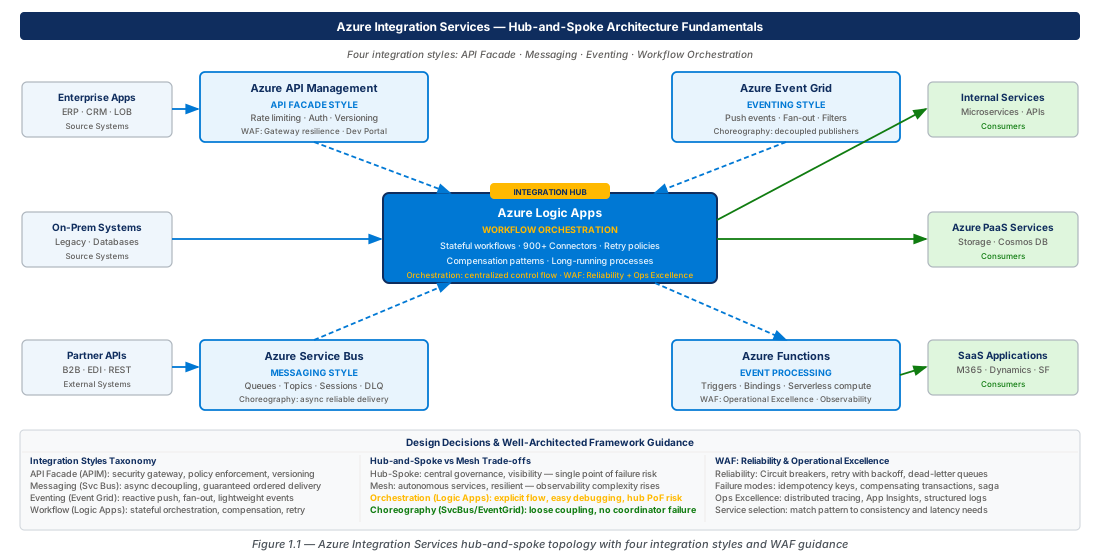
Azure Integration Services Portfolio and Service Selection Framework
Azure Integration Services comprises six primary managed services, each purpose-built for one or more integration styles. Understanding the overlap — and the hard boundaries — between services prevents both under-engineering (using Service Bus queues to implement a complex multi-step workflow) and over-engineering (deploying Logic Apps for a simple HTTP proxy that APIM handles natively).
The Six-Service Portfolio at a Glance
Azure API Management (APIM) is the API facade runtime. It sits at the network perimeter and enforces authentication (OAuth 2.0, mutual TLS, subscription keys), rate limiting, request/response transformation, caching, and routing. APIM is the correct entry point for any workload exposed to external consumers — it externalises cross-cutting concerns from backend services and provides the Developer Portal for API discovery and self-service onboarding.
Azure Service Bus is the enterprise message broker. It supports queues (point-to-point competing consumers) and topics with subscriptions (publish-subscribe fan-out) with AMQP 1.0 as the wire protocol. Service Bus provides exactly-once delivery semantics via message lock and settlement, dead-letter queues, message sessions for ordered processing, scheduled delivery, and duplicate detection. It is the correct choice for transactional, ordered, enterprise-grade messaging where exactly-once delivery is a business requirement.
Azure Event Grid is the event routing engine. It is a fully managed eventing backplane that routes CloudEvents or native Azure events from over 35 publisher sources (including Azure services, SaaS partners, and custom applications) to subscriber endpoints such as Azure Functions, Logic Apps, Event Hubs, Service Bus queues, and webhooks. Event Grid guarantees at-least-once delivery with configurable retry policies and dead-lettering to Blob Storage.
Azure Event Hubs is the high-throughput event streaming platform. Built on a partitioned log model compatible with Apache Kafka, Event Hubs ingests millions of events per second with configurable retention periods (up to 90 days on Premium and Dedicated tiers). Its consumer group model allows multiple independent consumers to read the same stream at different offsets, enabling parallel analytics, archival, and processing pipelines from a single ingestion point.
Azure Logic Apps is the low-code workflow orchestration and integration platform. It provides a visual designer, a library of over 1,000 connectors to SaaS applications, on-premises systems, and Azure services, and a durable state engine for long-running processes. Logic Apps Standard runs on the Azure Functions extensible hosting model, supports VNet integration, and enables local development with VS Code. It is the correct choice for business process automation, B2B EDI exchanges, and hybrid integration scenarios.
Azure Durable Functions provides code-first workflow orchestration built on Azure Functions. It persists workflow state in Azure Storage, supports fan-out/fan-in, chaining, human interaction (external event patterns), and eternal orchestrations for infinite-loop monitoring scenarios. It is the correct choice when the orchestration logic is complex enough to require unit testing, source-controlled as code, or integrated into a CI/CD pipeline alongside application services.
Service Selection Decision Framework
The following table maps integration style to service, tier, and the primary selection criteria.
| Integration Style | Primary Service | Alternative | Tier Guidance | Key Decision Criterion |
|---|---|---|---|---|
| API Facade | Azure APIM | NGINX / Azure App Gateway | Developer (PoC), Basic/Standard (production SMB), Premium (global, VNet) | Choose Premium when you need multi-region active/active, private VNet injection, or Availability Zones |
| Messaging — point-to-point | Azure Service Bus | Azure Storage Queues | Standard (dev/test), Premium (production isolation, VNet, large messages) | Service Bus when you need sessions, DLQ, duplicate detection, or message size > 64 KB |
| Messaging — pub/sub | Azure Service Bus Topics | Azure Event Grid | Standard → Premium | Service Bus Topics when subscribers need ordered delivery or transactional settlement |
| Eventing — fan-out | Azure Event Grid | Azure Event Hubs | System topics are free; custom topics billed per operation | Event Grid when consumer endpoints are heterogeneous webhooks; Event Hubs when consumers are stream processors |
| Eventing — streaming | Azure Event Hubs | Confluent Kafka on Azure | Basic (dev), Standard, Premium, Dedicated | Event Hubs Premium for VNet, CMK, schema registry, and 90-day retention |
| Workflow — low-code | Azure Logic Apps Standard | Azure Logic Apps Consumption | Standard WF1 → WS1 → WS2 based on throughput | Standard for VNet, stateful/stateless mix, and local dev; Consumption for simple event-triggered flows |
| Workflow — code-first | Azure Durable Functions | Azure Logic Apps Standard | Consumption (serverless) or Flex Consumption (VNet + scale-to-zero) | Durable Functions when orchestration logic requires unit tests or complex fan-out with typed data |
Note
Azure API Management and Logic Apps are often deployed together. APIM handles the external-facing API contract, while Logic Apps implements the backend integration workflow triggered by APIM policies. This is the integration facade + orchestration composite pattern and is the dominant architecture for B2B partner onboarding.
Connector and Protocol Coverage
A service-selection exercise is incomplete without evaluating connector and protocol coverage for the target integration scenario. Logic Apps provides pre-built connectors for SAP (certified NetWeaver RFC and BAPI), Salesforce, Dynamics 365, ServiceNow, AS2/EDIFACT/X12 for B2B EDI, and the full Microsoft 365 estate. Service Bus and Event Hubs both expose AMQP 1.0 and HTTPS endpoints, and Event Hubs additionally exposes the Kafka producer/consumer API on port 9093, enabling lift-and-shift of Kafka workloads without client-side code changes.
For on-premises connectivity, Logic Apps Standard and APIM both support Azure Virtual Network integration. The on-premises data gateway extends Logic Apps and APIM reach to systems inside corporate networks without requiring inbound firewall rules. For higher-throughput hybrid connectivity, Azure ExpressRoute or site-to-site VPN combined with private endpoints provides a fully private data path between on-premises systems and Azure Integration Services.
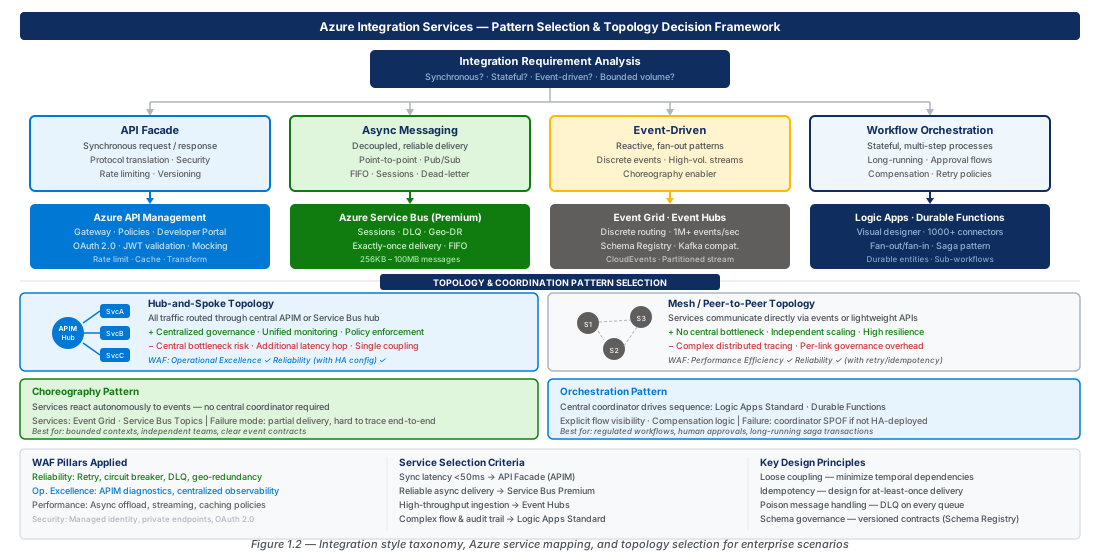
Hub-and-Spoke vs Mesh Integration Topology
Integration topology is the decision that determines how services discover and communicate with each other at an architectural level. It is not a technology choice — it is a governance choice that has profound implications for observability, blast radius, change management, and operational complexity at scale.
Hub-and-Spoke: Centralised Integration Governance
In a hub-and-spoke integration topology, all inter-service communication flows through a central integration hub. The hub is typically an API management gateway, a message broker, or an integration platform (iPaaS). No service calls another service directly; every call traverses the hub. The hub enforces consistent policy — authentication, authorisation, rate limiting, logging, and routing — for every integration path.
The hub-and-spoke model provides strong governance properties. The hub is the single policy enforcement point, which means adding a new cross-cutting concern (for example, request tracing with distributed trace IDs) requires a one-time configuration change at the hub rather than a deployment to every consumer and provider. The hub is also the single observability point: all traffic flows through it, so a single dashboard can show end-to-end latency, error rates, and throughput for every integration in the estate. This makes hub-and-spoke the dominant topology for heavily regulated industries (financial services, healthcare, government) where audit and compliance teams require centralised, tamper-evident logs of all inter-system communication.
The architectural cost of hub-and-spoke is the hub itself becoming a potential single point of failure and a potential bottleneck. On Azure, both risks are mitigated by deploying APIM in Premium tier with Availability Zones enabled (active-active replicas across three zones) and by enabling built-in caching and rate limiting to protect the hub from traffic spikes. The hub should never perform compute-intensive work — its job is routing, policy enforcement, and observability, not data transformation. Heavy transformation belongs in a Logic App or Function behind the hub.
Important
In a hub-and-spoke topology, the hub's availability directly determines the availability of every integration in the estate. Design the hub to a higher availability target than any individual spoke service. On Azure, APIM Premium with Availability Zones achieves a 99.99% uptime SLA.
Mesh Topology: Decentralised Service-to-Service Communication
In a mesh integration topology, services communicate with each other directly, with policy enforcement distributed to each service via a sidecar proxy (service mesh) or embedded SDK. There is no central hub; instead, each service independently enforces mTLS, retries, circuit breaking, and telemetry emission. The mesh control plane aggregates telemetry from all proxies for a global observability view.
The mesh topology is well-suited to greenfield, cloud-native microservices architectures where services are numerous, homogeneous in technology stack, and under the ownership of autonomous product teams. The decentralised model enables each team to independently deploy, scale, and version their service without coordinating with a central integration team. Azure Kubernetes Service with Istio or Open Service Mesh provides a production-grade mesh implementation with Microsoft-managed control plane components.
The mesh model's weakness is the absence of a centralised governance layer for external-facing APIs and for integrations that cross team or organisational boundaries. In practice, most enterprise Azure architectures use a hybrid topology: a hub (APIM) for external and partner-facing APIs and cross-domain orchestration, with a mesh (AKS + service mesh) for internal microservice-to-microservice communication within a domain boundary. The hub handles the hard governance problems; the mesh handles the internal traffic patterns.
Tip
Define domain boundaries before choosing topology. The hub-and-spoke vs mesh decision is best made per domain, not for the entire enterprise simultaneously. A payments domain with strict regulatory requirements may choose hub-and-spoke while a product recommendation domain optimised for developer velocity chooses mesh.
Topology Trade-off Summary
| Dimension | Hub-and-Spoke | Mesh |
|---|---|---|
| Policy enforcement | Centralised (one place to change) | Distributed (sidecar per service) |
| Observability | Single pane of glass at hub | Aggregated from distributed proxies |
| Single point of failure risk | High (mitigated by HA configuration) | Low (no central data-plane component) |
| Latency added | One additional network hop through hub | Sub-millisecond sidecar proxy overhead |
| Governance effort | Low (central team owns hub policy) | High (each team must manage sidecar config) |
| Change management | One hub deployment for cross-cutting changes | Coordinated sidecar rollout across all services |
| Best fit | Enterprise, regulated, heterogeneous tech stacks | Cloud-native microservices, homogeneous stack |
| Azure implementation | APIM + Service Bus + Logic Apps | AKS + Istio + Dapr |
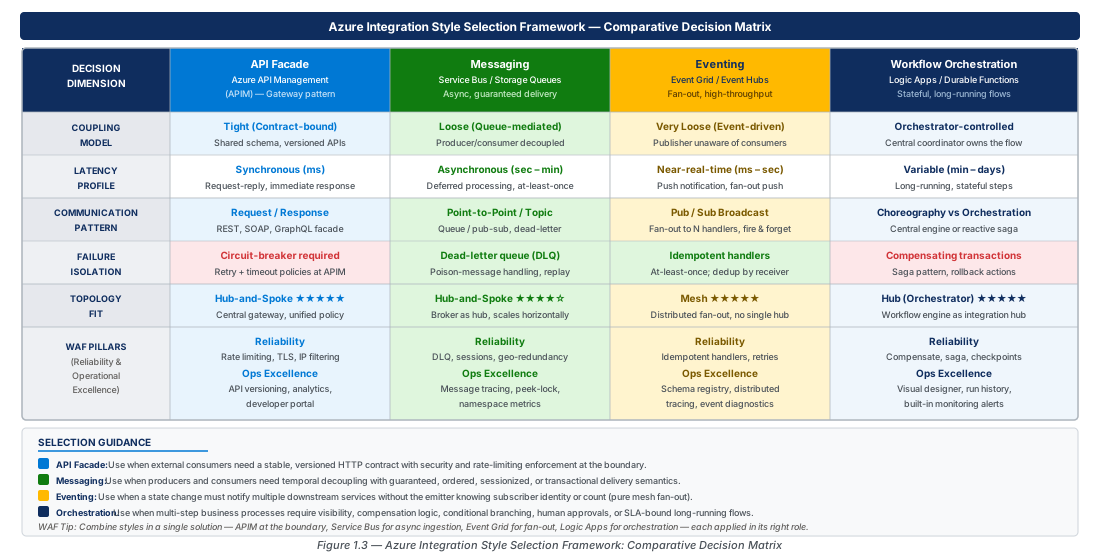
Choreography vs Orchestration: Design Decisions and Failure-Mode Implications
The choice between choreography and orchestration is one of the most consequential architectural decisions in integration design. Both approaches can implement the same end-to-end business capability, but they differ fundamentally in where state lives, who is responsible for error handling, and how the system behaves when something goes wrong.
Choreography: Emergent Process from Local Reactions
In a choreographed integration, there is no central coordinator. Each service listens for events from other services and reacts independently. The overall business process emerges from the sum of these local reactions, like dancers following music without a choreographer directing them in real time. The coupling is minimal: services know only about the events they consume and the events they publish, not about each other.
Choreography has excellent properties for autonomy and scalability. Because each service makes independent decisions based only on the events it receives, services can be deployed, scaled, and replaced independently without coordinating with a central orchestrator. Fan-out is natural — a single event can simultaneously trigger a dozen subscribers without any of them being aware of the others. Event-driven architectures built on Azure Event Grid or Service Bus Topics are inherently choreographed.
The failure-mode implications of choreography require careful design. When a choreographed step fails, the failure is local to the service that failed. However, determining the aggregate state of the overall business process requires correlating events from multiple services, which typically requires a separate read-model or event store that projects current process state from the event stream. Without this read-model, answering "has order 12345 been fully processed?" requires querying every participating service independently — an operationally untenable approach at scale. Azure Event Hubs with Azure Stream Analytics or Azure Synapse Analytics is the standard approach for projecting aggregate state from event streams.
Orchestration: Explicit Process Control
In an orchestrated integration, a single coordinator — the orchestrator — explicitly invokes each step, handles failures, and maintains the authoritative record of process state. The orchestrator knows the complete process flow; individual services know only how to execute their single assigned step and report success or failure. The coupling model is hub-and-spoke at the process level: all steps communicate through the orchestrator.
Orchestration provides strong observability and debuggability properties. Because the orchestrator owns process state, answering "what is the current state of order 12345?" requires querying only the orchestrator. The Logic Apps run history and Durable Functions status query endpoints provide instant answers with complete step-by-step audit trails, input/output values at each step, and exact timestamps — properties that are extremely difficult to reconstruct from choreographed event streams.
Failure handling in orchestration is explicit and codified. The orchestrator defines retry policies, timeout thresholds, and compensation logic in a single place. If step 4 of a 7-step process fails after three retries, the orchestrator initiates a saga compensation sequence, calling each preceding step's compensating action in reverse order. This deterministic, auditable failure-handling is the primary reason orchestration is preferred in regulated industries and in any scenario where partial completion of a business transaction has real-world consequences (financial transactions, medical orders, legal contracts).
Warning
Implementing orchestration using ad-hoc message chains — where each service publishes a "next step" message after completing — creates a distributed state machine whose state exists only in the aggregate of all queue depths and consumer states. This approach is indistinguishable from choreography in normal operation but catastrophically harder to debug during incidents. Use an explicit orchestrator (Logic Apps or Durable Functions) for any process with more than two sequential steps.
Decision Matrix: Choosing Between the Two Approaches
| Decision Factor | Favour Choreography | Favour Orchestration |
|---|---|---|
| Number of sequential steps | 1–2 steps | 3+ steps |
| Process duration | Milliseconds to seconds | Seconds to days |
| Human approval steps | None | Present |
| Compensation (saga rollback) required | No | Yes |
| Regulatory audit trail required | No | Yes |
| Team autonomy priority | High (each team owns their service) | Lower (central integration team owns orchestrator) |
| Consumer fan-out | Large (many independent subscribers) | Small (defined set of steps) |
| Debugging tooling requirement | Distributed tracing (App Insights) | Built-in run history (Logic Apps / Durable Functions) |
| Azure implementation | Event Grid + Event Hubs + Functions | Logic Apps Standard + Durable Functions |
Well-Architected Framework Pillars Applied to Integration
The Azure Well-Architected Framework (WAF) provides five architectural pillars — Reliability, Security, Cost Optimisation, Operational Excellence, and Performance Efficiency — that form a consistent evaluation rubric for any workload decision. Integration architecture decisions are particularly sensitive to the Reliability and Operational Excellence pillars, because integration services are the connective tissue of the broader system: a failure in the integration layer propagates to every system it connects.
Reliability: Designing Integration for Failure
The Reliability pillar demands that integration components be designed to continue functioning correctly despite hardware failures, software bugs, dependency outages, and demand spikes. For integration services, the Reliability pillar translates into six concrete design requirements: redundancy (HA across zones), circuit breaking (preventing cascading failures), retry with exponential backoff (handling transient faults), dead-letter handling (capturing unprocessable messages), idempotency (safely retrying operations), and graceful degradation (reducing functionality rather than complete failure).
On Azure, zone redundancy for integration services is achieved through specific SKU and configuration choices. APIM Premium with zone redundancy deploys gateway units across all three Availability Zones in the region, ensuring that a single zone failure does not interrupt API traffic. Service Bus Premium auto-replicates message data across zones. Event Hubs Premium and Dedicated tiers are zone-redundant by default. Logic Apps Standard on an App Service Environment (ASE) or with zone redundancy enabled at the App Service Plan level survives zone failures. For cross-region resilience, APIM Premium supports multi-region deployment where a secondary region gateway is promoted to primary automatically on regional failure.
Circuit breaking is the mechanism that prevents a slow or failing downstream service from exhausting the upstream's connection pool and thread pool. Azure APIM implements circuit breaking through the circuit-breaker policy, which can be configured to trip after a defined number of consecutive failures, route traffic to a secondary backend, and attempt recovery after a configurable cooldown period. Logic Apps and Durable Functions implement circuit breaking through the retry action combined with the Until loop pattern, or through custom circuit-breaker logic implemented as Durable Entities.
Important
Idempotency is not optional in integration. Every operation that can be retried — which means every integration operation — must produce the same outcome regardless of how many times it is invoked with the same inputs. For Service Bus, enable duplicate detection. For HTTP APIs behind APIM, require idempotency keys as headers and cache responses in APIM for the duplicate detection window.
Operational Excellence: Observability, Deployment, and Continuous Improvement
The Operational Excellence pillar requires that integration systems be observable, deployable through automated pipelines, and continuously improved through feedback from production telemetry. For integration services, this pillar translates into structured logging with correlation IDs, distributed tracing, infrastructure-as-code for all service configurations, blue/green or canary deployment for API changes, and runbook automation for common operational tasks.
Azure Monitor, Application Insights, and Log Analytics form the observability stack for all Azure Integration Services. Every APIM gateway request emits structured logs to Log Analytics including the operation ID, client IP, backend URL, response code, and latency. Service Bus and Event Hubs emit diagnostics logs for throughput, throttling, and dead-letter queue depth. Logic Apps Standard emits run telemetry to Application Insights with a complete step-by-step execution tree. The critical operational excellence requirement is that all these telemetry streams are correlated through a single distributed trace ID (the traceparent W3C header) so that a single App Insights transaction search reveals the end-to-end path of a business transaction across APIM, Service Bus, Logic Apps, and backend services.
Infrastructure-as-code for integration services is a non-negotiable operational excellence requirement. APIM policies, Logic Apps workflow definitions, Service Bus namespace configurations, and Event Grid subscriptions must all be source-controlled and deployed through CI/CD pipelines. Azure Bicep and Terraform both provide first-class resource providers for all Azure Integration Services. The APIM DevOps Resource Kit (APIOps) extends this to API definitions — API specs in OpenAPI format are source-controlled, and policy changes are deployed through pull request workflows with automated policy linting and deployment validation.
Tip
Use APIM revision and version features to implement safe API changes. Revisions allow you to make non-breaking changes and test them with a separate URL before promoting to production. Versions allow you to run multiple incompatible API versions simultaneously while deprecating older versions gracefully, giving consumers a migration window without a hard cutover.
Security: Zero-Trust Integration Architecture
While not the primary focus of this chapter, the Security pillar warrants mention because integration services are an attacker's preferred target — they aggregate credentials for dozens of backend systems and handle sensitive business data crossing trust boundaries. The zero-trust principle applied to integration requires that every service-to-service call is authenticated (no implicit trust based on network position), every payload is validated against a schema (no injection through malformed input), and every credential is managed by Azure Key Vault with automatic rotation.
APIM enforces zero-trust through mutual TLS for backend calls, managed identity for Azure service authentication (eliminating credential management entirely), and OAuth 2.0 with Azure Active Directory for consumer authentication. Service Bus and Event Hubs both support managed identity authentication, eliminating shared access signature (SAS) keys from application code. Logic Apps uses managed identity connections to Azure services and Key Vault references for third-party credentials.
Lab
CE-01: Provision the Integration Services Resource Group and APIM Instance
This lab task provisions the baseline resource group and an Azure API Management instance using the Developer SKU for learning purposes, with the naming convention aligned to the Cloud Adoption Framework.
# CE-01: Provision resource group and APIM instance for the fundamentals lab
# Prerequisites: Azure CLI 2.50+, logged in with az login, correct subscription selected

SUBSCRIPTION_ID=$(az account show --query id -o tsv)
LOCATION="eastus2"
RG_PROD="rg-integration-architecture-fundamentals-prod-001"
RG_DEV="rg-integration-architecture-fundamentals-dev-001"
APIM_NAME="integration-architecture-prod-eastus2-001"
PUBLISHER_EMAIL="[email protected]"
PUBLISHER_NAME="Azure Integration Services Team"

# Create resource groups
az group create \
  --name "$RG_PROD" \
  --location "$LOCATION" \
  --tags \
    "workload=integration-architecture-fundamentals" \
    "environment=prod" \
    "managedBy=platform-team" \
    "costCenter=CC-0042"

az group create \
  --name "$RG_DEV" \
  --location "$LOCATION" \
  --tags \
    "workload=integration-architecture-fundamentals" \
    "environment=dev" \
    "managedBy=platform-team" \
    "costCenter=CC-0042"

# Provision APIM Developer SKU (for lab use; use Standard or Premium for production)
az apim create \
  --name "$APIM_NAME" \
  --resource-group "$RG_DEV" \
  --location "$LOCATION" \
  --publisher-email "$PUBLISHER_EMAIL" \
  --publisher-name "$PUBLISHER_NAME" \
  --sku-name Developer \
  --no-wait

echo "APIM provisioning initiated. Developer SKU typically takes 30-45 minutes."
echo "Check status: az apim show --name $APIM_NAME --resource-group $RG_DEV --query provisioningState"
CE-02: Provision Service Bus Namespace and Core Topic/Queue Structure
This lab task provisions a Service Bus Premium namespace with the topic and queue structure that supports the hub-and-spoke integration topology demonstrated in later chapters. Premium SKU is used to enable VNet integration and message sessions in subsequent labs.
# CE-02: Provision Service Bus namespace with topic/subscription and dead-letter monitoring
LOCATION="eastus2"
RG_DEV="rg-integration-architecture-fundamentals-dev-001"
SB_NAMESPACE="sb-integration-fundamentals-dev-eastus2-001"
TOPIC_ORDERS="orders-events"
TOPIC_INTEGRATION="integration-domain-events"
QUEUE_COMMANDS="integration-commands"

# Create Service Bus Premium namespace (required for sessions, VNet, large messages)
az servicebus namespace create \
  --name "$SB_NAMESPACE" \
  --resource-group "$RG_DEV" \
  --location "$LOCATION" \
  --sku Premium \
  --capacity 1 \
  --tags \
    "workload=integration-architecture-fundamentals" \
    "environment=dev"

# Enable zone redundancy on the namespace
az servicebus namespace update \
  --name "$SB_NAMESPACE" \
  --resource-group "$RG_DEV" \
  --zone-redundant true

# Create a topic for order domain events with 7-day retention
az servicebus topic create \
  --name "$TOPIC_ORDERS" \
  --namespace-name "$SB_NAMESPACE" \
  --resource-group "$RG_DEV" \
  --default-message-time-to-live P7D \
  --duplicate-detection-history-time-window PT10M \
  --enable-duplicate-detection true \
  --enable-ordering true

# Create subscription for order processing with dead-letter on max delivery
az servicebus topic subscription create \
  --name "order-processor" \
  --namespace-name "$SB_NAMESPACE" \
  --resource-group "$RG_DEV" \
  --topic-name "$TOPIC_ORDERS" \
  --max-delivery-count 5 \
  --dead-letter-on-message-expiration true \
  --lock-duration PT1M

# Create subscription for audit trail (all events, no filter)
az servicebus topic subscription create \
  --name "audit-trail" \
  --namespace-name "$SB_NAMESPACE" \
  --resource-group "$RG_DEV" \
  --topic-name "$TOPIC_ORDERS" \
  --max-delivery-count 3 \
  --lock-duration PT30S

# Create commands queue for point-to-point messaging with sessions enabled
az servicebus queue create \
  --name "$QUEUE_COMMANDS" \
  --namespace-name "$SB_NAMESPACE" \
  --resource-group "$RG_DEV" \
  --enable-session true \
  --max-delivery-count 5 \
  --dead-lettering-on-message-expiration true \
  --lock-duration PT2M \
  --default-message-time-to-live P3D

echo "Service Bus namespace and messaging topology provisioned."
echo "Namespace: $SB_NAMESPACE"
echo "Topic: $TOPIC_ORDERS with subscriptions: order-processor, audit-trail"
echo "Queue: $QUEUE_COMMANDS (sessions enabled)"
CE-03: Provision Event Grid System Topic and Logic Apps Workflow
This lab task provisions an Event Grid custom topic and a Logic Apps Standard workflow to demonstrate the eventing integration style and the choreography pattern.
# CE-03: Provision Event Grid topic and Logic Apps Standard for eventing lab
LOCATION="eastus2"
RG_DEV="rg-integration-architecture-fundamentals-dev-001"
EG_TOPIC="egt-integration-fundamentals-dev-eastus2-001"
LA_PLAN="asp-integration-fundamentals-dev-eastus2-001"
LA_APP="la-integration-fundamentals-dev-eastus2-001"
STORAGE_ACCOUNT="stintfunddev001"

# Create Event Grid custom topic with CloudEvents schema
az eventgrid topic create \
  --name "$EG_TOPIC" \
  --resource-group "$RG_DEV" \
  --location "$LOCATION" \
  --input-schema cloudeventschemav1_0 \
  --public-network-access enabled \
  --tags \
    "workload=integration-architecture-fundamentals" \
    "environment=dev"

# Retrieve Event Grid topic endpoint and key for later use
EG_ENDPOINT=$(az eventgrid topic show \
  --name "$EG_TOPIC" \
  --resource-group "$RG_DEV" \
  --query endpoint -o tsv)

EG_KEY=$(az eventgrid topic key list \
  --name "$EG_TOPIC" \
  --resource-group "$RG_DEV" \
  --query key1 -o tsv)

echo "Event Grid Topic Endpoint: $EG_ENDPOINT"

# Create storage account for Logic Apps Standard workflow state
az storage account create \
  --name "$STORAGE_ACCOUNT" \
  --resource-group "$RG_DEV" \
  --location "$LOCATION" \
  --sku Standard_LRS \
  --kind StorageV2 \
  --min-tls-version TLS1_2 \
  --allow-blob-public-access false

# Create App Service Plan for Logic Apps Standard (WS1 for lab workloads)
az appservice plan create \
  --name "$LA_PLAN" \
  --resource-group "$RG_DEV" \
  --location "$LOCATION" \
  --sku WS1 \
  --is-linux

# Create Logic Apps Standard app
az logicapp create \
  --name "$LA_APP" \
  --resource-group "$RG_DEV" \
  --plan "$LA_PLAN" \
  --storage-account "$STORAGE_ACCOUNT" \
  --tags \
    "workload=integration-architecture-fundamentals" \
    "environment=dev"

echo "Logic Apps Standard instance provisioned: $LA_APP"
echo "Next step: Deploy workflow definitions using VS Code Azure Logic Apps extension"
CE-04: Enable Diagnostic Settings and Azure Monitor Integration
This lab task enables diagnostic logging for all provisioned integration services, routing telemetry to a shared Log Analytics workspace to implement the Operational Excellence observability requirements.
# CE-04: Create Log Analytics workspace and enable diagnostics across integration services
LOCATION="eastus2"
RG_PROD="rg-integration-architecture-fundamentals-prod-001"
RG_DEV="rg-integration-architecture-fundamentals-dev-001"
SB_NAMESPACE="sb-integration-fundamentals-dev-eastus2-001"
EG_TOPIC="egt-integration-fundamentals-dev-eastus2-001"
LA_APP="la-integration-fundamentals-dev-eastus2-001"
LAW_NAME="law-integration-fundamentals-dev-eastus2-001"
AI_NAME="appi-integration-fundamentals-dev-eastus2-001"

# Create Log Analytics workspace (30-day retention for dev)
az monitor log-analytics workspace create \
  --workspace-name "$LAW_NAME" \
  --resource-group "$RG_DEV" \
  --location "$LOCATION" \
  --retention-time 30 \
  --tags \
    "workload=integration-architecture-fundamentals" \
    "environment=dev"

LAW_ID=$(az monitor log-analytics workspace show \
  --workspace-name "$LAW_NAME" \
  --resource-group "$RG_DEV" \
  --query id -o tsv)

# Create Application Insights linked to Log Analytics workspace
az monitor app-insights component create \
  --app "$AI_NAME" \
  --resource-group "$RG_DEV" \
  --location "$LOCATION" \
  --workspace "$LAW_ID" \
  --tags \
    "workload=integration-architecture-fundamentals" \
    "environment=dev"

# Enable Service Bus diagnostics (operational logs + metrics)
SB_ID=$(az servicebus namespace show \
  --name "$SB_NAMESPACE" \
  --resource-group "$RG_DEV" \
  --query id -o tsv)

az monitor diagnostic-settings create \
  --name "diag-sb-to-law" \
  --resource "$SB_ID" \
  --workspace "$LAW_ID" \
  --logs '[{"category":"OperationalLogs","enabled":true},{"category":"VNetAndIPFilteringLogs","enabled":true}]' \
  --metrics '[{"category":"AllMetrics","enabled":true,"retentionPolicy":{"days":30,"enabled":true}}]'

# Enable Event Grid diagnostics
EG_ID=$(az eventgrid topic show \
  --name "$EG_TOPIC" \
  --resource-group "$RG_DEV" \
  --query id -o tsv)

az monitor diagnostic-settings create \
  --name "diag-egt-to-law" \
  --resource "$EG_ID" \
  --workspace "$LAW_ID" \
  --logs '[{"category":"DeliveryFailures","enabled":true},{"category":"PublishFailures","enabled":true}]' \
  --metrics '[{"category":"AllMetrics","enabled":true}]'

echo "Diagnostic settings enabled. Telemetry flowing to: $LAW_NAME"
echo "Application Insights: $AI_NAME"
echo "Connect Logic Apps to App Insights via APPLICATIONINSIGHTS_CONNECTION_STRING app setting."
CE-05: Verify Topology with a Test Event Publication
This lab task publishes a test CloudEvent to the Event Grid topic and verifies end-to-end delivery through the Logic Apps workflow, validating the eventing integration path provisioned in CE-03.
# CE-05: Publish a test CloudEvent and verify end-to-end delivery
EG_TOPIC="egt-integration-fundamentals-dev-eastus2-001"
RG_DEV="rg-integration-architecture-fundamentals-dev-001"

EG_ENDPOINT=$(az eventgrid topic show \
  --name "$EG_TOPIC" \
  --resource-group "$RG_DEV" \
  --query endpoint -o tsv)

EG_KEY=$(az eventgrid topic key list \
  --name "$EG_TOPIC" \
  --resource-group "$RG_DEV" \
  --query key1 -o tsv)

# Construct a CloudEvents 1.0 compliant event payload
EVENT_PAYLOAD=$(cat <<'PAYLOAD'
[{
  "specversion": "1.0",
  "type": "com.integration.order.created.v1",
  "source": "/lab/ce-05/order-service",
  "id": "order-lab-001",
  "time": "2026-07-08T12:00:00Z",
  "datacontenttype": "application/json",
  "subject": "orders/order-lab-001",
  "data": {
    "orderId": "order-lab-001",
    "customerId": "cust-42",
    "amount": 299.99,
    "currency": "USD",
    "status": "created"
  }
}]
PAYLOAD
)

# Publish event using curl (Azure CLI does not have a native event publish command for custom topics)
curl -X POST "$EG_ENDPOINT/api/events" \
  -H "Content-Type: application/cloudevents-batch+json; charset=utf-8" \
  -H "aeg-sas-key: $EG_KEY" \
  -d "$EVENT_PAYLOAD" \
  -w "\nHTTP Status: %{http_code}\n"

# Verify delivery metrics in Event Grid (check deliverySuccessCount)
az monitor metrics list \
  --resource "$(az eventgrid topic show --name "$EG_TOPIC" --resource-group "$RG_DEV" --query id -o tsv)" \
  --metric "DeliverySuccessCount,DeliveryFailedCount" \
  --interval PT1M \
  --output table

echo "Check Logic Apps run history in Azure Portal:"
echo "  Portal > Logic Apps > la-integration-fundamentals-dev-eastus2-001 > Run History"
Summary
| Concept | Key Point |
|---|---|
| Integration Styles | Four canonical styles — API facade (synchronous), messaging (reliable decoupled delivery), eventing (fan-out notification), and workflow orchestration (long-running process state) — each maps to a different Azure service and coupling model |
| Service Selection | Match the integration style to the service: APIM for facades, Service Bus for transactional messaging, Event Grid for fan-out eventing, Event Hubs for streaming, Logic Apps for low-code orchestration, Durable Functions for code-first orchestration |
| Hub-and-Spoke Topology | Centralises policy enforcement and observability through a single hub (APIM + Service Bus); ideal for regulated industries; hub must be deployed with Availability Zones to eliminate single point of failure |
| Mesh Topology | Distributes policy to sidecar proxies; ideal for cloud-native microservices under autonomous team ownership; combine with hub-and-spoke at domain boundaries for a hybrid model |
| Choreography vs Orchestration | Choreography provides team autonomy and natural fan-out but makes aggregate process state opaque; orchestration provides explicit state management and audit trails but concentrates process logic in a single coordinator |
| Failure-Mode Design | Every integration must define retry policy, dead-letter handling, and idempotency semantics at design time — not as a post-incident retrofit |
| WAF Reliability | Zone redundancy (APIM Premium, Service Bus Premium, Event Hubs Premium) and circuit breaking (APIM circuit-breaker policy) are the two highest-priority Reliability investments for integration services |
| WAF Operational Excellence | Distributed tracing with a single correlation ID across APIM, Service Bus, Logic Apps, and backend services; infrastructure-as-code for all service configurations; APIOps for API definition lifecycle management |
Chapter: 1 of 11 | Status: v0.1 Draft |