Azure Integration Services: Production Patterns
Event Hubs Real-Time Streaming Platform
Azure Event Hubs transforms high-volume telemetry and event data into a durable, ordered stream that downstream processors can consume independently at their own pace. Unlike traditional message brokers that delete messages upon delivery, Event Hubs retains events in an append-only log—giving architectures the flexibility to replay history, fan out to multiple consumer groups, and seamlessly bridge real-time and batch analytics pipelines. This chapter establishes the mental model, sizing discipline, and operational patterns required to run Event Hubs reliably in production at scale.
Event Hubs Architecture Fundamentals
The Partitioned Log Model
Event Hubs is built on a partitioned, durable commit log. Every event namespace contains one or more event hubs (analogous to topics in Apache Kafka), and each event hub is subdivided into a fixed number of partitions at creation time. A partition is an ordered, immutable sequence of events. Producers append events to partitions; consumers read from a specific offset within each partition. This design decouples producers from consumers entirely—a producer writing at ten thousand events per second has no awareness of how many consumers are reading, or how far behind they may be.
Each partition is replicated across multiple storage nodes within a region, providing the durability guarantee that events survive individual node failures. The retention window—configurable from 1 hour up to 90 days on the Premium and Dedicated tiers—determines how long events remain available for consumption. This retention makes Event Hubs fundamentally different from a queue: events are not deleted when a consumer reads them, allowing multiple independent consumers to process the same stream at different points in time. A real-time fraud detection pipeline and a daily batch reconciliation job can both consume the same financial transactions stream without interfering with one another.
The unit of throughput in the Standard tier is the throughput unit (TU). One TU provides 1 MB/s or 1,000 events per second of ingress, and 2 MB/s or 4,096 events per second of egress. Throughput units apply at the namespace level and are shared across all event hubs in that namespace. This pooling means careful capacity planning is essential: a namespace with 10 TUs can sustain bursts across all its event hubs, but sustained overuse of a single event hub will throttle the entire namespace.
Consumer Groups and Fan-Out Isolation
A consumer group is a named view of an event hub's partition log. Each consumer group maintains its own independent set of offsets, so consumers within different groups never interfere with one another. This is the mechanism that allows multiple applications—a real-time dashboard, a stream processing job, a machine learning feature store, and a data lake ingestion pipeline—to all consume from a single event hub simultaneously without coordination overhead.
Within a consumer group, each partition should be assigned to at most one active consumer at a time. This exclusivity is what guarantees ordered, non-duplicate processing within a partition: if two consumers tried to read from the same partition in the same group, they would race and could process events out of order or skip events entirely. The Event Processor Host (EPH) and the newer EventProcessorClient in the Azure SDK enforce this rule through a distributed lease mechanism backed by Azure Blob Storage. Each consumer instance claims ownership of a set of partitions by acquiring time-limited leases, and the lease renewal protocol ensures that when a consumer instance fails, its partitions are rebalanced to healthy instances within a configurable grace period.
The practical implication is that the maximum parallelism of a consumer group is bounded by the number of partitions. A 32-partition event hub can support up to 32 concurrent consumer instances in a consumer group. Adding a 33rd consumer instance leaves one idle, waiting to claim a partition if an existing owner fails. When sizing your application's consumer fleet, target a ratio of one consumer instance per partition as a starting point, then adjust based on your processing latency budget and the cost of consumer compute.
Note
Consumer groups are free to create up to the namespace's limit. The Standard tier supports up to 20 consumer groups per event hub; the Premium tier supports up to 100. Plan your consumer group topology during the design phase, since increasing the partition count after creation requires creating a new event hub and migrating producers.
Event Schema and Serialization Strategies
Every event in Event Hubs consists of a binary body, a set of system properties (partition key, sequence number, offset, enqueue time), and a dictionary of user-defined application properties. The event body is opaque to Event Hubs—it stores and delivers bytes without inspecting content. This means your choice of serialization format (JSON, Avro, Protocol Buffers, MessagePack) is entirely a producer-consumer contract, invisible to the broker.
For high-throughput production workloads, Apache Avro with an external schema registry is the recommended serialization strategy. Avro encodes only field values—not field names—which dramatically reduces per-event overhead compared to self-describing formats like JSON. A telemetry event that occupies 800 bytes as JSON may compress to 120 bytes in Avro binary. At one million events per hour, that difference in payload size translates directly into lower TU consumption and storage costs. Azure provides the Schema Registry feature, available on the Standard tier and above, to store and version Avro schemas. Producers register a schema and embed only a compact schema ID in each event; consumers fetch the schema once per ID and cache it locally.
For simpler workloads or during early development phases, JSON remains appropriate: it is human-readable, easy to debug with the Azure Portal's Data Explorer, and supported natively by Azure Stream Analytics, Azure Functions event trigger, and most Azure integration services. The key discipline when using JSON is to enforce a schema validation layer at the producer side—either with JSON Schema validation or by using a typed SDK model—to prevent malformed events from entering the stream and causing downstream failures.
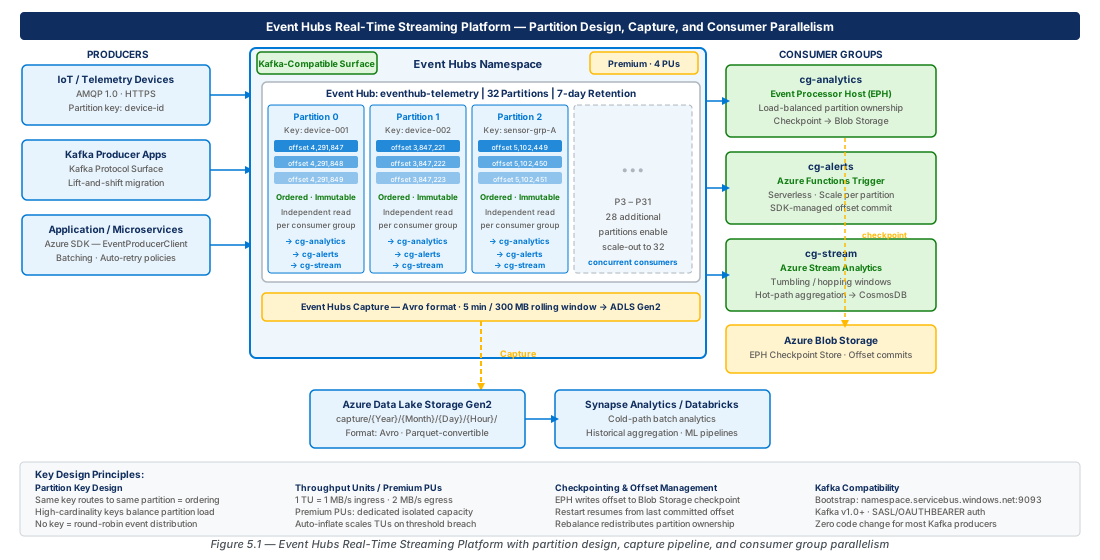
Partition Key Design for Consumer Parallelism and Ordering Guarantees
How Partition Assignment Works
When a producer sends an event, it can specify a partition key, a partition ID directly, or neither. When a partition key is specified, Event Hubs hashes the key using a consistent hashing algorithm and maps the result to one of the available partitions. The same partition key always maps to the same partition for the lifetime of the event hub, which is the foundation for ordering guarantees. When no partition key is specified, the broker distributes events across partitions in a round-robin fashion, which maximizes throughput but provides no ordering guarantee.
Understanding this routing behavior is the most important design decision you make for an Event Hubs workload. If your downstream consumers need to process all events for a given entity in order—for example, all account balance updates for a specific customer ID, or all position telemetry from a specific IoT device—you must use the customer ID or device ID as the partition key. Events with the same key land on the same partition, and within a partition, events are delivered to consumers in strict sequence number order. This ordering guarantee is per-partition, not across the entire event hub. Two events with different keys that arrive at nearly the same time may be processed in any relative order by consumers handling different partitions.
The hashing function distributes keys across partitions, but it does not guarantee a uniform distribution unless keys are diverse and numerous. If your key space is small—for example, if you have only 8 distinct device types and 32 partitions—several partitions will receive no events, leaving their assigned consumers idle while a few hot partitions receive all the load. A practical rule of thumb is that your cardinality of unique partition keys should be at least 10 times the number of partitions to achieve a statistically reasonable distribution.
Hot Partition Detection and Mitigation
Hot partitions—partitions receiving a disproportionate share of events—are the most common operational problem in Event Hubs deployments. A hot partition creates a throughput bottleneck because ingress throttling applies at the partition level when the namespace-level TU limit is reached. Downstream consumers on that partition fall behind while consumers on cold partitions sit idle, resulting in uneven processing latency across your event stream.
Detection begins with monitoring the IncomingBytes and IncomingMessages metrics per partition, available in Azure Monitor. Healthy distributions show relatively flat per-partition metrics. A single partition consistently absorbing more than 20% of total ingress in a 32-partition hub is a warning sign. At 50%+, you are likely experiencing latency spikes for events on that partition.
Mitigation strategies depend on the root cause. If the hot partition is caused by a genuinely high-volume entity (for example, a single high-frequency trading system producing 90% of your event volume), consider routing that entity's events to a dedicated event hub in a separate namespace with its own TU allocation. If the hot partition is caused by a poor key choice—for example, using a low-cardinality field like region code—consider composing a more granular synthetic key. A composite key that concatenates region code with a modulo of a high-cardinality ID (e.g., "eastus2-" + (accountId % 32)) spreads load across partitions while still keeping related events close to one another.
Warning
Never use timestamp or a monotonically incrementing counter as a partition key. Timestamps concentrate writes on a single "latest" partition as time advances, creating an extreme hot partition. Counters produce the same effect. These patterns collapse all parallelism onto a single partition, defeating the purpose of a partitioned log entirely.
Ordering Guarantees and Their Limits
Event Hubs provides a strict ordering guarantee within a single partition: events are assigned monotonically increasing sequence numbers, and consumers receive events in sequence number order. This is a strong guarantee that holds even across consumer reconnections and rebalancing events. When a consumer picks up a partition after a failover, it resumes from the stored checkpoint offset, and the broker delivers events from that position onward in sequence order.
The ordering guarantee does not extend across partitions. If your business logic requires a total ordering across all events in an event hub—for example, to maintain a globally consistent audit trail—Event Hubs is not the right tool by itself. You would need to impose a global sequence at the application layer, which reintroduces a serialization bottleneck. The practical alternative for most use cases is to design your consumer logic to handle out-of-order events across partitions using event-time watermarks (as Stream Analytics and Apache Flink do natively), rather than relying on the broker to impose global order.
For change data capture (CDC) scenarios, partition key design is particularly critical. When capturing changes from a relational database, the primary key of the source table is the natural partition key. This ensures all INSERT, UPDATE, and DELETE events for a given row arrive on the same partition in sequence, allowing consumers to reconstruct the current state without merge conflicts. Stream Analytics' TIMESTAMP BY and Flink's event-time processing both rely on this pattern to provide correct stateful aggregations over CDC streams.
Tip
For IoT workloads where device IDs are GUIDs, use the raw GUID string as the partition key. GUIDs are high-cardinality and uniformly distributed by design (UUID v4 uses random bytes for most of the identifier), so they hash well across partitions without any additional manipulation.
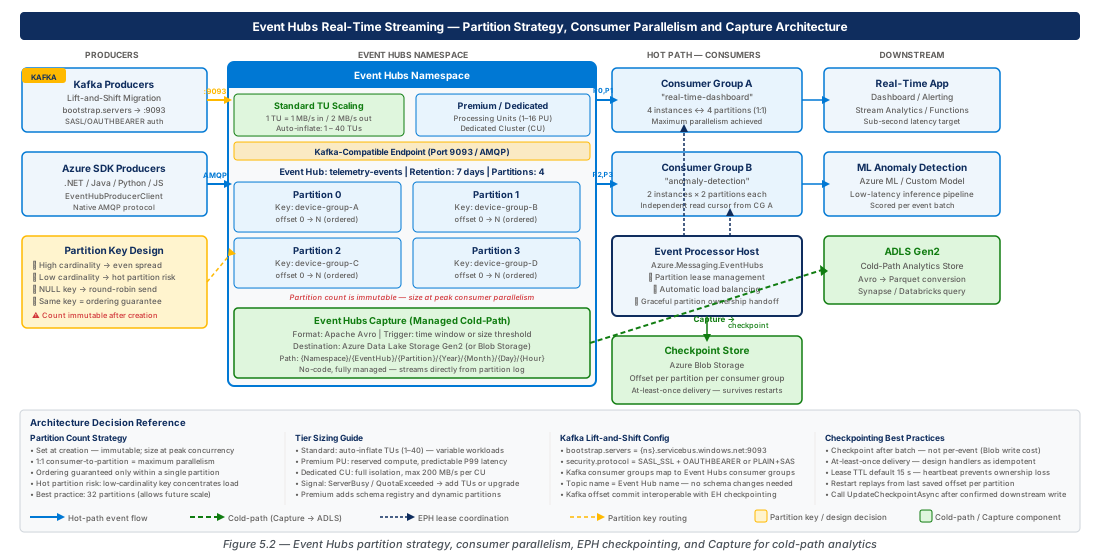
Throughput Unit and Premium Tier Dedicated Cluster Sizing
Standard Tier: Throughput Unit Capacity Model
The Standard tier uses throughput units as the primary capacity lever. Each TU provides 1 MB/s ingress and 2 MB/s egress. TUs are purchased at the namespace level, and all event hubs in the namespace share the pool. Auto-inflate (Auto-scale) can automatically increase the TU count up to a configured maximum when ingress consistently approaches the current limit, preventing throttling during unexpected traffic spikes.
Sizing begins with characterizing your peak ingress rate. Measure or estimate the maximum event bytes per second across all producers writing to the namespace. Add a 30% buffer for encoding overhead and protocol framing. Divide by 1 MB/s to get the minimum TU count for ingress. Then independently calculate egress requirements: sum the read rates of all consumer groups across all partitions. Consumer groups multiplied by ingress rate gives total egress—if you have 4 consumer groups reading a 5 MB/s ingress stream, your egress requirement is 20 MB/s, or 10 TUs. Take the higher of ingress-driven and egress-driven TU requirements.
Important
The Standard tier is capped at 40 TUs per namespace (or up to 20 manually set; Auto-inflate raises this to 40). If your peak requirements exceed 40 MB/s ingress or 80 MB/s egress, you must either shard across multiple namespaces or upgrade to the Premium tier. Sharding namespaces adds operational complexity—each namespace is an independent throttling domain—so for workloads above this threshold, the Premium tier is almost always the right economic choice.
Premium Tier: Processing Unit Capacity Model
The Premium tier replaces throughput units with processing units (PUs). One PU provides 4x the throughput of a single Standard TU, along with enhanced isolation: each PU corresponds to a dedicated share of the underlying compute, memory, and storage I/O. Premium namespaces are multi-tenant but at a coarser isolation granularity than Dedicated clusters. The Premium tier also unlocks several features unavailable on Standard: up to 90 days of message retention, dynamic partition scaling (increasing partition count after creation, in preview), 1 MB maximum event size (versus 256 KB on Standard), and enhanced throughput for the Kafka-compatible surface.
Sizing Premium namespaces follows the same methodology as Standard, but mapped to PU units. One PU roughly corresponds to 10 MB/s ingress sustained, though the actual ceiling is higher under burst conditions due to the compute isolation model. The recommended starting point is 1 PU per 8 MB/s of sustained peak ingress, leaving 20% headroom. For organizations running multiple production workloads on a single namespace, the isolation properties of the Premium tier also reduce noisy-neighbor risk compared to packing multiple workloads onto a heavily utilized Standard namespace.
The following table summarizes the key distinctions across Event Hubs tiers to guide tier selection:
| Capability | Basic | Standard | Premium | Dedicated |
|---|---|---|---|---|
| Max Throughput Units / PUs | 1 TU | 40 TUs | 16 PUs | Cluster-based |
| Max Partitions per Event Hub | 32 | 32 | 100 | 1,024 |
| Max Event Size | 256 KB | 256 KB | 1 MB | 1 MB |
| Message Retention | 1 day | 7 days | 90 days | 90 days |
| Consumer Groups per Event Hub | 1 | 20 | 100 | 1,000 |
| Schema Registry | No | Yes | Yes | Yes |
| Capture to ADLS | No | Yes | Yes | Yes |
| Kafka-compatible surface | No | Yes | Yes | Yes |
| Geo-Disaster Recovery | No | Yes | Yes | Yes |
| Private Link / VNet | No | Yes | Yes | Yes |
| Dedicated compute isolation | No | No | Partial | Full |
| Pricing model | Per TU | Per TU | Per PU/hr | Per CU/hr |
Dedicated Clusters: Predictable Latency at Scale
The Dedicated tier provisions a single-tenant Event Hubs cluster. All compute, storage, and network I/O is exclusive to your workload—no multi-tenancy, no noisy neighbors, no shared throttling limits. Dedicated clusters are sized in capacity units (CUs), where 1 CU provides approximately 200 MB/s ingress and 400 MB/s egress. Clusters can be scaled from 1 to 20 CUs, and the cluster is always available regardless of instantaneous utilization. Pricing is per cluster-hour, independent of event volume, which makes Dedicated cost-efficient only at high, consistent utilization (typically above 50% of a single CU sustained).
The primary use cases for Dedicated clusters are financial services workloads with strict latency SLAs (Dedicated removes multi-tenant scheduling jitter), workloads requiring more than 1,024 partitions across their namespaces, and organizations with compliance requirements mandating single-tenant compute isolation. Dedicated clusters also support customer-managed keys (BYOK) via Azure Key Vault, which is a hard requirement in several regulated industries.
Tip
Before committing to a Dedicated cluster, measure your p99 end-to-end ingestion latency on a Premium namespace under representative load. Many workloads that initially seem to require Dedicated actually meet their SLAs on Premium. Dedicated clusters carry a minimum commitment of 8-hour blocks and a significantly higher per-hour cost, so validating the business need before provisioning avoids unnecessary spend.
# CE-SIZING-01: Provision a Premium namespace for the streaming platform
az group create \
  --name rg-event-hubs-streaming-platform-prod-001 \
  --location eastus2 \
  --tags environment=prod workload=streaming-platform costcenter=platform

az eventhubs namespace create \
  --resource-group rg-event-hubs-streaming-platform-prod-001 \
  --name event-hubs-prod-eastus2-001 \
  --location eastus2 \
  --sku Premium \
  --capacity 2 \
  --minimum-tls-version 1.2 \
  --public-network-access Disabled \
  --tags environment=prod workload=streaming-platform

# Create a 32-partition event hub with 7-day retention for telemetry ingestion
az eventhubs eventhub create \
  --resource-group rg-event-hubs-streaming-platform-prod-001 \
  --namespace-name event-hubs-prod-eastus2-001 \
  --name eh-device-telemetry \
  --partition-count 32 \
  --retention-time-in-hours 168 \
  --cleanup-policy Delete

# Create consumer groups for independent downstream consumers
az eventhubs eventhub consumer-group create \
  --resource-group rg-event-hubs-streaming-platform-prod-001 \
  --namespace-name event-hubs-prod-eastus2-001 \
  --eventhub-name eh-device-telemetry \
  --name cg-stream-analytics

az eventhubs eventhub consumer-group create \
  --resource-group rg-event-hubs-streaming-platform-prod-001 \
  --namespace-name event-hubs-prod-eastus2-001 \
  --eventhub-name eh-device-telemetry \
  --name cg-data-lake-capture

az eventhubs eventhub consumer-group create \
  --resource-group rg-event-hubs-streaming-platform-prod-001 \
  --namespace-name event-hubs-prod-eastus2-001 \
  --eventhub-name eh-device-telemetry \
  --name cg-ml-feature-store
Event Hubs Capture to Azure Data Lake Storage Gen2
Architecture of the Capture Feature
Event Hubs Capture is a built-in mechanism that automatically writes event data from one or more event hubs to Azure Blob Storage or Azure Data Lake Storage Gen2 (ADLS Gen2) in Apache Avro format. Capture runs as a background process within the Event Hubs service infrastructure—it is not a consumer from the perspective of offset management, it does not consume TU egress bandwidth, and it does not interfere with regular consumer group processing. This makes Capture the lowest-overhead path to land raw event data in a data lake for cold-path analytics.
The Capture output is organized in a configurable path hierarchy: {Namespace}/{EventHub}/{PartitionId}/{Year}/{Month}/{Day}/{Hour}/{Minute}/{Second}. Each Avro file is self-describing—it contains the full schema alongside the data—making it immediately queryable with tools like Azure Synapse Analytics, Azure Databricks, HDInsight, and Apache Spark. The file naming convention embeds the sequence number range of the contained events, which allows downstream pipelines to detect gaps and deduplicate reprocessing.
Capture files are created on a time or size trigger, whichever occurs first. The minimum time window is 60 seconds, and the minimum file size threshold is 10 MB. For most production workloads, the defaults (300 seconds / 300 MB) work well and produce file sizes that are efficient for batch analytics without accumulating excessive small files. For high-throughput workloads exceeding 100 MB/s ingress, lowering the size threshold to 100 MB prevents individual Avro files from growing so large that Spark tasks processing them cannot complete within their timeout windows.
Note
Capture does not guarantee exactly-once delivery of events to the Avro files. At partition leadership failovers, a small number of events near the file boundary may be duplicated across two consecutive Avro files. Downstream analytics pipelines that require exactly-once semantics must implement deduplication based on the event's sequence number, which is preserved in the Avro envelope as the SequenceNumber field.
Configuring Capture for ADLS Gen2
Integrating Capture with ADLS Gen2 requires granting the Event Hubs namespace's managed identity the Storage Blob Data Contributor role on the target storage account. Using managed identity authentication eliminates the need to manage storage account keys or SAS tokens for the Capture feature, which simplifies key rotation and strengthens the security posture.
The storage account and container hierarchy should be planned before enabling Capture, as changing the output path format requires disabling and re-enabling the feature. A recommended layout separates raw capture data by namespace and event hub, then organizes by date partitioning (year/month/day), which aligns with the default Hive-style partitioning that Synapse Analytics and Databricks auto-discover. When multiple event hubs share a single storage account, use separate containers per event hub rather than using the namespace-level path prefix alone, to simplify storage lifecycle management and access control at the container level.
# CE-CAPTURE-01: Enable Capture to ADLS Gen2 with managed identity
STORAGE_ACCOUNT=adlsevthubsprodeastus001
RESOURCE_GROUP=rg-event-hubs-streaming-platform-prod-001
NAMESPACE=event-hubs-prod-eastus2-001

# Create the ADLS Gen2 storage account with hierarchical namespace
az storage account create \
  --resource-group $RESOURCE_GROUP \
  --name $STORAGE_ACCOUNT \
  --location eastus2 \
  --sku Standard_LRS \
  --kind StorageV2 \
  --enable-hierarchical-namespace true \
  --min-tls-version TLS1_2 \
  --allow-blob-public-access false \
  --tags environment=prod workload=streaming-platform

# Create a dedicated container for raw event capture
az storage container create \
  --account-name $STORAGE_ACCOUNT \
  --name raw-event-capture \
  --auth-mode login

# Assign the namespace's system-assigned managed identity to the storage account
NAMESPACE_PRINCIPAL=$(az eventhubs namespace show \
  --resource-group $RESOURCE_GROUP \
  --name $NAMESPACE \
  --query identity.principalId --output tsv)

STORAGE_ACCOUNT_ID=$(az storage account show \
  --resource-group $RESOURCE_GROUP \
  --name $STORAGE_ACCOUNT \
  --query id --output tsv)

az role assignment create \
  --assignee $NAMESPACE_PRINCIPAL \
  --role "Storage Blob Data Contributor" \
  --scope $STORAGE_ACCOUNT_ID

# Enable Capture on the event hub
az eventhubs eventhub update \
  --resource-group $RESOURCE_GROUP \
  --namespace-name $NAMESPACE \
  --name eh-device-telemetry \
  --enable-capture true \
  --capture-interval 300 \
  --capture-size-limit 314572800 \
  --destination-name EventHubArchive.AzureBlockBlob \
  --storage-account $STORAGE_ACCOUNT_ID \
  --blob-container raw-event-capture \
  --archive-name-format "{Namespace}/{EventHub}/{PartitionId}/{Year}/{Month}/{Day}/{Hour}/{Minute}/{Second}"
Cold-Path Analytics Pattern with Capture
The canonical cold-path analytics pattern with Event Hubs Capture works as follows: raw events land in ADLS Gen2 as Avro files through Capture; an Azure Data Factory or Synapse Pipeline runs hourly or daily to convert Avro to Parquet (applying schema projection and basic cleansing); the Parquet files are registered in a Delta Lake or Apache Iceberg table catalog; and Azure Synapse Analytics or Databricks runs ad-hoc queries and scheduled batch aggregations against the Delta table. This layered architecture—often called the medallion architecture (bronze, silver, gold)—keeps the raw event data immutable in bronze, transformed data in silver Parquet, and business-level aggregations in gold.
Capture-produced Avro files serve as the bronze layer. The schema embedded in the Avro files is the contract between the event producer and the cold-path analytics pipeline. If the producer evolves the schema (adds a field, renames a field), the schema registry version is updated, and the Avro files in the new path prefix will contain the new schema. The Delta Lake time-travel feature can then query a specific schema version's data by filtering on the date partition range, maintaining backward compatibility without requiring a full table rewrite.
Important
ADLS Gen2 lifecycle management policies can automatically tier or delete old Capture Avro files after a configurable number of days. Ensure lifecycle policies are set to delete or archive raw Avro files only after the downstream silver-layer transformation has successfully completed and the data is confirmed present in the Delta table. A simple audit job that compares Avro file counts against Delta table row counts per date partition provides this confirmation signal.
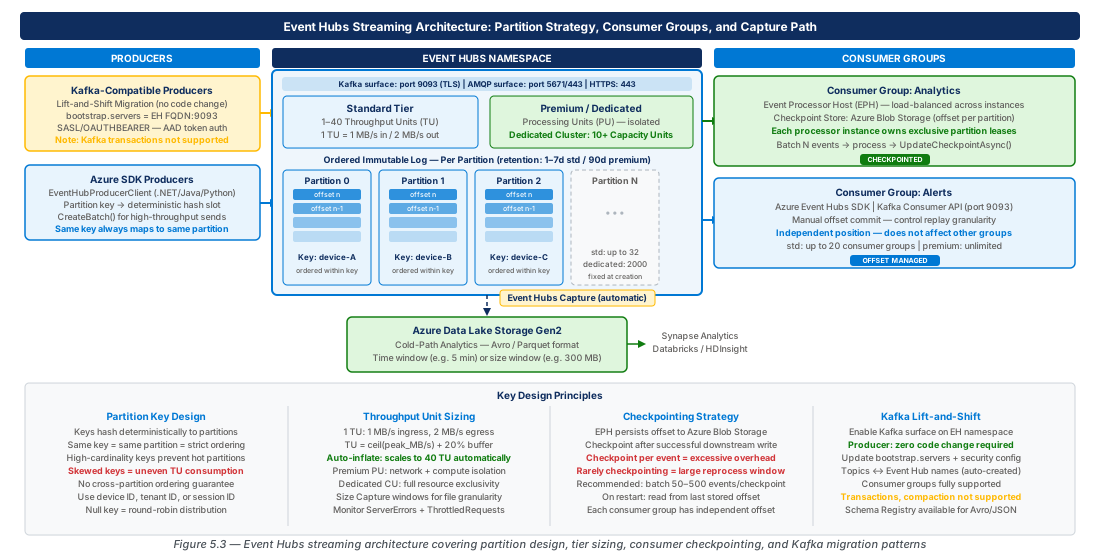
Kafka-Compatible Surface for Lift-and-Shift Producer Migration
How the Kafka Protocol Surface Works
Event Hubs exposes a Kafka-compatible endpoint that speaks the Apache Kafka wire protocol version 1.0 and later. Existing Kafka producers and consumers can connect to Event Hubs by updating three configuration properties: bootstrap.servers (to the Event Hubs namespace FQDN on port 9093), security.protocol (to SASL_SSL), and sasl.mechanism and sasl.jaas.config (to provide the Event Hubs connection string as the SASL password). No code changes, no library upgrades, no recompilation—just configuration substitution.
The Kafka concept mapping to Event Hubs is direct: a Kafka topic maps to an Event Hubs event hub, a Kafka consumer group maps to an Event Hubs consumer group, and Kafka partition indices map one-to-one to Event Hubs partition IDs. The Kafka offset concept maps to the Event Hubs sequence number, though the numeric ranges are not interchangeable—a Kafka offset of 1000 does not correspond to Event Hubs sequence number 1000 unless the event hub started from the beginning of time with no gaps. The Kafka-compatible surface translates between offset spaces transparently, so consumer offset commits via the Kafka protocol store correctly in the Event Hubs offset management infrastructure.
Note
Not all Kafka APIs are supported on the Event Hubs Kafka surface. The producer API, consumer API, and admin API for topic listing and consumer group management are fully supported. APIs for ACL management, transaction coordination, Schema Registry (use the Event Hubs native Schema Registry instead), log compaction, and Kafka Streams stateful operations are not supported. Review the compatibility matrix in the official documentation before migrating workloads that use these features.
Migration Strategy: Configuration-Only vs. Gradual Cutover
For stateless producers whose only concern is writing events to a topic, migration is a configuration-only exercise. Replace the Kafka broker address with the Event Hubs endpoint, provide the connection string credentials, and restart the producer. Events will flow immediately into the Event Hubs event hub that matches the Kafka topic name (the event hub must be pre-created; Event Hubs does not support Kafka's auto-create-topics behavior by default).
For consumer groups that maintain committed offsets in Kafka's internal __consumer_offsets topic, the migration requires a brief pause to avoid message loss or duplication. The recommended procedure is: (1) pause all consumers, (2) record the current Kafka consumer group offsets for all topic-partitions, (3) update the consumer configuration to point to Event Hubs, (4) translate Kafka offsets to Event Hubs offsets using the OffsetMigration utility or a custom offset translation script, (5) pre-commit the translated offsets to Event Hubs via the admin API, and (6) restart consumers against Event Hubs. This approach provides a clean cutover with no reprocessing of already-consumed events.
For workloads where some reprocessing is acceptable, the simpler approach is to set the consumer's auto.offset.reset to latest and accept that events ingested during the migration window (typically under 10 minutes) are not reprocessed. For idempotent consumers—those that can safely reprocess events—setting auto.offset.reset to earliest after the cutover allows the consumer to reprocess any events that landed in Event Hubs before the consumer first connected.
# CE-KAFKA-01: Create an event hub for Kafka topic migration and configure access
RESOURCE_GROUP=rg-event-hubs-streaming-platform-prod-001
NAMESPACE=event-hubs-prod-eastus2-001

# Create the event hub matching the Kafka topic name (case-sensitive)
az eventhubs eventhub create \
  --resource-group $RESOURCE_GROUP \
  --namespace-name $NAMESPACE \
  --name orders-topic \
  --partition-count 32 \
  --retention-time-in-hours 72

# Create a SAS policy for the Kafka producer application
az eventhubs eventhub authorization-rule create \
  --resource-group $RESOURCE_GROUP \
  --namespace-name $NAMESPACE \
  --eventhub-name orders-topic \
  --name kafka-producer-policy \
  --rights Send

# Retrieve the Kafka producer connection string
az eventhubs eventhub authorization-rule keys list \
  --resource-group $RESOURCE_GROUP \
  --namespace-name $NAMESPACE \
  --eventhub-name orders-topic \
  --name kafka-producer-policy \
  --query primaryConnectionString \
  --output tsv

# Output Kafka client configuration (bootstrap.servers uses port 9093 with SASL_SSL)
echo "Kafka client properties for migration:"
echo "bootstrap.servers=${NAMESPACE}.servicebus.windows.net:9093"
echo "security.protocol=SASL_SSL"
echo "sasl.mechanism=PLAIN"
echo 'sasl.jaas.config=org.apache.kafka.common.security.plain.PlainLoginModule required username="$ConnectionString" password="<connection-string-above>";'
Schema and Serialization Compatibility
When migrating Kafka producers that use Confluent Schema Registry, the migration requires moving schemas to the Event Hubs Schema Registry. The Event Hubs Schema Registry is compatible with the Confluent Schema Registry wire format for Avro schemas, which means that producers using the KafkaAvroSerializer can be configured to point to the Event Hubs Schema Registry endpoint with minimal changes. The schema.registry.url property in the producer configuration changes from the Confluent Registry URL to the Event Hubs Schema Registry URL, and the authentication mechanism updates to use the Event Hubs connection string.
For producers using JSON serialization without a schema registry, migration is simpler: no serialization changes are required. For producers using Protocol Buffers or custom binary formats, the migration is also format-neutral—Event Hubs stores and delivers the bytes without interpreting them. Schema registry migration is only necessary for Avro-serialized topics using the registry wire format.
Warning
The Event Hubs Kafka surface does not support Kafka log compaction. If you are migrating a Kafka topic that uses compaction to maintain the latest value per key (a common pattern for configuration stores and change data feeds), you cannot replicate this behavior in Event Hubs natively. Consider using Azure Cosmos DB Change Feed or a deduplicated Delta table as the target state store, fed by the Event Hubs stream, rather than relying on broker-level compaction.
Checkpointing and Offset Management
The Checkpoint Mechanism
Checkpointing is the act of recording the last successfully processed event offset for each partition, so that when a consumer restarts—whether due to a crash, deployment, or intentional shutdown—it resumes processing from exactly where it left off rather than reprocessing all historical events. In Event Hubs, checkpoints are stored in Azure Blob Storage. Each partition's checkpoint is a small JSON blob containing the namespace, event hub name, consumer group, partition ID, and either the sequence number or the offset of the last processed event.
The EventProcessorClient in the Azure SDK for .NET, Java, Python, and JavaScript handles checkpointing automatically when you call UpdateCheckpointAsync from within your event handler. The checkpoint is written to Blob Storage as a conditional PUT operation using ETags, which prevents two concurrent consumers from silently overwriting each other's checkpoints during a partition ownership dispute. The blob path follows the convention {EventHubsNamespace}/{EventHubName}/{ConsumerGroupName}/{PartitionId}, and the container hosting these blobs is typically called event-processor-checkpoints by convention, though any container name can be configured.
The frequency of checkpointing is a tunable balance between recovery latency and checkpoint overhead. Checkpointing after every event minimizes potential re-processing on recovery but adds significant Blob Storage write latency (typically 5–15 ms per checkpoint) to your event processing loop. Checkpointing every N events or every T seconds reduces storage operations at the cost of reprocessing up to N events or T seconds of events on restart. For most production workloads, checkpointing every 100 events or every 10 seconds (whichever comes first) is a reasonable default. Idempotent consumers that can safely reprocess events can checkpoint even less frequently.
Important
Checkpointing does not prevent reprocessing—it only bounds it. Event Hubs guarantees at-least-once delivery. Your consumer logic must be idempotent (or explicitly deduplicate) to handle the scenario where a consumer crashes after processing events but before checkpointing. The checkpoint represents "I have successfully processed everything up to this offset," not "I am the only one who will ever process events at this offset."
Partition Ownership and Lease Management
The EventProcessorClient acquires exclusive ownership of partitions through a lease mechanism stored in the same Blob Storage container as checkpoints. Each partition has a corresponding lease blob. The processor atomically acquires the lease by performing a conditional write using the blob's ETag, ensuring only one processor instance at a time holds ownership of any given partition. Leases have a configurable duration (default 30 seconds) and must be renewed periodically; if a processor fails to renew its lease before expiry, another processor instance claims the partition in the next ownership rebalancing cycle.
Rebalancing occurs when the processor fleet detects an imbalance—either because a new processor instance joined, an existing instance failed, or an instance's partition count diverged from the ideal (total partitions / active processors). The rebalancing algorithm in recent SDK versions uses a "greedy" approach: each processor evaluates the current ownership distribution and claims unowned or expired partitions until the fleet reaches a balanced state. Rebalancing is designed to minimize partition migration, which would disrupt in-flight processing, while converging to balance within a configurable stabilization period.
For deployment scenarios involving rolling restarts (blue/green deployments, Kubernetes pod upgrades), the lease expiry mechanism naturally handles the transition: the outgoing pod's leases expire after 30 seconds, and the incoming pod claims them. To reduce the ownership gap during rolling restarts, set the lease expiry to a value lower than your deployment's timeout—but not so low that network blips cause spurious ownership transfers during normal operation. A lease duration of 15–20 seconds is often appropriate for containerized workloads with reliable networking.
# CE-CHECKPOINT-01: Create and configure Blob Storage for checkpointing
RESOURCE_GROUP=rg-event-hubs-streaming-platform-prod-001
CHECKPOINT_STORAGE=saeventhubscheckprod001

az storage account create \
  --resource-group $RESOURCE_GROUP \
  --name $CHECKPOINT_STORAGE \
  --location eastus2 \
  --sku Standard_LRS \
  --kind StorageV2 \
  --min-tls-version TLS1_2 \
  --allow-blob-public-access false \
  --tags environment=prod workload=streaming-platform purpose=event-processor-checkpoints

# Create the checkpoint container
az storage container create \
  --account-name $CHECKPOINT_STORAGE \
  --name event-processor-checkpoints \
  --auth-mode login

# Grant the consumer application's managed identity access to checkpoint storage
CHECKPOINT_STORAGE_ID=$(az storage account show \
  --resource-group $RESOURCE_GROUP \
  --name $CHECKPOINT_STORAGE \
  --query id --output tsv)

az role assignment create \
  --assignee "<consumer-app-principal-id>" \
  --role "Storage Blob Data Contributor" \
  --scope $CHECKPOINT_STORAGE_ID

# Grant the consumer's managed identity access to Event Hubs for receiving
NAMESPACE_ID=$(az eventhubs namespace show \
  --resource-group $RESOURCE_GROUP \
  --name event-hubs-prod-eastus2-001 \
  --query id --output tsv)

az role assignment create \
  --assignee "<consumer-app-principal-id>" \
  --role "Azure Event Hubs Data Receiver" \
  --scope "${NAMESPACE_ID}/eventhubs/eh-device-telemetry"
Offset Reset Strategies and Disaster Recovery
When a consumer group is brand new—no checkpoints exist—the starting position for consumption is determined by the StartPosition property: Earliest (start from the beginning of retention), Latest (start from the next new event), or EnqueuedTime (start from the first event after a specified timestamp). Choosing the right default start position is critical: a new consumer group with Earliest on a 90-day retention event hub will reprocess potentially billions of historical events before reaching the live feed, which may or may not be the intended behavior.
For disaster recovery scenarios where a primary Event Hubs namespace fails and you failover to a secondary namespace using Geo-Disaster Recovery (Geo-DR) pairing, the consumer groups and their names are replicated to the secondary namespace, but checkpoints stored in Blob Storage are not automatically synchronized. After a Geo-DR failover, consumers restarting against the secondary namespace find no checkpoints and must fall back to their configured default start position. To minimize data reprocessing after failover, implement a checkpoint synchronization pattern: periodically copy the checkpoint blobs from the primary region's storage account to the secondary region's storage account. If checkpoints are copied every 5 minutes, the maximum reprocessing window after failover is 5 minutes of events—a much smaller blast radius than reprocessing the full retention window.
Tip
Use Azure Blob Storage's object replication feature to asynchronously replicate checkpoint blobs from the primary storage account to a paired secondary storage account in a different region. Object replication is asynchronous with typically sub-minute lag, requires no application code changes, and the secondary storage account's checkpoint blobs are immediately readable by consumers after a failover. This is the most operationally efficient approach to checkpoint continuity in a multi-region Event Hubs architecture.
# CE-CHECKPOINT-02: Configure checkpoint blob replication for DR readiness
PRIMARY_STORAGE=saeventhubscheckprod001
SECONDARY_STORAGE=saeventhubscheckprod002
RESOURCE_GROUP=rg-event-hubs-streaming-platform-prod-001

# Create secondary storage account in paired region
az storage account create \
  --resource-group $RESOURCE_GROUP \
  --name $SECONDARY_STORAGE \
  --location westus2 \
  --sku Standard_LRS \
  --kind StorageV2 \
  --min-tls-version TLS1_2 \
  --allow-blob-public-access false \
  --tags environment=prod workload=streaming-platform purpose=event-processor-checkpoints-dr

# Create the checkpoint container in secondary
az storage container create \
  --account-name $SECONDARY_STORAGE \
  --name event-processor-checkpoints \
  --auth-mode login

# Enable object replication: primary -> secondary
# First, enable versioning on both accounts (required for object replication)
az storage account blob-service-properties update \
  --resource-group $RESOURCE_GROUP \
  --account-name $PRIMARY_STORAGE \
  --enable-versioning true

az storage account blob-service-properties update \
  --resource-group $RESOURCE_GROUP \
  --account-name $SECONDARY_STORAGE \
  --enable-versioning true

# Create replication policy (source: primary, destination: secondary)
az storage account or-policy create \
  --resource-group $RESOURCE_GROUP \
  --account-name $SECONDARY_STORAGE \
  --source-account $PRIMARY_STORAGE \
  --destination-account $SECONDARY_STORAGE \
  --source-container event-processor-checkpoints \
  --destination-container event-processor-checkpoints
Lab
CE-09: Deploy and Configure a Production Event Hubs Streaming Platform
# CE-09: Deploy a complete Event Hubs streaming platform with Premium namespace,
# multi-consumer-group event hub, Capture to ADLS Gen2, and diagnostic settings.

RESOURCE_GROUP=rg-event-hubs-streaming-platform-prod-001
NAMESPACE=event-hubs-prod-eastus2-001
LOCATION=eastus2
STORAGE_ACCOUNT=adlsevthubsprodeastus001
LOG_WORKSPACE=log-event-hubs-prod-eastus2-001

# 1. Create resource group
az group create \
  --name $RESOURCE_GROUP \
  --location $LOCATION \
  --tags environment=prod workload=streaming-platform costcenter=platform chapter=ch05

# 2. Create Log Analytics workspace for diagnostics
az monitor log-analytics workspace create \
  --resource-group $RESOURCE_GROUP \
  --workspace-name $LOG_WORKSPACE \
  --location $LOCATION \
  --sku PerGB2018 \
  --retention-time 90

# 3. Create Premium Event Hubs namespace with 2 Processing Units
az eventhubs namespace create \
  --resource-group $RESOURCE_GROUP \
  --name $NAMESPACE \
  --location $LOCATION \
  --sku Premium \
  --capacity 2 \
  --minimum-tls-version 1.2 \
  --public-network-access Disabled \
  --enable-auto-inflate false \
  --identity-type SystemAssigned \
  --tags environment=prod workload=streaming-platform

# 4. Enable diagnostic settings on the namespace
NAMESPACE_ID=$(az eventhubs namespace show \
  --resource-group $RESOURCE_GROUP \
  --name $NAMESPACE \
  --query id --output tsv)

WORKSPACE_ID=$(az monitor log-analytics workspace show \
  --resource-group $RESOURCE_GROUP \
  --workspace-name $LOG_WORKSPACE \
  --query id --output tsv)

az monitor diagnostic-settings create \
  --name diag-event-hubs-prod \
  --resource $NAMESPACE_ID \
  --workspace $WORKSPACE_ID \
  --logs '[{"category":"OperationalLogs","enabled":true},{"category":"AutoScaleLogs","enabled":true},{"category":"KafkaCoordinatorLogs","enabled":true},{"category":"EventHubVNetConnectionEvent","enabled":true}]' \
  --metrics '[{"category":"AllMetrics","enabled":true}]'

# 5. Create ADLS Gen2 storage with hierarchical namespace for Capture
az storage account create \
  --resource-group $RESOURCE_GROUP \
  --name $STORAGE_ACCOUNT \
  --location $LOCATION \
  --sku Standard_LRS \
  --kind StorageV2 \
  --enable-hierarchical-namespace true \
  --min-tls-version TLS1_2 \
  --allow-blob-public-access false \
  --tags environment=prod workload=streaming-platform purpose=event-capture

az storage container create \
  --account-name $STORAGE_ACCOUNT \
  --name raw-event-capture \
  --auth-mode login

# 6. Grant namespace managed identity access to storage for Capture
NAMESPACE_PRINCIPAL=$(az eventhubs namespace show \
  --resource-group $RESOURCE_GROUP \
  --name $NAMESPACE \
  --query identity.principalId --output tsv)

STORAGE_ID=$(az storage account show \
  --resource-group $RESOURCE_GROUP \
  --name $STORAGE_ACCOUNT \
  --query id --output tsv)

az role assignment create \
  --assignee $NAMESPACE_PRINCIPAL \
  --role "Storage Blob Data Contributor" \
  --scope $STORAGE_ID

# 7. Create the device telemetry event hub with 32 partitions and 7-day retention
az eventhubs eventhub create \
  --resource-group $RESOURCE_GROUP \
  --namespace-name $NAMESPACE \
  --name eh-device-telemetry \
  --partition-count 32 \
  --retention-time-in-hours 168 \
  --cleanup-policy Delete

# 8. Create independent consumer groups for each downstream processor
for CG in cg-stream-analytics cg-data-lake-capture cg-ml-feature-store cg-real-time-dashboard; do
  az eventhubs eventhub consumer-group create \
    --resource-group $RESOURCE_GROUP \
    --namespace-name $NAMESPACE \
    --eventhub-name eh-device-telemetry \
    --name $CG
  echo "Created consumer group: $CG"
done

# 9. Enable Capture to ADLS Gen2
az eventhubs eventhub update \
  --resource-group $RESOURCE_GROUP \
  --namespace-name $NAMESPACE \
  --name eh-device-telemetry \
  --enable-capture true \
  --capture-interval 300 \
  --capture-size-limit 314572800 \
  --destination-name EventHubArchive.AzureBlockBlob \
  --storage-account $STORAGE_ID \
  --blob-container raw-event-capture \
  --archive-name-format "{Namespace}/{EventHub}/{PartitionId}/{Year}/{Month}/{Day}/{Hour}/{Minute}/{Second}"

echo "Streaming platform deployment complete."
echo "Namespace FQDN: ${NAMESPACE}.servicebus.windows.net"
echo "Kafka bootstrap.servers: ${NAMESPACE}.servicebus.windows.net:9093"CE-10: Validate Partition Distribution and Monitor Throughput Metrics
# CE-10: Query Azure Monitor metrics to validate partition-level throughput distribution,
# confirm consumer group lag, and verify Capture is producing output files in ADLS Gen2.

RESOURCE_GROUP=rg-event-hubs-streaming-platform-prod-001
NAMESPACE=event-hubs-prod-eastus2-001
STORAGE_ACCOUNT=adlsevthubsprodeastus001
EVENTHUB=eh-device-telemetry

NAMESPACE_ID=$(az eventhubs namespace show \
  --resource-group $RESOURCE_GROUP \
  --name $NAMESPACE \
  --query id --output tsv)

# 1. Check namespace-level incoming bytes over the last hour
az monitor metrics list \
  --resource $NAMESPACE_ID \
  --metric IncomingBytes \
  --interval PT1M \
  --start-time "$(date -u -d '1 hour ago' +%Y-%m-%dT%H:%M:%SZ)" \
  --end-time "$(date -u +%Y-%m-%dT%H:%M:%SZ)" \
  --query "value[].timeseries[].data[-10:].{time:timeStamp,bytes:total}" \
  --output table

# 2. Check for throttling errors (ThrottledRequests > 0 indicates TU/PU exhaustion)
az monitor metrics list \
  --resource $NAMESPACE_ID \
  --metric ThrottledRequests \
  --interval PT5M \
  --start-time "$(date -u -d '1 hour ago' +%Y-%m-%dT%H:%M:%SZ)" \
  --end-time "$(date -u +%Y-%m-%dT%H:%M:%SZ)" \
  --query "value[].timeseries[].data[].total" \
  --output tsv

# 3. List Capture output files in ADLS Gen2 to confirm Capture is running
az storage blob list \
  --account-name $STORAGE_ACCOUNT \
  --container-name raw-event-capture \
  --prefix "${NAMESPACE}/${EVENTHUB}/" \
  --auth-mode login \
  --query "[*].{name:name, size:properties.contentLength, lastModified:properties.lastModified}" \
  --output table

# 4. Check consumer group offset lag per partition
CONSUMER_GROUP=cg-stream-analytics

az eventhubs eventhub show \
  --resource-group $RESOURCE_GROUP \
  --namespace-name $NAMESPACE \
  --name $EVENTHUB \
  --query "partitionIds" \
  --output tsv | while read PARTITION_ID; do
    echo "Partition: $PARTITION_ID"
    az eventhubs eventhub partition show \
      --resource-group $RESOURCE_GROUP \
      --namespace-name $NAMESPACE \
      --eventhub-name $EVENTHUB \
      --partition-id $PARTITION_ID \
      --query "{lastSequence:partitionRuntimeInformation.lastEnqueuedSequenceNumber, lastOffset:partitionRuntimeInformation.lastEnqueuedOffset, lastEnqueueTime:partitionRuntimeInformation.lastEnqueuedTimeUtc}" \
      --output json
  done

# 5. Verify the Kafka-compatible endpoint is reachable (requires kcat/kafkacat)
# kcat -L -b ${NAMESPACE}.servicebus.windows.net:9093 \
#   -X security.protocol=SASL_SSL \
#   -X sasl.mechanism=PLAIN \
#   -X sasl.username='$ConnectionString' \
#   -X sasl.password='<connection-string>' \
#   -X ssl.ca.location=/etc/ssl/certs/ca-certificates.crt

echo "Monitoring validation complete."
echo "Review ThrottledRequests metric for capacity warnings."
echo "Review Capture blob list to confirm cold-path data landing."
Summary
| Concept | Key Point |
|---|---|
| Partition key design | Use high-cardinality keys (device ID, account ID, order ID) to distribute load across partitions; never use timestamps or monotonic counters as partition keys |
| Consumer group isolation | Each consumer group maintains independent offsets, enabling multiple independent processors to read the same stream without interference; parallelism is bounded by partition count |
| Throughput unit sizing | Calculate ingress (MB/s ÷ 1) and egress (consumer groups × ingress MB/s ÷ 2) TU requirements independently; use the higher value plus 30% headroom |
| Premium vs Dedicated tier | Premium (PUs) provides partial compute isolation at 4× Standard TU density; Dedicated (CUs) provides full single-tenant isolation for financial-grade SLAs and BYOK compliance |
| Event Hubs Capture | Built-in, zero-egress-cost Avro export to ADLS Gen2 on time/size triggers; serves as the bronze layer in medallion architectures; implement downstream deduplication on sequence number for exactly-once semantics |
| Kafka-compatible surface | Three configuration property changes migrate existing Kafka producers to Event Hubs; consumer group offsets require a translation step during cutover; log compaction is not supported |
| Checkpointing and offsets | EventProcessorClient stores checkpoints in Blob Storage via conditional ETags; checkpoint every 100 events or 10 seconds; use Blob object replication to sync checkpoints to a secondary region for Geo-DR continuity |
Chapter: 5 of 11 | Status: v0.1 Draft |