Azure Integration Services: Production Patterns
Service Bus Messaging Architecture
Azure Service Bus is the enterprise messaging backbone of the Azure Integration Services portfolio, providing reliable asynchronous communication between loosely coupled services across distributed systems. Unlike simple queue storage, Service Bus delivers a rich set of messaging primitives — sessions, transactions, dead-letter queues, and geo-replication — that address the full spectrum of production messaging requirements, from ordered financial workflows to globally resilient event pipelines. This chapter provides a production-grade design guide for selecting, configuring, and operating Service Bus topologies at enterprise scale.
Messaging Topology Fundamentals
Before choosing between queues and topics, architects must understand what Azure Service Bus guarantees at the transport layer and how those guarantees compose into higher-order patterns. Service Bus is a fully managed broker, meaning it persists messages to durable storage before acknowledging receipt to the sender — this durability contract is fundamental to every design decision that follows.
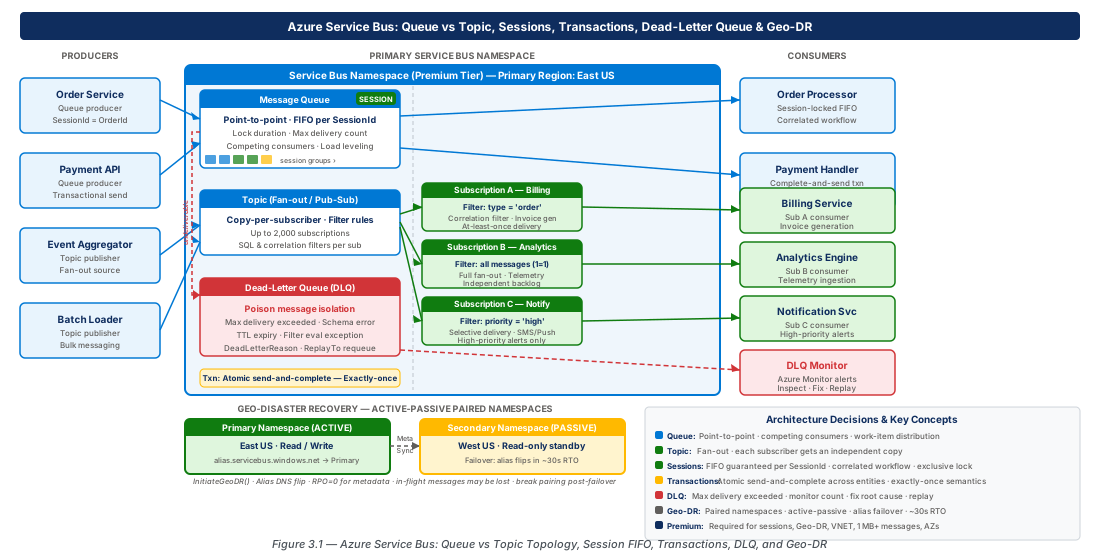
Queue vs. Topic-Subscription Topology Selection
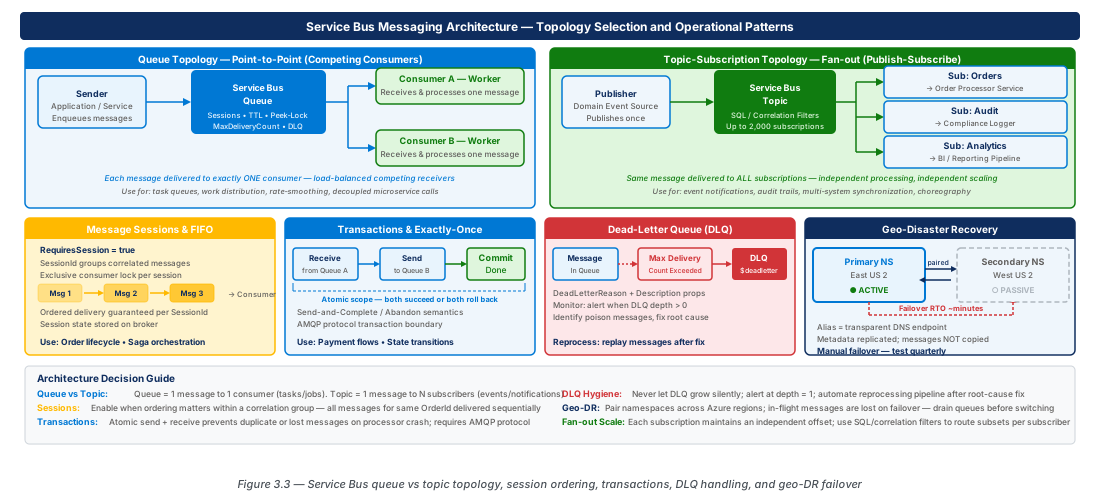
A queue implements a point-to-point (P2P) channel. One or more producers send messages to the queue; one or more competing consumers draw from it, with each message delivered to exactly one consumer. The queue model is the right default for command-style workloads: invoice processing, order fulfilment, background job dispatch, and any scenario where you need guaranteed single delivery and load-leveled concurrency. Competing consumers on a single queue provide horizontal scale-out without any additional broker configuration — adding a second consumer instance immediately doubles throughput on CPU-bound work.
A topic with subscriptions implements a publish-subscribe (pub/sub) channel. Producers publish to the topic, and the broker fans each message out to every registered subscription. Each subscription holds its own independent copy of the message, so Consumer A and Consumer B each receive the full message regardless of which one processes first. Topics are the correct choice when a single domain event must trigger multiple downstream workflows: a payment-confirmed event might simultaneously notify the fulfilment service, update the loyalty-points ledger, and push a push notification — three distinct subscribers, one publish. Topics support up to 2,000 subscriptions per namespace on the Premium tier and allow subscription-level filter rules (SQL or correlation filters) so consumers receive only the messages relevant to them.
The decision table below codifies the selection criteria:
| Criterion | Queue | Topic + Subscription |
|---|---|---|
| Delivery model | Point-to-point (one consumer per message) | Fan-out (all subscriptions receive the message) |
| Consumer count | Many competing consumers share one stream | Each subscription is an independent stream |
| Typical use case | Commands, jobs, task offloading | Events, notifications, integration events |
| Message filtering | Not applicable — consumers receive all messages | Per-subscription SQL or correlation filters |
| Ordering guarantee | Session-enabled queues provide per-session FIFO | Session-enabled subscriptions provide per-session FIFO |
| Max message size (Premium) | 100 MB | 100 MB |
| Typical throughput baseline | Up to 1 million messages/sec (partitioned + Premium) | Same; each subscription counts independently |
| Cost model | Single entity billed per operation | Topic + N subscription entities billed per operation |
Note
A subscription is logically a queue attached to a topic. Everything that applies to queue configuration — sessions, lock duration, TTL, dead-lettering, forwarding — applies identically to subscriptions. The architectural choice is purely about delivery semantics.
Fan-Out Patterns and Subscription Filters
Fan-out at scale requires filter discipline. Without filters, every subscription receives every message published to the topic, which is correct for broadcast scenarios but wasteful when subscribers are regionally partitioned or domain-scoped. Service Bus supports three filter types: TrueFilter (receive all messages, the default), FalseFilter (receive no messages, useful for paused consumers), CorrelationFilter (match on a fixed set of well-known properties — efficient, evaluated in the broker without SQL parsing overhead), and SqlFilter (arbitrary SQL-92 predicate on message properties — flexible but costlier).
For high-throughput fan-out, prefer CorrelationFilter over SqlFilter whenever possible. A CorrelationFilter matching Region = 'EastUS2' is evaluated in constant time with a hash lookup; the equivalent SqlFilter requires a SQL parser invocation per message. At 50,000 messages per minute this difference is measurable in both latency and cost. A practical pattern is to use ApplicationProperties (formerly called UserProperties) on the message to carry routing metadata — EventType, TenantId, Region, SchemaVersion — and then define subscriptions with CorrelationFilters that select on those properties.
Tip
Design your message schema to include routing properties from day one. Retrofitting CorrelationFilter-friendly properties into a production message stream is a breaking change that requires coordinated deployment of all producers. Agree on a canonical set of routing properties — EventType, TenantId, Region, Version — and enforce them in a shared message contract library.
The forwarding feature enables cascaded topologies: a subscription can forward its messages to another queue or topic, enabling a fan-out tree where a primary topic distributes to regional topics, each of which fans out further to service-specific queues. This eliminates the need for a router service process and keeps forwarding logic in the broker where it is durable and scales with the namespace.
Message Sessions: FIFO Ordering and Correlated Workflow Processing
Distributed systems typically sacrifice ordering for throughput. Service Bus message sessions restore per-group ordering guarantees without sacrificing the horizontal scale-out of competing consumers — a combination that is otherwise extremely difficult to achieve.
Understanding Session Semantics
A message session groups related messages under a shared SessionId property. When session support is enabled on a queue or subscription, the broker guarantees that all messages sharing the same SessionId are delivered in sequence to a single consumer at a time. No other consumer can claim a message from that session while the first consumer holds the session lock. This gives you FIFO ordering within a session combined with parallel processing across different sessions — the throughput model of competing consumers with the ordering model of a serial queue.
Sessions are the foundational primitive for any workflow that has per-entity ordering requirements. Financial systems use them extensively: all debit/credit events for a given account share the same SessionId (typically the account number), ensuring that a balance-increasing credit and a subsequent balance-decreasing debit are never processed out of order even under high concurrency. Order management systems use the order ID as the SessionId, so state transitions (Created → Confirmed → Shipped → Delivered) arrive at the processor in the correct sequence even if network delays caused the Shipped event to arrive before the Confirmed event was fully processed.
Important
Session support must be enabled at entity creation time. You cannot enable sessions on an existing queue or subscription without recreating the entity. Plan session requirements during your initial capacity design, and if in doubt, enable sessions — a session-enabled queue can still receive non-session messages as long as producers set the SessionId property.
Session Lifecycle and Stateful Processing
The session model has a lifecycle that differs from standard message lock management. A consumer accepts a session (equivalent to claiming a session lock), processes messages within that session, and then closes the session (releasing the lock for another consumer). Between accepting and closing, the consumer can maintain session state — a blob of up to 256 KB stored in the broker — that persists across consumer restarts. This is a powerful feature for implementing saga workflows: the consumer updates session state after each message to record the current saga step, so if the consumer process crashes, the replacement consumer resumes from the last committed state rather than replaying the entire message history.
Session locks, like standard message locks, expire if the consumer does not renew them. The default session lock duration is 60 seconds and is configurable up to 5 minutes. Long-running session processors must implement lock renewal. In the Azure SDK for .NET, the ServiceBusSessionProcessor class manages this automatically when SessionIdleTimeout and lock renewal callbacks are configured. For custom session processors, call RenewSessionLockAsync() before the lock expiry to maintain the session claim.
Warning
A session lock expiry does not roll back any in-flight operations. If the consumer was mid-processing when the lock expired and another consumer claims the session, both consumers may attempt to complete or abandon the same message. Design idempotent message handlers for session-enabled entities, using a message deduplication store (Azure Table Storage with the message MessageId as the partition key is a lightweight option) to detect and discard reprocessed duplicates.
Session-Based Correlated Workflow Implementation
The canonical pattern for correlated workflow processing with sessions is the process manager pattern: a single stateful processor owns a session from start to finish, using session state to persist the workflow's progress map. When a new correlation arrives (for example, a new order is created), the processor accepts a new session keyed on the order ID, records the initial state, and processes subsequent messages in sequence. Each message drives a state transition; the new state is persisted to session state before the message is completed. When the workflow reaches a terminal state (completed or failed), the processor closes the session and the broker relinquishes the session slot.
This pattern scales well because sessions are processed in parallel up to the degree of concurrency configured on the session processor. An order management system processing 10,000 concurrent orders sets MaxConcurrentSessions to a value that saturates available compute without overwhelming downstream dependencies — typically between 16 and 128 on a Premium namespace with one messaging unit. Each session processor instance pulls sessions from the broker as they become available, providing natural load balancing without a coordinator.
Transactions and Exactly-Once Semantics
Distributed transactions are notoriously difficult, but Service Bus provides a scoped transaction model that covers the most common exactly-once requirements: atomically sending and completing messages within a single broker operation, and grouping sends across related entities.
Service Bus Transaction Scope
A Service Bus transaction groups operations on a single namespace into an atomic unit that either commits or rolls back together. The supported operations within a transaction are: send (to queue, topic, or subscription), complete (acknowledge receipt and remove), abandon (release lock for redelivery), dead-letter, defer, and schedule. Cross-namespace transactions are not supported; if your architecture spans multiple namespaces, you must implement a saga or outbox pattern at the application layer.
The most important transaction pattern in production messaging is the send-and-complete pattern, also called the receive-send-complete transaction. A consumer receives message A, performs processing, and sends result message B — all within a single transaction. If the processing fails after sending B but before completing A, the transaction rolls back: B is not committed to the destination queue, and A remains in the source queue for redelivery. This gives you exactly-once processing semantics for transformations: message A is consumed precisely once, and message B is produced precisely once, even in the presence of crashes between the send and the complete.
Important
Service Bus transactions use a via-entity (also called a transfer destination) mechanism for send-and-complete. The producing entity (where the new message is sent) must be a queue or topic within the same namespace. When committing a transaction that both completes a received message and sends to a destination, the SDK internally uses the source entity as the via-entity. Ensure your namespace topology places source and destination entities in the same namespace; if architectural constraints require cross-namespace delivery, use the outbox pattern with an intermediary storage layer.
Exactly-Once Semantics with Duplicate Detection
Service Bus provides a complementary exactly-once mechanism at the namespace level: duplicate detection. When enabled on a queue or topic, the broker records the MessageId of every accepted message for a configurable time window (1 minute to 7 days). If a producer re-sends a message with the same MessageId within that window — a common occurrence when a producer retries after not receiving an acknowledgment — the broker silently discards the duplicate without delivering it to consumers.
Duplicate detection is critical for idempotent ingestion. The pattern is: producers generate a deterministic MessageId based on the business key of the event (for example, a hash of OrderId + EventType + EventTimestamp). If the send operation times out or returns a transient error, the producer retries with the same MessageId. The broker either accepts the message for the first time or silently deduplicates it — either way, the consumer receives exactly one copy. This approach is simpler and more performant than application-level deduplication stores for the ingestion path.
Tip
Set MessageId explicitly on every message your producers send. If you rely on the SDK to generate a random GUID, you lose the ability to use duplicate detection for idempotent retries. Adopt a convention: {EntityType}-{EntityId}-{EventType}-{Timestamp}, truncated or hashed to fit the 128-character limit. Document this convention in your team's messaging contract standards.
Atomic Batch Operations and Outbox Integration
For high-throughput producers that must atomically persist a database change and publish an event, the transactional outbox pattern complements Service Bus transactions. The producer writes the domain event to an outbox table in its database within the same database transaction as the domain change. A separate relay process reads uncommitted outbox records and publishes them to Service Bus, then marks the records as sent. This pattern achieves exactly-once event publication even when the application crashes after committing the database transaction but before the Service Bus send operation completes.
Integrating the outbox relay with Service Bus duplicate detection creates a robust pipeline: the relay generates a deterministic MessageId from the outbox record's primary key and re-sends on any transient failure. Service Bus deduplication ensures the consumer never receives a duplicate regardless of how many relay retries occur. The relay can use batched sends (up to 100 messages per batch, or up to 1 MB total) to maximize throughput; the entire batch is atomic — if any message in the batch fails validation, the entire batch is rejected.
# CE-05-A: Create a Premium namespace with duplicate detection and geo-pair
az servicebus namespace create \
  --resource-group rg-service-bus-messaging-prod-001 \
  --name service-bus-prod-eastus2-001 \
  --sku Premium \
  --location eastus2 \
  --capacity 1 \
  --zone-redundant true

# Create a transactional queue with duplicate detection enabled
az servicebus queue create \
  --resource-group rg-service-bus-messaging-prod-001 \
  --namespace-name service-bus-prod-eastus2-001 \
  --name orders-commands \
  --enable-duplicate-detection true \
  --duplicate-detection-history-time-window PT10M \
  --enable-session true \
  --lock-duration PT5M \
  --max-delivery-count 10 \
  --default-message-time-to-live P7D \
  --enable-dead-lettering-on-message-expiration true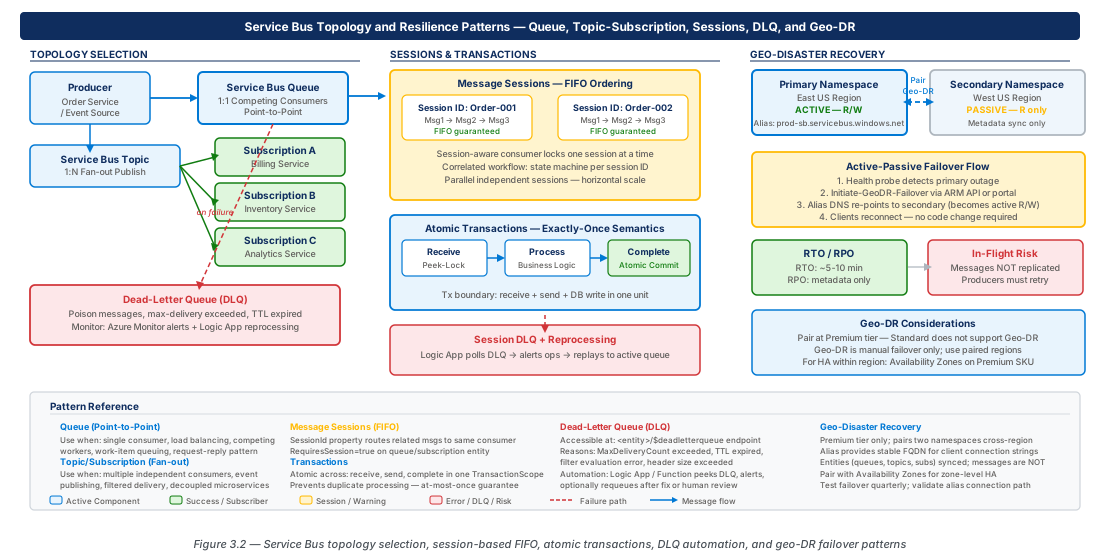
Dead-Letter Queue Operations
Every Service Bus queue and subscription has an associated dead-letter queue (DLQ) — a sub-queue that holds messages that cannot be delivered or processed. The DLQ is a first-class operational entity, not an afterthought, and production messaging architectures must treat it as such: monitor it actively, alert on growth, investigate root causes, and automate reprocessing where appropriate.
Dead-Lettering Triggers and Diagnostic Properties
Messages arrive in the DLQ through several distinct paths, each requiring a different operational response. Understanding the trigger is essential to diagnosing and remediating the root cause.
Max delivery count exceeded: The broker increments DeliveryCount each time a consumer abandons or fails to complete a message within the lock duration. When DeliveryCount reaches the queue's MaxDeliveryCount threshold (default 10, configurable 1–2000), the broker moves the message to the DLQ with DeadLetterReason = MaxDeliveryCountExceeded. This is the most common DLQ trigger and typically indicates a poison message — a message whose content or format consistently causes the consumer to fail. Investigate the DeadLetterErrorDescription property for the last exception details.
Time-to-live expired: If a message remains in the queue past its TimeToLive and the queue has EnableDeadLetteringOnMessageExpiration set to true, the broker moves it to the DLQ with DeadLetterReason = TTLExpiredException. This indicates either a chronically undersized consumer fleet (messages are produced faster than they are consumed) or a subscriber outage longer than the TTL window. Without dead-lettering on expiration, expired messages are silently discarded — always enable this setting in production.
Filter evaluation exceptions: For subscriptions with SQL filter rules, a filter evaluation exception moves the message to the DLQ with DeadLetterReason = FilterEvaluationException. This typically indicates a schema change: a new message property referenced in a filter rule was renamed or removed. Review filter rules and message schemas together when this trigger fires.
Application-initiated dead-lettering: Consumers can explicitly dead-letter a message with a custom reason and description using DeadLetterAsync(reason, description). Use this deliberately for messages that are semantically invalid but syntactically correct — for example, a payment instruction for a non-existent account. Include actionable information in the description: the validation rule that failed, the offending field value, and the correlation ID linking to the upstream trace.
Important
The DLQ has its own TTL; messages in the DLQ expire based on the original message's TTL counted from the time it entered the DLQ, not from the original send time. On high-throughput queues with short TTLs, DLQ entries can themselves expire before an operator investigates. Set DefaultMessageTimeToLive on production entities to at least 7 days to give operations teams adequate investigation windows.
Poison Message Identification and Root-Cause Analysis
A poison message is a message that persistently prevents a consumer from making progress. The term is often used loosely to mean "any message in the DLQ," but the distinction matters operationally. Not all DLQ messages are poison — an expired message is not poison; a message from a consumer outage is not poison. A true poison message has content or metadata that causes a deterministic failure on every processing attempt: a malformed JSON payload, a reference to a deleted resource, a numeric overflow in a calculation, or a message type the consumer has never seen.
Identifying poison messages requires correlating the DLQ entry with consumer logs. The Service Bus message carries the EnqueuedSequenceNumber, MessageId, and — if sessions are used — SessionId. Use these as correlation keys when querying Application Insights or your centralized log store. A diagnostic query should answer: What exception was thrown on the last delivery attempt? Which consumer instance processed it? Does the same exception appear for all delivery attempts, or did it vary? Consistent exceptions indicate poison content; variable exceptions suggest transient infrastructure issues that may have self-resolved.
Note
The DeadLetterErrorDescription property on a DLQ message contains the exception message from the last consumer failure, but only when the consumer explicitly dead-letters the message with a description. When the broker dead-letters due to max delivery count, the description is the last abandonment reason if the consumer provided one; otherwise it is empty. Enforce a logging and abandonment policy in your consumer framework: always abandon with a reason string that includes the exception type and a short message, and always emit a structured log entry with the full exception stack.
DLQ Monitoring and Alerting Architecture
Production DLQ monitoring requires two layers: reactive alerting on DLQ depth growth, and proactive health checks on DLQ entry age. Azure Monitor provides the DeadLetteredMessageCount metric for every Service Bus entity. Configure metric alerts to trigger when DeadLetteredMessageCount exceeds a warning threshold (e.g., 10 messages) and a critical threshold (e.g., 100 messages), with severity levels mapped to your incident management process.
The age dimension is equally important and requires a custom monitoring approach. Service Bus does not expose a "maximum message age in DLQ" metric. Implement a scheduled Azure Function that connects to each DLQ, peeks (without consuming) the oldest message using PeekMessageAsync, and emits a custom metric to Application Insights with the age in minutes. Alert on this metric when the oldest DLQ message exceeds the SLA for investigation (typically 30–60 minutes for critical queues). This prevents a scenario where DLQ entries age silently past their own TTL.
# CE-05-B: Configure DLQ monitoring and alert rules
# Create Action Group for Service Bus alerts
az monitor action-group create \
  --resource-group rg-service-bus-messaging-prod-001 \
  --name ag-servicebus-ops-prod \
  --short-name sb-ops \
  --email-receiver name=ops-team [email protected]

# DLQ depth alert - warning threshold
az monitor metrics alert create \
  --resource-group rg-service-bus-messaging-prod-001 \
  --name alert-dlq-depth-warning-orders-commands \
  --scopes "/subscriptions/$(az account show --query id -o tsv)/resourceGroups/rg-service-bus-messaging-prod-001/providers/Microsoft.ServiceBus/namespaces/service-bus-prod-eastus2-001" \
  --condition "avg DeadLetteredMessageCount > 10" \
  --window-size 5m \
  --evaluation-frequency 1m \
  --severity 2 \
  --action ag-servicebus-ops-prod \
  --description "DLQ depth warning threshold exceeded for orders-commands"

# DLQ depth alert - critical threshold
az monitor metrics alert create \
  --resource-group rg-service-bus-messaging-prod-001 \
  --name alert-dlq-depth-critical-orders-commands \
  --scopes "/subscriptions/$(az account show --query id -o tsv)/resourceGroups/rg-service-bus-messaging-prod-001/providers/Microsoft.ServiceBus/namespaces/service-bus-prod-eastus2-001" \
  --condition "avg DeadLetteredMessageCount > 100" \
  --window-size 5m \
  --evaluation-frequency 1m \
  --severity 1 \
  --action ag-servicebus-ops-prod \
  --description "DLQ critical threshold exceeded - immediate investigation required"
DLQ Reprocessing Automation
Reprocessing DLQ messages is a distinct operational workflow from normal message processing. Do not route DLQ messages directly back to the head of the original queue without investigation — this risks creating an infinite loop for true poison messages. The recommended pattern is a DLQ triage pipeline:
- A scheduled Azure Function or Logic App peeks DLQ messages without completing them.
- A triage step classifies each message: transient failure (safe to reprocess), poison (requires manual intervention), or expired (informational only, no action).
- Transient failures are moved to a reprocessing queue that feeds into the original consumer with a lower
MaxDeliveryCountto limit re-entry to the DLQ. - Poison messages are moved to a quarantine store (Blob Storage or Table Storage) for manual review and schema analysis.
- All triage actions are logged with the original
MessageId,SessionId, classification, and operator identity for audit compliance.
Automating classification is feasible for well-known failure categories. A consumer framework that always abandons with structured reason codes (e.g., TRANSIENT_DATABASE_TIMEOUT, POISON_SCHEMA_INVALID, POISON_REFERENCE_NOT_FOUND) makes the triage step straightforward: a simple string match routes messages to the correct reprocessing path.
Geo-Disaster Recovery and Multi-Region Reliability
Azure Service Bus Premium tier provides built-in geo-disaster recovery (Geo-DR) through namespace pairing. Understanding the pairing model, its recovery time objectives, and its operational procedures is essential for any production system with business continuity requirements.
Geo-DR Pairing Model and Active-Passive Architecture
Service Bus Geo-DR operates on an active-passive model: one namespace is the primary (active), receiving all producer traffic; the other is the secondary (passive), which is a standby replica. The pairing is managed through the Service Bus Geo-DR feature, which synchronizes the entity metadata — queue names, topic names, subscription names, filter rules, authorization rules, and entity properties — from primary to secondary continuously. The synchronization is metadata-only; messages in-flight are not replicated. This is a critical distinction that informs your RTO and RPO calculations.
When a failover is triggered (either manually or — on Premium with geo-replication enabled in certain configurations — automatically), the secondary namespace assumes the primary alias DNS name. Producers and consumers that connect using the alias connection string begin connecting to the new primary without code changes. The failover process takes approximately 1–5 minutes for metadata synchronization to complete and the alias to propagate.
Warning
Messages that were in the primary namespace at the time of failover are lost unless you have implemented a supplementary message replication strategy. The default Geo-DR pairing does not replicate in-flight messages. For workloads with zero-RPO requirements for in-flight messages, implement active-active replication using the Service Bus Replication application pattern: a relay process running in both regions that mirrors messages across paired namespaces. This doubles your operation costs but provides continuous message availability.
The Geo-DR alias provides a stable connection endpoint that survives failover. Connection strings reference the alias rather than the primary namespace directly:
Endpoint=sb://service-bus-prod-geo-alias-001.servicebus.windows.net/;...After failover, this alias resolves to the secondary namespace. Producers and consumers reconnect transparently on their next reconnect cycle, typically within seconds for well-configured SDK connection pools.
Setting Up Geo-DR Pairing
# CE-06: Configure Geo-DR pairing between primary and secondary namespaces

# Create secondary namespace in paired region
az servicebus namespace create \
  --resource-group rg-service-bus-messaging-prod-001 \
  --name service-bus-prod-westus2-001 \
  --sku Premium \
  --location westus2 \
  --capacity 1 \
  --zone-redundant true

# Retrieve the primary namespace resource ID
PRIMARY_NS_ID=$(az servicebus namespace show \
  --resource-group rg-service-bus-messaging-prod-001 \
  --name service-bus-prod-eastus2-001 \
  --query id --output tsv)

# Retrieve the secondary namespace resource ID
SECONDARY_NS_ID=$(az servicebus namespace show \
  --resource-group rg-service-bus-messaging-prod-001 \
  --name service-bus-prod-westus2-001 \
  --query id --output tsv)

# Initiate the geo-pairing (sets primary as active, secondary as passive)
az servicebus georecovery-alias create \
  --resource-group rg-service-bus-messaging-prod-001 \
  --namespace-name service-bus-prod-eastus2-001 \
  --alias service-bus-prod-geo-alias-001 \
  --partner-namespace $SECONDARY_NS_ID

# Verify pairing status - wait for ProvisioningState = Succeeded
az servicebus georecovery-alias show \
  --resource-group rg-service-bus-messaging-prod-001 \
  --namespace-name service-bus-prod-eastus2-001 \
  --alias service-bus-prod-geo-alias-001 \
  --query "{status:provisioningState, role:role, pendingReplicationCount:pendingReplicationOperationsCount}" \
  --output table
Failover Procedures and Operational Runbook
Production Geo-DR requires a documented, tested failover runbook that every on-call engineer can execute under pressure. The runbook must distinguish between planned failover (for maintenance or proactive risk mitigation) and unplanned failover (in response to a primary region outage).
Planned failover procedure: (1) Drain the primary namespace by stopping all producers and waiting for ActiveMessageCount to reach zero. (2) Verify PendingReplicationOperationsCount on the geo-alias is zero, confirming metadata synchronization is complete. (3) Execute the failover command. (4) Update producer and consumer connection strings to use the alias if not already configured. (5) Validate end-to-end message flow in the secondary region. (6) Document the failover time and any messages lost for post-incident review.
Unplanned failover procedure: (1) Confirm primary region unavailability via Azure Service Health and independent monitoring. (2) Accept that in-flight messages in the primary namespace may be unrecoverable. (3) Execute the failover command immediately — do not wait for PendingReplicationOperationsCount to reach zero in an active outage. (4) Alert upstream services to retry any operations that were in-flight during the outage window. (5) Begin post-incident analysis of message loss scope.
# CE-06-B: Execute a planned failover with pre-flight validation

# Check pending replication count before failover
PENDING=$(az servicebus georecovery-alias show \
  --resource-group rg-service-bus-messaging-prod-001 \
  --namespace-name service-bus-prod-eastus2-001 \
  --alias service-bus-prod-geo-alias-001 \
  --query pendingReplicationOperationsCount --output tsv)

echo "Pending replication operations: $PENDING"
# Proceed only if PENDING == 0 for planned failover

# Execute failover - this promotes secondary to primary
az servicebus georecovery-alias fail-over \
  --resource-group rg-service-bus-messaging-prod-001 \
  --namespace-name service-bus-prod-westus2-001 \
  --alias service-bus-prod-geo-alias-001

# Verify new primary assignment
az servicebus georecovery-alias show \
  --resource-group rg-service-bus-messaging-prod-001 \
  --namespace-name service-bus-prod-westus2-001 \
  --alias service-bus-prod-geo-alias-001 \
  --query "{newPrimary:namespaceName, role:role, status:provisioningState}" \
--output tableNote
After failover, the original primary namespace is broken from the pairing and becomes a standalone namespace. To restore the geo-DR configuration after region recovery, re-pair the namespaces with the roles reversed. The original primary (now recovered) becomes the new secondary, and you perform a planned failback when business continuity allows.
Premium Tier Capabilities and SKU Comparison
Service Bus is available in Basic, Standard, and Premium tiers. Geo-DR, message sessions, and transactions require Premium. The following table covers the capabilities relevant to production architecture decisions:
| Capability | Basic | Standard | Premium |
|---|---|---|---|
| Queues | Yes | Yes | Yes |
| Topics and subscriptions | No | Yes | Yes |
| Message sessions | No | No | Yes |
| Transactions | No | No | Yes |
| Duplicate detection | No | Yes | Yes |
| Geo-disaster recovery | No | No | Yes |
| Availability Zones | No | No | Yes |
| Message size limit | 256 KB | 256 KB | 100 MB |
| Messaging units (compute) | Shared | Shared | Dedicated (1, 2, 4, 8, 16) |
| VNet service endpoints | No | No | Yes |
| Private Endpoints | No | No | Yes |
| Customer-managed keys (CMK) | No | No | Yes |
| Pricing model | Per operation | Per operation | Per messaging unit/hour |
| Typical workload | Dev/test | Low-volume production | Enterprise production |
Important
Premium tier uses dedicated compute (messaging units) rather than shared infrastructure. A single messaging unit supports up to approximately 10 million operations per day as a baseline, with throughput scaling linearly as you add units. For production systems with SLA requirements, Premium is not optional — Basic and Standard tiers share infrastructure and provide no throughput guarantees.
Lab
CE-05: Build a Session-Enabled Order Processing Queue with Dead-Letter Monitoring
# CE-05: Full setup of a session-enabled queue with DLQ monitoring
# and a topic-subscription fan-out for order events

# Prerequisites: resource group and premium namespace already created (see CE-05-A)
# Development namespace for local testing
az servicebus namespace create \
  --resource-group rg-service-bus-messaging-dev-001 \
  --name service-bus-dev-eastus2-001 \
  --sku Standard \
  --location eastus2

# Create the main order-commands queue (session-enabled for FIFO per order)
az servicebus queue create \
  --resource-group rg-service-bus-messaging-prod-001 \
  --namespace-name service-bus-prod-eastus2-001 \
  --name orders-commands \
  --enable-session true \
  --enable-duplicate-detection true \
  --duplicate-detection-history-time-window PT10M \
  --lock-duration PT5M \
  --max-delivery-count 10 \
  --default-message-time-to-live P7D \
  --enable-dead-lettering-on-message-expiration true \
  --max-size-in-megabytes 5120

# Create the order-events topic for fan-out to downstream services
az servicebus topic create \
  --resource-group rg-service-bus-messaging-prod-001 \
  --namespace-name service-bus-prod-eastus2-001 \
  --name orders-events \
  --default-message-time-to-live P1D \
  --enable-duplicate-detection true \
  --duplicate-detection-history-time-window PT5M \
  --max-size-in-megabytes 5120

# Create subscription for fulfilment service - receives all order events
az servicebus topic subscription create \
  --resource-group rg-service-bus-messaging-prod-001 \
  --namespace-name service-bus-prod-eastus2-001 \
  --topic-name orders-events \
  --name sub-fulfilment \
  --enable-session true \
  --max-delivery-count 10 \
  --lock-duration PT2M \
  --default-message-time-to-live P1D \
  --enable-dead-lettering-on-message-expiration true

# Create subscription for loyalty service - only payment-confirmed events
az servicebus topic subscription create \
  --resource-group rg-service-bus-messaging-prod-001 \
  --namespace-name service-bus-prod-eastus2-001 \
  --topic-name orders-events \
  --name sub-loyalty \
  --max-delivery-count 5 \
  --lock-duration PT1M \
  --default-message-time-to-live P1D

# Add correlation filter to loyalty subscription - only payment events
az servicebus topic subscription rule create \
  --resource-group rg-service-bus-messaging-prod-001 \
  --namespace-name service-bus-prod-eastus2-001 \
  --topic-name orders-events \
  --subscription-name sub-loyalty \
  --name filter-payment-events \
  --filter-type CorrelationFilter \
  --action-sql-expression "SET EventCategory = 'payment'" \
  --correlation-filter-property EventType=PaymentConfirmed

# Remove the default TrueFilter from loyalty subscription
az servicebus topic subscription rule delete \
  --resource-group rg-service-bus-messaging-prod-001 \
  --namespace-name service-bus-prod-eastus2-001 \
  --topic-name orders-events \
  --subscription-name sub-loyalty \
  --name "\$Default"

# Create a shared access policy for the order processor service
az servicebus queue authorization-rule create \
  --resource-group rg-service-bus-messaging-prod-001 \
  --namespace-name service-bus-prod-eastus2-001 \
  --queue-name orders-commands \
  --name order-processor-policy \
  --rights Send Listen

# Retrieve the connection string for the order processor
az servicebus queue authorization-rule keys list \
  --resource-group rg-service-bus-messaging-prod-001 \
  --namespace-name service-bus-prod-eastus2-001 \
  --queue-name orders-commands \
  --name order-processor-policy \
  --query primaryConnectionString \
--output tsvCE-06: Configure Geo-DR and Validate Failover
# CE-06: Complete Geo-DR configuration with alias-based connection validation

# Step 1: Create the secondary namespace (paired region)
az servicebus namespace create \
  --resource-group rg-service-bus-messaging-prod-001 \
  --name service-bus-prod-westus2-001 \
  --sku Premium \
  --location westus2 \
  --capacity 1 \
  --zone-redundant true

# Step 2: Create the geo-DR alias pairing
SECONDARY_NS_ID=$(az servicebus namespace show \
  --resource-group rg-service-bus-messaging-prod-001 \
  --name service-bus-prod-westus2-001 \
  --query id --output tsv)

az servicebus georecovery-alias create \
  --resource-group rg-service-bus-messaging-prod-001 \
  --namespace-name service-bus-prod-eastus2-001 \
  --alias service-bus-prod-geo-alias-001 \
  --partner-namespace $SECONDARY_NS_ID

# Step 3: Wait for initial sync and validate entity replication
echo "Waiting 30 seconds for initial metadata synchronization..."
sleep 30

# Check entities replicated to secondary
az servicebus queue list \
  --resource-group rg-service-bus-messaging-prod-001 \
  --namespace-name service-bus-prod-westus2-001 \
  --query "[].{name:name, status:status}" \
  --output table

az servicebus topic list \
  --resource-group rg-service-bus-messaging-prod-001 \
  --namespace-name service-bus-prod-westus2-001 \
  --query "[].{name:name, status:status}" \
  --output table

# Step 4: Retrieve the alias connection string (use this in all applications)
az servicebus georecovery-alias authorization-rule keys list \
  --resource-group rg-service-bus-messaging-prod-001 \
  --namespace-name service-bus-prod-eastus2-001 \
  --alias service-bus-prod-geo-alias-001 \
  --name RootManageSharedAccessKey \
  --query primaryConnectionString \
  --output tsv

# Step 5: Simulate planned failover (for DR drill)
# Verify zero pending replications
PENDING=$(az servicebus georecovery-alias show \
  --resource-group rg-service-bus-messaging-prod-001 \
  --namespace-name service-bus-prod-eastus2-001 \
  --alias service-bus-prod-geo-alias-001 \
  --query pendingReplicationOperationsCount --output tsv)

if [ "$PENDING" -eq "0" ]; then
  echo "Replication complete. Safe to initiate planned failover."
  az servicebus georecovery-alias fail-over \
    --resource-group rg-service-bus-messaging-prod-001 \
    --namespace-name service-bus-prod-westus2-001 \
    --alias service-bus-prod-geo-alias-001
else
  echo "WARNING: $PENDING operations pending. Drain primary before failover."
fi

# Step 6: Validate post-failover state
az servicebus georecovery-alias show \
  --resource-group rg-service-bus-messaging-prod-001 \
  --namespace-name service-bus-prod-westus2-001 \
  --alias service-bus-prod-geo-alias-001 \
  --query "{alias:name, role:role, provisioningState:provisioningState}" \
  --output table
Summary
| Concept | Key Point |
|---|---|
| Queue vs. Topic topology | Use queues for point-to-point command dispatch; use topics with subscriptions for event fan-out to multiple independent consumers. Add CorrelationFilter on subscriptions to route by message properties with minimal broker overhead. |
| Message sessions | Enable sessions for per-entity FIFO ordering (e.g., per-order, per-account). Session state persists workflow progress across consumer restarts, enabling resilient saga implementations without an external state store. |
| Transactions | Service Bus transactions are scoped to a single namespace and enable atomic send-and-complete patterns. Use the receive-send-complete transaction to guarantee exactly-once transformation semantics. |
| Duplicate detection | Set a deterministic MessageId on every message so producers can safely retry on transient failures. The broker deduplicates within a configurable history window without consumer involvement. |
| Dead-letter queue | Treat the DLQ as a first-class operational signal. Monitor DeadLetteredMessageCount and oldest-entry age via Azure Monitor. Classify DLQ entries before reprocessing; quarantine true poison messages rather than returning them to the head queue. |
| Geo-disaster recovery | Premium Geo-DR replicates entity metadata, not in-flight messages. Use the alias connection string in all applications for transparent failover. Planned failover requires zero pending replications; unplanned failover accepts potential message loss. |
| Premium tier | Sessions, transactions, Geo-DR, VNet integration, and dedicated compute require Premium. For any production workload with SLA requirements, Basic and Standard tiers are insufficient. |
Chapter: 3 of 11 | Status: v0.1 Draft |