Book 01 — Azure Networking Deep Dive
Network Security
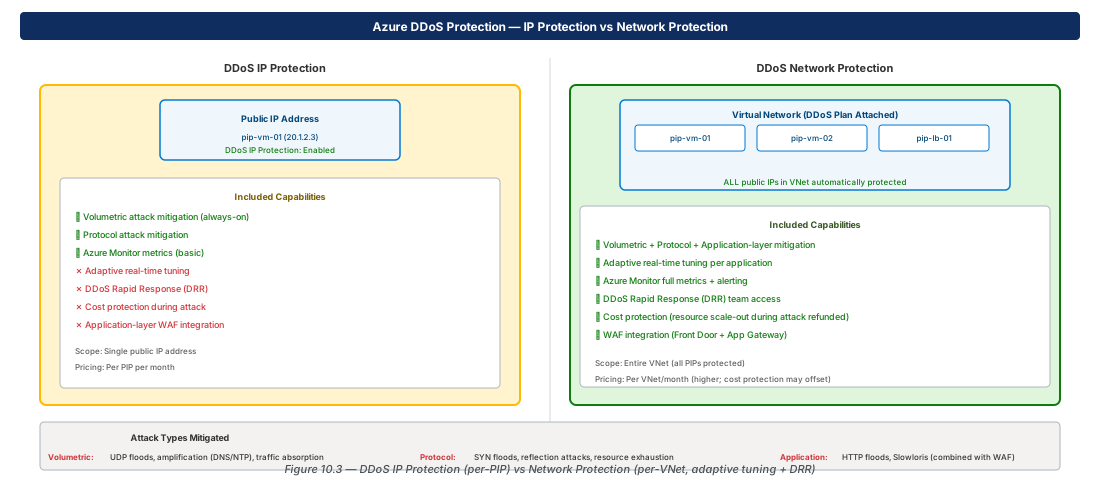
Azure provides a layered network security model: NSGs apply stateful L4 filtering at subnet and NIC boundaries; Azure Firewall provides managed L4/L7 inspection with FQDN filtering and Threat Intelligence; and DDoS Protection defends against volumetric and protocol attacks at the edge.
Network Security Groups (NSG)
Rule Evaluation Order
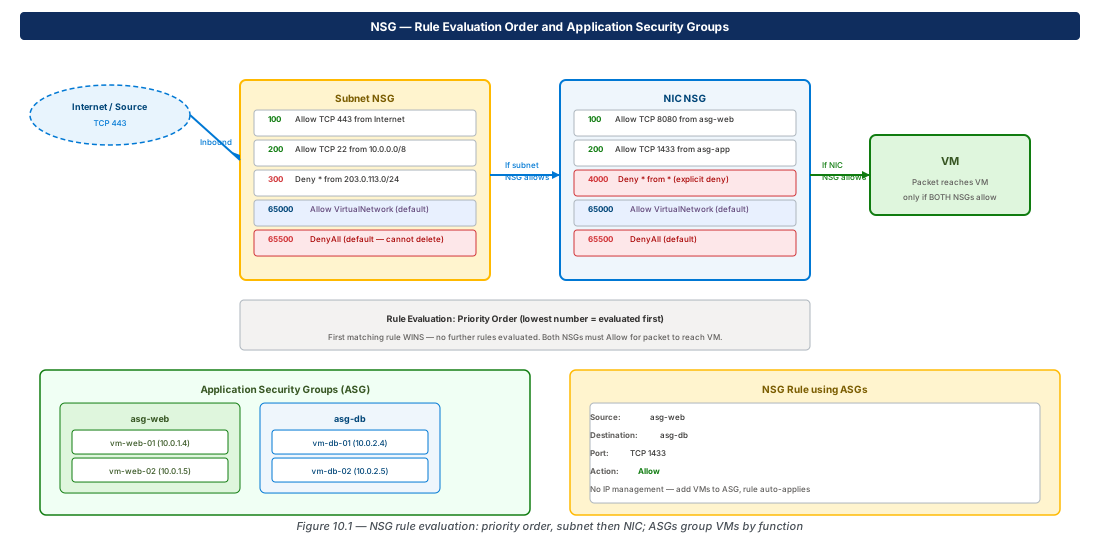
NSG rules are evaluated in priority order — lowest number first (range 100–4096). The first matching rule wins; subsequent rules are not evaluated. Rules are stateful: return traffic for an allowed connection is automatically permitted.
For inbound: the subnet NSG is evaluated first, then the NIC NSG. Both must allow the traffic for the packet to reach the VM. For outbound: NIC NSG first, then subnet NSG.
Application Security Groups
ASGs group VMs by function (web, app, db). NSG rules reference ASG names as source or destination — when VMs are added to an ASG, they automatically inherit all associated rules without any IP address changes.
# ASG-based NSG rule — no IP addresses needed
az network asg create --name asg-web --resource-group rg-app
az network asg create --name asg-db --resource-group rg-app

az network nsg rule create \
  --nsg-name nsg-app --resource-group rg-app \
  --name allow-web-to-db \
  --priority 200 --protocol Tcp \
  --source-asgs asg-web \
  --destination-asgs asg-db \
  --destination-port-ranges 1433 --access Allow
Service Tags
| Service Tag | Represents |
|---|---|
VirtualNetwork | VNet address space + peered + connected VNets |
AzureLoadBalancer | 168.63.129.16 (Azure health probe source IP) |
Internet | All public IP addresses |
AzureCloud | All Azure datacenter IPs (region-specific variants available) |
Storage, Sql, AppService | Service-specific IP ranges (used with Service Endpoints) |
Azure Firewall
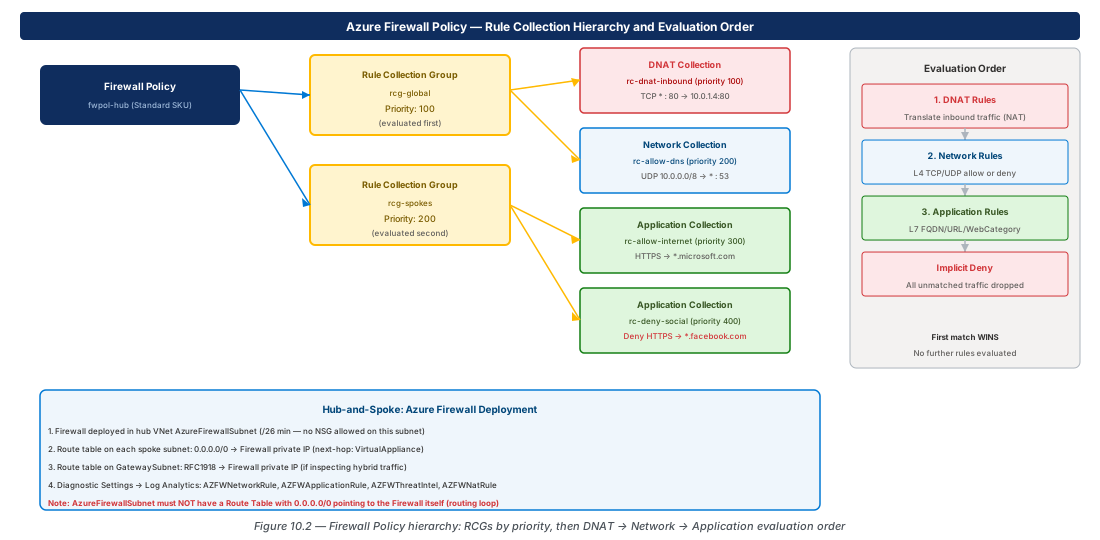
Azure Firewall is a stateful, managed L4/L7 network firewall deployed in the hub VNet's AzureFirewallSubnet (minimum /26; no NSG or UDR allowed on this subnet). It provides FQDN-based filtering, Threat Intelligence feed, and central policy management via Firewall Policy.
Warning
Never place a UDR with 0.0.0.0/0 → Firewall on the AzureFirewallSubnet itself. This creates a routing loop that drops all traffic through the firewall. The route table must only be applied to spoke subnets, not the firewall's own subnet.
Firewall SKU Comparison
| Feature | Standard | Premium |
|---|---|---|
| FQDN / App / Network / NAT rules | Yes | Yes |
| Threat Intelligence | Yes | Yes |
| TLS Inspection | No | Yes |
| IDPS | No | Yes |
| URL Filtering | No | Yes |
| Web Categories | No | Yes |
# Firewall Policy with application rule for outbound HTTPS
az network firewall policy create \
  --name fwpol-hub --resource-group rg-hub \
  --sku Standard --threat-intel-mode Alert

az network firewall policy rule-collection-group create \
  --policy-name fwpol-hub --resource-group rg-hub \
  --name rcg-spokes --priority 200

az network firewall policy rule-collection-group collection \
  add-filter-collection \
  --policy-name fwpol-hub --resource-group rg-hub \
  --rule-collection-group-name rcg-spokes \
  --name rc-allow-windows-update \
  --collection-priority 300 --action Allow \
  --rule-type ApplicationRule \
  --rule-name allow-winupdate \
  --protocols Https=443 \
  --source-addresses "10.0.0.0/8" \
  --target-fqdns "*.update.microsoft.com" "*.windowsupdate.com"
DDoS Protection
# DDoS Network Protection plan + VNet attachment
az network ddos-protection create \
  --name ddos-plan-prod \
  --resource-group rg-security \
  --location eastus2

az network vnet update \
  --name vnet-hub --resource-group rg-hub \
  --ddos-protection true \
  --ddos-protection-plan ddos-plan-prod
Lab: NSG with ASG and Firewall Policy
NSG with Application Security Groups (CE-22)
RG="rg-lab-ch10"; LOC="eastus2"
az group create --name "$RG" --location "$LOC"

az network asg create --name asg-web \
  --resource-group "$RG" --location "$LOC"
az network asg create --name asg-db \
  --resource-group "$RG" --location "$LOC"
az network nsg create --name nsg-app \
  --resource-group "$RG" --location "$LOC"

az network nsg rule create \
  --nsg-name nsg-app --resource-group "$RG" \
  --name allow-web-to-db \
  --priority 200 --protocol Tcp \
  --source-asgs asg-web \
  --destination-asgs asg-db \
--destination-port-ranges 1433 --access AllowFirewall Policy with Application Rule (CE-23)
az network firewall policy create \
  --name fwpol-lab --resource-group "$RG" \
  --location "$LOC" --sku Standard \
  --threat-intel-mode Alert

az network firewall policy rule-collection-group create \
  --policy-name fwpol-lab --resource-group "$RG" \
  --name rcg-lab --priority 300

az network firewall policy rule-collection-group collection \
  add-filter-collection \
  --policy-name fwpol-lab --resource-group "$RG" \
  --rule-collection-group-name rcg-lab \
  --name rc-allow-azure \
  --collection-priority 400 --action Allow \
  --rule-type ApplicationRule \
  --rule-name allow-azure \
  --protocols Https=443 \
  --source-addresses "10.0.0.0/8" \
  --target-fqdns "*.azure.com" "*.microsoft.com"

az group delete --name "$RG" --yes --no-wait
Summary
| Concept | Key Fact |
|---|---|
| NSG priority | 100–4096; lowest number evaluated first; first match wins |
| Layering | Inbound: subnet NSG first, then NIC NSG; both must allow |
| ASG | Group VMs by function; auto-apply rules without IP management |
| AzureLoadBalancer tag | Must allow in NSG for health probes to reach VMs |
| Firewall Standard | FQDN/App/Net/NAT rules + Threat Intel |
| Firewall Premium | + TLS Inspection, IDPS, URL filtering, Web categories |
| Rule eval order | DNAT → Network → Application; implicit deny at end |
| DDoS IP Protection | Per PIP; basic mitigation; lower cost |
| DDoS Network Protection | Per VNet; adaptive tuning + DRR + cost protection |
Chapter 11 covers DNS Architecture — Azure DNS public zones, Private DNS Zones, auto-registration, and DNS Private Resolver for hybrid DNS forwarding.
Chapter: 10 of 12 | Status: v0.1 Draft |