Book 01 — Azure Networking Deep Dive
Azure Network Foundations
Every Azure architecture in this book relies on the constructs you build here. Before you configure an ExpressRoute circuit, design a hub-and-spoke topology, or attach a private endpoint, you need a precise understanding of how Azure constructs an isolated network, how subnets divide that network into functional segments, and how a network interface card (NIC) connects compute to the underlying network fabric. This chapter establishes those foundations.
You will work through six sections. The first two build the conceptual model: what a Virtual Network (VNet) is at the platform level, and how to design an address space that will not require a re-IP project six months later. The middle two translate that model into precise subnet design and IP address management. The final two move from theory to deployment code and a hands-on lab where you verify every concept against a live Azure subscription.
The Azure Virtual Network Model
A Virtual Network (VNet) is Azure's software-defined networking (SDN) primitive. It provides an isolated network boundary within which your resources communicate privately, and it is the foundation for every connectivity pattern in this book. Understanding what VNets are — and what they are not — is the prerequisite for every design decision that follows.
How Azure SDN Enforces VNet Isolation
VNet isolation is enforced by the Azure host networking stack, not by a physical switch, firewall, or router. When you create a VNet and deploy resources into it, the Azure Network Controller programs policies onto the Hyper-V virtual switch on each physical host that holds those resources. Those policies block any packet that attempts to cross a VNet boundary without explicit configuration — VNet peering, a gateway, or a network virtual appliance (NVA).
This software-defined model has a critical implication: there is no default path between two VNets. A virtual machine in vnet-spoke-001 cannot reach a virtual machine in vnet-spoke-002 unless you explicitly configure connectivity. Traffic between unconnected VNets does not traverse a shared switching fabric — it does not flow at all. The VNet boundary is enforced before a packet ever reaches the wire.
The host-based enforcement model also means that VNet isolation is not a function of IP addressing alone. Two VNets can share the same address space — 10.0.0.0/16 in both — and Azure will not flag a conflict at creation time, because the isolation is independent of address space. The conflict surfaces only when you attempt to connect them. Chapter 3 covers VNet peering and the constraints that address space overlap imposes on hub-and-spoke topologies.
Note
VNets support encryption at the VNet level. When you enable VNet encryption, Azure encrypts VM-to-VM traffic within the VNet and across peered VNets. Encryption is configured at VNet creation and applies transparently to all VM traffic. Review the VNet encryption documentation before enabling it in high-throughput environments, as the supported VM SKU list is specific.
VNet Scope: Regional and Subscription-Bound
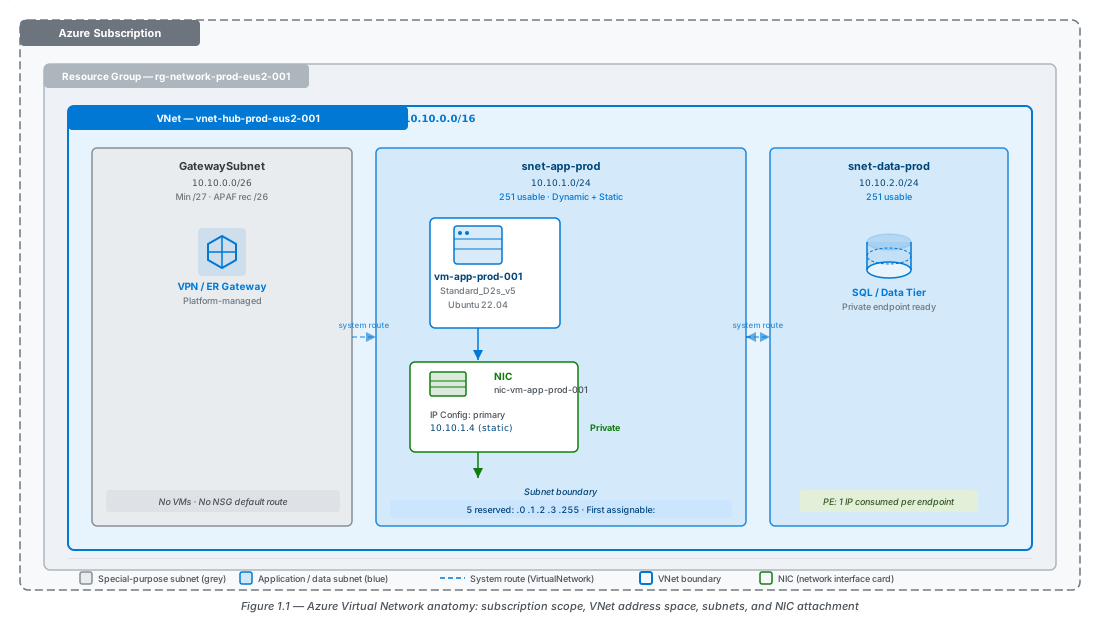
A VNet exists in a single Azure region and belongs to a single subscription. You cannot stretch a VNet across two regions or move it between subscriptions without recreating it. This regional scope is a design constraint that all architects must internalise before CIDR planning begins.
A VNet can hold multiple address spaces. You can add address spaces after creation without downtime, which allows you to expand an existing VNet when workload growth exceeds the original allocation. Do not treat this capability as an excuse to under-provision at creation time — adding non-contiguous address spaces fragments your address plan and complicates route summarisation in hybrid scenarios.
VNets and their subnets span all availability zones within a region automatically. You do not need to partition subnets by zone to accommodate zonal resources. A virtual machine pinned to Zone 1 and a virtual machine pinned to Zone 3 can share the same subnet without any special configuration. The subnet is a flat Layer 2 domain at the VNet level; the availability zone assignment is a compute scheduling decision, not a networking boundary. This is counterintuitive to engineers with on-premises data centre experience, where VLANs and physical rack placement are closely related.
Note
VNets cannot span regions natively. Chapter 4 covers Azure Virtual WAN (vWAN), which provides a Microsoft-managed hub that connects VNets across regions through a global transit network.
VNet Limits You Must Know Before You Design
Certain VNet limits constrain design choices directly. The table below shows the limits most relevant to production architects.
| Limit | Default Value | Notes |
|---|---|---|
| Address spaces per VNet | 5 | Expandable via Azure Support request |
| Subnets per VNet | 3,000 | Rarely the bottleneck in practice |
| VNet peerings per VNet | 500 | Can become a bottleneck in large hub-and-spoke topologies |
| NIC IP configurations per NIC | 2,000 | Applies to Standard SKU NICs |
| IPv4 VNet address space range | /8 to /29 | APAF baseline recommendation: /16 per spoke VNet |
| IPv6 subnet prefix length | /64 (fixed) | All IPv6 subnets in a dual-stack VNet must use exactly /64 |
Note
Verify these limits against the current Azure subscription and service limits page before finalising a design. Microsoft updates these values without versioning the page, and the VNet peering limit in particular has changed multiple times.
Address Spaces and Subnets
The address plan you create at VNet construction time constrains every future deployment decision. A subnet that is too small blocks a blue/green deployment. An address space that overlaps with your on-premises estate prevents you from connecting the VNet to your hub. The decisions in this section are among the highest-impact, lowest-reversibility choices in Azure networking. Make them deliberately.
Choosing Your RFC 1918 Ranges
Azure VNets must use private IP addressing from RFC 1918 ranges. Three blocks are available, and each carries a different collision risk in enterprise environments:
10.0.0.0/8— the largest available range. Most enterprises already use portions of this block on-premises, making overlap likely without careful coordination with your network team.172.16.0.0/12— less common in corporate environments, which makes it lower-risk for Azure-specific allocations.192.168.0.0/16— frequently used in branch offices, home networks, and legacy point-to-site VPN configurations. Avoid this range for spoke VNets in any hybrid topology.
APAF recommends that you carve your entire Azure address plan from a dedicated supernet within 10.0.0.0/8. For example, reserve 10.100.0.0/14 exclusively for all Azure VNets in your organisation, subdivide it by region and environment (production, staging, development), and record every allocation in your IPAM system before creating any VNet. This approach prevents overlap and makes block delegation predictable as the organisation grows.
This supernet reservation must be coordinated with your network team before you create a single VNet. In most enterprises, the network team controls the RFC 1918 address space allocation. File a formal IPAM request that identifies your Azure supernet, and obtain sign-off from the network architect before you proceed.
Warning
If your Azure VNet address space overlaps with any network reachable via ExpressRoute, VPN Gateway, or VNet peering, routing will break silently or peering will fail at creation time. Azure cannot validate for overlap against your on-premises routing table — it has no visibility into it. Audit your on-premises IP addressing scheme before you allocate Azure address ranges.
Subnet Fundamentals
A subnet is a child of the VNet address space. Its CIDR range must fall entirely within one of the VNet's address spaces and cannot overlap with any other subnet in the same VNet. Every NIC must attach to a subnet — a NIC cannot attach directly to a VNet.
Azure reserves five IP addresses in every subnet. These addresses are unavailable for assignment to resources regardless of subnet size:
| Address | Offset | Purpose |
|---|---|---|
10.10.1.0 | .0 | Network address |
10.10.1.1 | .1 | Default gateway (Azure-managed) |
10.10.1.2 | .2 | Azure DNS |
10.10.1.3 | .3 | Azure DNS (reserved for future use) |
10.10.1.255 | .255 | Broadcast address |
The table above uses 10.10.1.0/24 as the example subnet. Apply the same pattern to any prefix: the first four addresses and the last address are always reserved.
Calculate usable hosts using the formula usable = 2n − 5, where n is the number of host bits:
/24— 256 total, 251 usable/27— 32 total, 27 usable/28— 16 total, 11 usable/29— 8 total, 3 usable — the minimum viable subnet, sufficient only for tightly constrained gateway resources
Reserve /29 subnets for deployments where the resource count is known and fixed. For application subnets, start at /24 and increase as workload sizing demands.
Special-Purpose Subnets
Four subnet names are reserved by Azure for specific platform services. Use the exact name shown in the table — no variations, no appended prefixes or suffixes. Azure identifies these subnets by name to inject platform-managed gateway and security resources, and an incorrect name causes deployment failures that produce misleading error messages.
| Subnet Name | Required Exact Name | Minimum Size | APAF Rec. | Purpose |
|---|---|---|---|---|
| Gateway subnet | GatewaySubnet | /27 | /26 | VPN Gateway, ExpressRoute Gateway |
| Firewall subnet | AzureFirewallSubnet | /26 | /26 | Azure Firewall |
| Bastion subnet | AzureBastionSubnet | /26 | /26 | Azure Bastion |
| Route Server subnet | RouteServerSubnet | /27 | /27 | Azure Route Server |
For GatewaySubnet, the /27 minimum applies to all current VPN Gateway and ExpressRoute Gateway SKUs. The historical /29 minimum applied only to the Basic VPN Gateway SKU, which was retired along with Basic public IP addresses on September 30, 2025. Use /26 for GatewaySubnet in all new designs to accommodate active/active gateway configurations and future gateway scale unit increases.
Important
GatewaySubnet must not contain any resources other than gateway instances. Placing a virtual machine or any other resource type in GatewaySubnet is unsupported and may cause gateway deployments to fail. User-defined routes with a 0.0.0.0/0 destination and network security groups (NSGs) are not supported on GatewaySubnet. If you apply a route table to GatewaySubnet, ensure it contains only specific routes to on-premises prefixes — never a default route pointing to an NVA.
Subnet Delegation
Subnet delegation authorises a specific Azure service to deploy resources directly into a subnet using the platform's network injection mechanism. Services that use delegation include Azure SQL Managed Instance (SQL MI), App Service Environments (ASE v3), Azure API Management (stv2), and Azure NetApp Files.
Whether other resources can co-exist in a delegated subnet depends entirely on the delegated service. Some services require a dedicated subnet — SQL MI, for example, does not permit any other resource types in its delegated subnet, and deployment into a mixed subnet will fail. Other services permit co-existence with virtual machines and other workloads. Check the service-specific documentation before allocating address space for a delegated subnet, because the exclusivity model and sizing requirements differ significantly across services.
Important
Delegated subnets cannot contain private endpoints, regardless of whether the service uses a shared or dedicated subnet model. If you require private endpoint connectivity for a service deployed in a delegated subnet, you must create a separate subnet for those endpoints.
When you create a delegated subnet, Azure adds a service-specific network intent policy that restricts deployments to the delegated service type. Removing the delegation requires you to first remove all delegated resources from the subnet — you cannot remove the delegation from a populated subnet.
Network Interface Cards and IP Addressing
The network interface card (NIC) is the Azure resource that connects a virtual machine to a subnet. Every connectivity troubleshooting path eventually reaches the NIC — effective routes, NSG rules, and IP configurations all attach at this layer. Understanding NIC-level state is not optional for architects who diagnose production networking incidents.
The NIC as the Azure Network Attachment Point
The relationship between compute and network in Azure follows a strict hierarchy: VM → NIC → Subnet → VNet. A virtual machine does not connect to a subnet directly; the NIC mediates that connection. A VM can have multiple NICs, subject to the VM SKU's maximum NIC count. Each NIC belongs to exactly one subnet.
Each NIC holds one or more IP configurations. Each IP configuration defines a private IP address from the subnet's range and, optionally, a public IP address resource. NSGs and application security groups (ASGs) attach at the NIC level — not at the VM level. This distinction matters when you write NSG rules that target specific VMs rather than entire subnets, and it is covered in detail in Chapter 10.
A single NIC supports up to 2,000 IP configurations on Standard SKU NICs. This limit rarely constrains normal VM deployments, but it becomes relevant in scenarios such as Azure Kubernetes Service nodes where pod IPs are assigned as additional IP configurations on the node's NIC.
Note
To inspect the current network configuration of a running VM, query the NIC directly: az network nic show --resource-group YOUR-RG --name YOUR-NIC-NAME. This command returns the current NSG associations, IP configurations, and DNS server assignments applied to that NIC.
Static vs Dynamic IP Assignment
Azure supports two IP assignment methods for private IP addresses on a NIC IP configuration: dynamic and static.
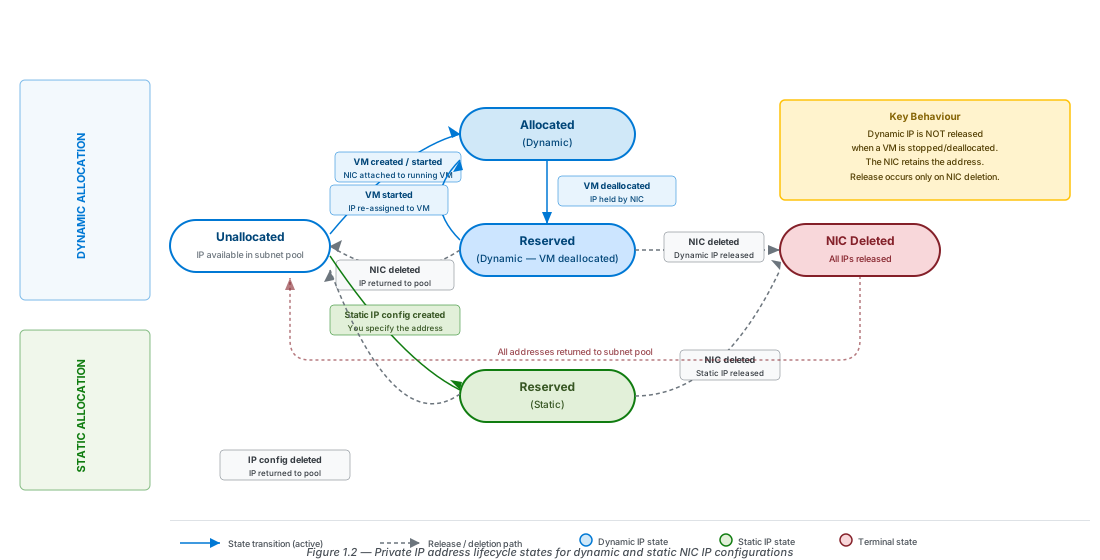
Dynamic is the default method. Azure allocates an address from the subnet's available range using its internal DHCP service and holds that address for the lifetime of the NIC. The address persists across VM stop and start cycles — this is not a renewable DHCP lease. Azure releases a dynamic private IP address only when one of three events occurs: the NIC is deleted, the NIC is reassigned to a different subnet, or the allocation method on that IP configuration is explicitly changed to static with a different address. If you stop and deallocate a VM overnight, its NIC retains the same private IP address when you start it again the next morning.
Static assignment requires you to specify an IP address within the subnet range. Azure validates that the address is not already in use and reserves it permanently. The address is released only when the NIC is deleted. You cannot move a statically assigned IP to another NIC without first deleting the IP configuration.
Use static assignment for any resource whose IP address appears in a route table, NSG rule, firewall rule, or DNS record. The following resource types require static private IP assignment:
- Azure Firewall instances
- Azure Bastion hosts
- VPN Gateways and ExpressRoute Gateways
- Custom DNS server VMs
- Network virtual appliances (NVAs)
- Any VM whose IP address appears in a user-defined route (UDR) next hop
Tip
Assign the static IP before you configure any route tables or DNS server settings that reference it. If you configure the route table first and then assign the static IP, a window exists during which the dynamic allocation could assign the intended IP to a different resource before you claim it with the static assignment.
Public IP Addresses
Azure public IP addresses are available in two SKUs: Standard and Basic. Use Standard SKU exclusively in all new designs.
Standard public IP addresses are zone-redundant by default in all Azure regions that support availability zones. All Standard public IPs — including those previously created without an explicit zone assignment — are now zone-redundant. Standard IPs are closed to inbound traffic by default: an NSG must explicitly allow inbound connections to the associated resource. This is the security-correct posture for all internet-facing resources.
Basic public IP addresses were retired on September 30, 2025. Basic IPs remain operational after retirement but are formally unsupported and excluded from Microsoft SLA guarantees. Basic public IPs were open to inbound traffic by default, with NSGs recommended but not enforced — the primary security risk that drove the retirement.
Warning
Basic SKU public IP addresses were retired on September 30, 2025. They remain operational but carry no SLA guarantees and receive no security updates. Do not use Basic SKU public IPs in new deployments. Migrate existing Basic public IPs to Standard SKU as soon as possible using the Basic to Standard upgrade guidance, which includes an Azure portal automated upgrade tool for common configurations.
IPv6 in Azure VNets
Azure VNets support dual-stack configuration: an IPv4 address space and an IPv6 address space coexist in the same VNet. Each subnet in a dual-stack VNet requires both an IPv4 CIDR block and an IPv6 CIDR block. IPv6 subnet prefixes must be exactly /64 — this is an Azure platform requirement and is not adjustable. Standard SKU public IPs support IPv6; Basic SKU does not and was retired in September 2025.
IPv6-only virtual machines are not supported in Azure. Every NIC must include at least one IPv4 IP configuration. IPv6 provides a second address per NIC for workloads that require it, but you cannot remove the IPv4 address from an Azure VM's NIC.
Several widely used Azure services do not support IPv6. Confirm service support before you enable dual-stack on a VNet:
- Azure Firewall does not support IPv6. It operates in a dual-stack VNet but processes only IPv4 traffic. Chapter 10 covers Firewall deployment constraints.
- VPN Gateway cannot be used in a VNet where IPv6 is enabled — neither directly nor through a VNet peering with
UseRemoteGatewayset to true. If you require both IPv6 and hybrid VPN connectivity, evaluate alternative architectures before committing to a dual-stack design. - Azure Container Instances and Azure Container Apps do not support IPv6.
Note
For most production workloads in 2026, IPv4-only remains the standard deployment pattern in Azure. Enable IPv6 when your organisation has a regulatory compliance requirement for IPv6 readiness, or when your workloads serve users whose ISPs assign IPv6-only addresses.
CIDR Planning for Production VNets
Sizing VNets and subnets correctly at design time is more important than any subsequent optimisation. Azure does not support subnet resizing after resources are deployed. To change a subnet's address range, you must first empty it — removing all NICs, service endpoints, and private endpoints from the subnet before modifying its prefix. The decisions you make in this section constrain or enable everything that follows.
The Three Sizing Mistakes That Cause Re-IPs
In practice, three mistakes account for the majority of VNet re-IP projects.
Sizing subnets for current workload only. A /27 subnet provides 27 usable addresses. That looks sufficient for 10 application server instances — until you need 20 instances for a blue/green deployment, or until 5 private endpoints each consume one address from the same subnet. Size every application subnet for peak load with 50% headroom, plus your projected private endpoint count, plus 5 for Azure reservations.
Forgetting the five Azure-reserved addresses. Engineers who calculate subnet capacity as 2n will consistently undercount. A /27 has 32 total addresses and 27 usable. Internalise the formula 2n − 5 and apply it to every subnet in your design before you write down a single CIDR range.
Sizing the VNet address space to fit only current subnets. A VNet address space that exactly covers your deployed subnets has no room for new subnets — feature teams, security controls, and platform services all generate subnet requirements that you cannot predict at design time. Reserve at least 30% of your VNet address space as unallocated headroom from the start.
A Repeatable Sizing Method
Use the following five-step process for every new VNet. Document the inputs and outputs in your IPAM system before you run az network vnet create.
Step 1. List every workload that will deploy into the VNet, including platform services such as Azure Firewall and Azure Bastion if this is a hub VNet.
Step 2. For each application subnet, calculate the required address count: (peak instance count × 1.5) + private endpoint count + 5 (Azure-reserved addresses).
Step 3. Round the calculated address count up to the next power of 2 to determine the subnet size. Select the CIDR prefix: a /27 gives 32 total (27 usable), a /26 gives 64 total (59 usable), a /25 gives 128 total (123 usable).
Step 4. Add the fixed-size platform subnets: GatewaySubnet /26, AzureFirewallSubnet /26, AzureBastionSubnet /26.
Step 5. Sum all subnet address counts, multiply by 1.3 to add 30% headroom, and select the VNet address space CIDR that contains the total.
The table below applies this method to a typical three-tier web application deployed in a hub VNet.
| Subnet | Workload | Calculation | CIDR | Usable |
|---|---|---|---|---|
snet-web-prod | 4 web nodes | (4 × 1.5) + 3 PE + 5 = 14 | /27 | 27 |
snet-app-prod | 8 app nodes | (8 × 1.5) + 5 PE + 5 = 22 | /27 | 27 |
snet-data-prod | 2 SQL MI nodes | (2 × 1.5) + 3 PE + 5 = 11 | /28 | 11 |
AzureFirewallSubnet | Azure Firewall | Fixed /26 | /26 | 59 |
GatewaySubnet | VPN/ER Gateway | Fixed /26 | /26 | 59 |
| Subtotal | — | 27+27+16+64+64 = 198 | — | — |
| VNet with 30% headroom | — | 198 × 1.3 ≈ 258 → /24 = 256 | /24 | 251 |
A /24 fits the current subnets but leaves only 53 unallocated addresses — barely enough for one additional /26. In production, choose a /22 (1,022 usable after reserved) to give the team room to add workloads, staging environments, and private endpoint subnets over the next two to three years.
Overlapping Address Space: The Silent Killer
Azure does not prevent you from creating VNets with overlapping address spaces in the same subscription. The platform validates overlap only at the moment you attempt to connect two VNets through peering, a gateway, or Virtual WAN. By that time, resources may be deployed and running in both VNets, making remediation expensive.
Overlapping address space causes three distinct failure modes depending on the topology:
VNet peering fails at creation. When you attempt to peer vnet-spoke-001 (10.10.0.0/16) with vnet-hub-001 (10.10.0.0/16), the peering creation request returns an overlap error immediately. You cannot create the peering until one of the address spaces changes — which first requires that you empty all subnets in the affected range.
ExpressRoute routes traffic to the wrong destination. When both your Azure VNet and your on-premises network advertise the same prefix, the ExpressRoute gateway receives competing route advertisements. Traffic intended for Azure may travel down the ExpressRoute circuit toward on-premises, and traffic from on-premises may loop back toward Azure. This failure mode is especially dangerous for database subnets, where split-brain routing can cause writes to land in the wrong environment.
Private endpoint DNS resolution breaks. A private endpoint whose IP address falls within a range also advertised from on-premises can produce a DNS response pointing to an address that the on-premises resolver routes to the wrong destination, bypassing the private endpoint entirely.
Before you allocate a new range, run the following command to audit existing VNet address spaces in the subscription:
# Audit VNet address spaces in the current subscription before allocating a new range
az network vnet list \
  --query "[].{Name:name, Prefixes:addressSpace.addressPrefixes}" \
  --output table
Cross-reference the output against your IPAM system and your on-premises routing table before finalising any new VNet address allocation.
Important
Azure does not prevent the creation of VNets with overlapping address spaces — it only surfaces the conflict at connection time. Audit address space in your IPAM system at design time. Discovering the conflict at peering time is significantly more expensive to remediate.
Deploying VNets: Azure CLI and Bicep
Understanding the deployment tools is not optional for architects. Your team will need to review infrastructure-as-code pull requests, diagnose deployment failures, and translate conceptual designs into working declarations. This section covers the two tools you will use in every chapter of this book: Azure CLI for interactive verification and iteration, and Bicep for repeatable, version-controlled infrastructure.
Azure CLI: Creating a VNet with Subnets
The minimal az network vnet create command creates a VNet and one subnet simultaneously. For a production VNet, you typically create the VNet first and add subnets individually to maintain explicit control over naming and address ranges.
# CE-01: Minimal VNet with one subnet (APAF naming convention)
az network vnet create \
  --name           vnet-spoke-prod-eus2-001 \
  --resource-group rg-networking-prod-eus2-001 \
  --location       eastus2 \
  --address-prefixes 10.10.0.0/22 \
  --subnet-name    snet-app-prod \
  --subnet-prefixes 10.10.1.0/24
Note that both --address-prefixes and --subnet-prefixes take the plural form. The singular --address-prefix and --subnet-prefix forms are accepted but marked as deprecated in the Azure CLI and will be removed in a future version. Use the plural form in all new scripts.
After the VNet is created, add each additional subnet with az network vnet subnet create:
# CE-02: Add additional subnets after VNet creation
VNET="vnet-spoke-prod-eus2-001"
RG="rg-networking-prod-eus2-001"

# GatewaySubnet — exact name required; no NSG; /26 per APAF recommendation
az network vnet subnet create \
  --vnet-name      "$VNET" \
  --resource-group "$RG" \
  --name           GatewaySubnet \
  --address-prefixes 10.10.0.0/26

# Application data subnet
az network vnet subnet create \
  --vnet-name      "$VNET" \
  --resource-group "$RG" \
  --name           snet-data-prod \
  --address-prefixes 10.10.2.0/24

# Verify: list all subnets with their address ranges
az network vnet subnet list \
  --vnet-name      "$VNET" \
  --resource-group "$RG" \
  --query          "[].{Name:name, Prefix:addressPrefix, Purpose:serviceEndpoints}" \
  --output         table
Bicep: Production-Ready VNet Declaration
Bicep is the recommended infrastructure-as-code language for all new Azure deployments. The following example declares the same VNet and subnets as the CLI commands above, using the current Bicep API version and APAF structural conventions.
// CE-03: Production VNet — Bicep (API version 2025-07-01)
@description('Azure region for deployment')
param location string = resourceGroup().location

@description('Environment tag: prod | staging | dev')
@allowed(['prod', 'staging', 'dev'])
param environmentName string = 'prod'

resource virtualNetwork 'Microsoft.Network/virtualNetworks@2025-07-01' = {
  name: 'vnet-spoke-${environmentName}-eus2-001'
  location: location
  tags: {
    environment: environmentName
    managedBy: 'platform-networking'
    chapter: 'ch01'
  }
  properties: {
    addressSpace: {
      addressPrefixes: ['10.10.0.0/22']
    }
    subnets: [
      {
        name: 'GatewaySubnet'          // Exact name required by Azure
        properties: {
          addressPrefix: '10.10.0.0/26'
          // Do NOT set networkSecurityGroup here
          // Do NOT set routeTable with 0.0.0.0/0 here
        }
      }
      {
        name: 'snet-app-prod'
        properties: {
          addressPrefix: '10.10.1.0/24'
          privateEndpointNetworkPolicies: 'Disabled'  // Required for private endpoints
        }
      }
      {
        name: 'snet-data-prod'
        properties: {
          addressPrefix: '10.10.2.0/24'
          privateEndpointNetworkPolicies: 'Disabled'
        }
      }
    ]
  }
}

output vnetId string = virtualNetwork.id
output appSubnetId string = virtualNetwork.properties.subnets[1].id
output dataSubnetId string = virtualNetwork.properties.subnets[2].id
The Microsoft.Network/virtualNetworks@2025-07-01 API version is the current stable release as of the date this chapter was written. Verify the current API version in the Azure resource type reference before deploying to production. The API version affects which properties are available — the privateEndpointNetworkPolicies property shown above requires 2021-02-01 or later.
The privateEndpointNetworkPolicies: 'Disabled' setting is required on any subnet that will host private endpoints. This property is not required on GatewaySubnet or subnets that do not host private endpoints. Set it on application and data subnets as a baseline practice, since adding private endpoints later requires updating this property — a no-downtime change, but one that can be overlooked under time pressure.
Reading Effective Routes on a NIC
After deploying a VNet and attaching a VM, the first verification step is to read the effective routes on the VM's NIC. Effective routes show the actual forwarding decision Azure applies to each packet, merging system routes with any user-defined routes (UDRs) and BGP-learned routes from a gateway. If traffic is taking an unexpected path, the effective routes table is where you confirm or rule out routing as the cause.
# CE-04: Read effective routes on a NIC — primary diagnostic tool
az network nic show-effective-route-table \
  --resource-group rg-networking-prod-eus2-001 \
  --name           nic-vm-app-prod-001 \
  --output         table

# Expected output for a VNet with no UDRs or gateway:
# Source    State    Address Prefix    Next Hop Type       Next Hop IP
# Default   Active   10.10.0.0/22      VnetLocal
# Default   Active   0.0.0.0/0         Internet
# Default   Active   100.64.0.0/10     None                — (discard)
# Default   Active   192.168.0.0/16    None                — (discard)
# Default   Active   10.0.0.0/8        None                — (discard)
# Default   Active   172.16.0.0/12     None                — (discard)
The output has four important columns. Source identifies whether the route was learned from a system default, a UDR (User), or a BGP advertisement (VirtualNetworkGateway). State is either Active or Invalid — Invalid routes are overridden by a more specific prefix and will never be used. Next Hop Type identifies the forwarding target: VnetLocal means Azure routes the packet within the VNet fabric; Internet sends the packet to Azure's public internet egress; None discards the packet with no response, which is how Azure prevents traffic from leaking into RFC 1918 ranges that are not part of the VNet.
When you add a UDR with a next hop pointing to an NVA or Azure Firewall, the UDR route appears with Source: User and overrides the system route for the same or a less specific prefix. Chapter 2 covers UDR construction and the longest-prefix match algorithm in detail.
Hands-On Lab: Build and Verify a Multi-Subnet VNet
This lab deploys a VNet with three subnets, attaches a virtual machine, assigns a static private IP, and verifies the configuration using the CLI commands covered in this chapter. Complete it in a non-production subscription or a dedicated lab resource group.
Prerequisites: Azure CLI 2.60 or later; a subscription with Contributor access; resource group rg-lab-ch01 already created in eastus2.
Create the VNet and platform subnets
Create the VNet with a /22 address space, then add GatewaySubnet and snet-data-prod as additional subnets.
# Set variables for this lab
RG="rg-lab-ch01"
LOC="eastus2"
VNET="vnet-lab-ch01-001"

# Create VNet with app subnet
az network vnet create \
  --name           "$VNET" \
  --resource-group "$RG" \
  --location       "$LOC" \
  --address-prefixes 10.99.0.0/22 \
  --subnet-name    snet-app-lab \
  --subnet-prefixes 10.99.1.0/24

# Add GatewaySubnet
az network vnet subnet create \
  --vnet-name      "$VNET" \
  --resource-group "$RG" \
  --name           GatewaySubnet \
  --address-prefixes 10.99.0.0/26

# Add data subnet
az network vnet subnet create \
  --vnet-name      "$VNET" \
  --resource-group "$RG" \
  --name           snet-data-lab \
  --address-prefixes 10.99.2.0/24

# Verify all 3 subnets are present
az network vnet subnet list \
  --vnet-name "$VNET" \
  --resource-group "$RG" \
  --query "[].{Subnet:name, CIDR:addressPrefix}" \
  --output table
Expected output: three rows — GatewaySubnet/10.99.0.0/26, snet-app-lab/10.99.1.0/24, snet-data-lab/10.99.2.0/24.
Deploy a VM with a static private IP
Create a NIC with a static private IP assignment, then deploy a VM using that NIC. Using a pre-created NIC gives you explicit control over the IP assignment before the VM is created.
# Create NIC with static IP 10.99.1.10
az network nic create \
  --name               nic-vm-lab-001 \
  --resource-group     "$RG" \
  --location           "$LOC" \
  --vnet-name          "$VNET" \
  --subnet             snet-app-lab \
  --private-ip-address 10.99.1.10 \
  --private-ip-address-version IPv4

# Deploy Ubuntu VM using the pre-created NIC
az vm create \
  --resource-group "$RG" \
  --name           vm-lab-app-001 \
  --nics           nic-vm-lab-001 \
  --image          Ubuntu2204 \
  --size           Standard_B2s \
  --generate-ssh-keys \
--no-waitVerify the NIC IP configuration
Once the VM deployment completes, verify that the NIC shows the static assignment.
az network nic show \
  --resource-group "$RG" \
  --name           nic-vm-lab-001 \
  --query          "ipConfigurations[0].{IP:privateIPAddress, Method:privateIPAllocationMethod, Subnet:subnet.id}" \
  --output         json
Confirm privateIPAllocationMethod is Static and privateIPAddress is 10.99.1.10.
Stop the VM and verify IP retention
Deallocate the VM (not just stop — deallocate releases compute resources from the host) and confirm the static IP is still held by the NIC.
# Deallocate VM (releases compute host, not network)
az vm deallocate \
  --resource-group "$RG" \
  --name           vm-lab-app-001

# Query NIC — IP should still be 10.99.1.10 with method Static
az network nic show \
  --resource-group "$RG" \
  --name           nic-vm-lab-001 \
  --query          "ipConfigurations[0].{IP:privateIPAddress, Method:privateIPAllocationMethod}" \
  --output         json
For a static assignment, the IP persists across VM lifecycle events. Had you created the NIC with --private-ip-address-version IPv4 and no explicit --private-ip-address, the method would be Dynamic — and the IP would still persist on deallocation. As Figure 1.2 shows, dynamic IP release requires NIC deletion, not just VM deallocation.
Read effective routes
Start the VM and then read its effective routes to see the default system routes Azure installs for the VNet.
# Start the VM before reading routes
az vm start \
  --resource-group "$RG" \
  --name           vm-lab-app-001

# Read effective routes from the NIC
az network nic show-effective-route-table \
  --resource-group "$RG" \
  --name           nic-vm-lab-001 \
  --output         table

# Clean up when done
az group delete --name "$RG" --yes --no-wait
Verify you see a VnetLocal route for 10.99.0.0/22 and an Internet route for 0.0.0.0/0. The four RFC 1918 discard routes (None next hop) confirm Azure's default isolation of private address space. Chapter 2 shows how to override the 0.0.0.0/0 Internet route with a UDR that forces all egress traffic through Azure Firewall.
Note
az network nic show-effective-route-table requires the VM to be in a running state. If the VM is deallocated, the command returns an error. Start the VM or use az vm show to confirm the VM state before running route diagnostics.
Summary
This chapter established the foundational Azure networking model that every subsequent chapter builds on. The core concepts form a hierarchy: the SDN layer enforces VNet isolation independent of IP addressing; subnets segment the VNet address space with five reserved addresses each; and the NIC is the attachment point between compute and network, carrying IP configurations, NSG associations, and routing state.
| Concept | Key Rule |
|---|---|
| VNet isolation | Enforced at the host SDN layer; independent of IP addressing |
| VNet scope | Single region, single subscription; subnets span all AZs automatically |
| Reserved addresses | 5 per subnet (.0, .1, .2, .3, .255); usable = 2n − 5 |
| GatewaySubnet | Exact name; /26 recommended; no NSGs, no 0.0.0.0/0 UDRs, no VMs |
| Dynamic IP retention | Held across VM stop/deallocate; released only on NIC deletion |
| Public IP SKU | Standard only; Basic retired September 30, 2025 |
| IPv6 subnet size | Must be exactly /64; Azure Firewall and VPN Gateway do not support IPv6 |
| CLI parameters | --address-prefixes and --subnet-prefixes (plural forms) |
| Bicep API version | Microsoft.Network/virtualNetworks@2025-07-01 |
Chapter 2 extends the routing model introduced here. You will build user-defined routes to override system routes, configure next-hop targets for NVAs and Azure Firewall, and understand how Azure evaluates multiple routes for the same destination using longest-prefix matching. The effective routes diagnostic command you used in Task 5 of this lab becomes your primary tool throughout that chapter.
Chapter: 1 of 12 | Status: v0.1 Draft — pending S08 review | Last updated: