Book 01 — Azure Networking Deep Dive
Azure Virtual WAN
Azure Virtual WAN replaces the manual work of hub-and-spoke topology — peering configuration, UDR tables, gateway SKU selection — with a Microsoft-managed network service that provides any-to-any connectivity between branches, VNets, and other hubs. Understanding when vWAN's automation is an advantage, and when it limits your control, is one of the most important architectural decisions in enterprise Azure networking.
What is Azure Virtual WAN
The Virtual Hub
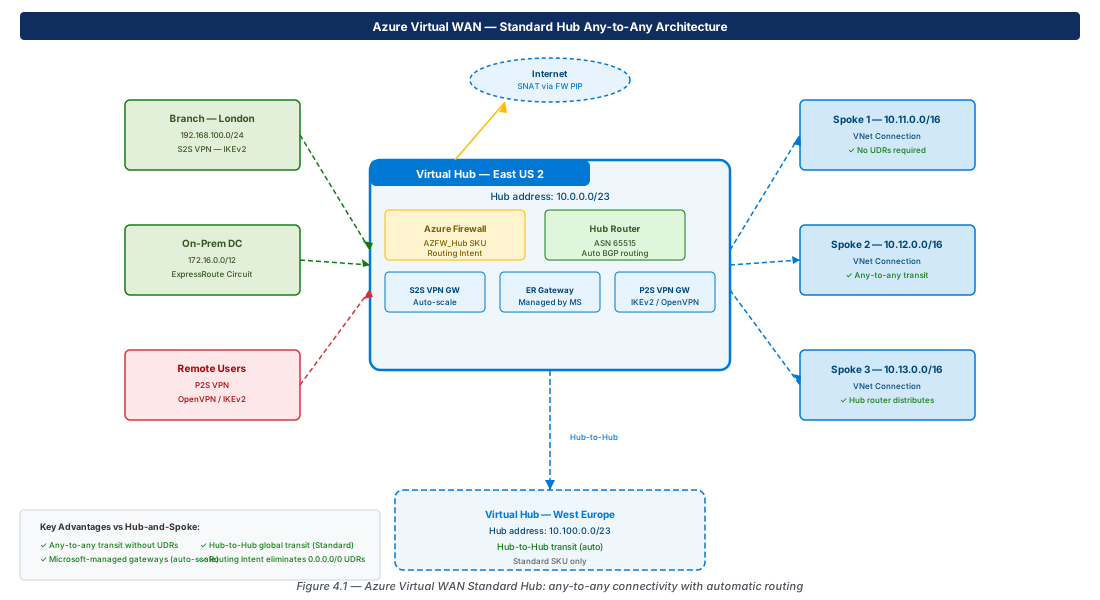
A Virtual Hub is a Microsoft-managed regional hub that automates routing between all connected entities. You cannot configure subnets inside the hub or access its internal routing directly — Microsoft operates the hub's control plane. You interact only with what connects to the hub and the routing policies applied to those connections.
The hub contains managed instances of: VPN Gateway (auto-scale, no SKU selection), ExpressRoute Gateway, P2S VPN Gateway, Azure Firewall (if Secure Hub), and the Hub Router (ASN 65515, full-mesh BGP). All route propagation between connected VNets, branches, and other hubs happens automatically.
vWAN SKUs
| Feature | Basic | Standard |
|---|---|---|
| Site-to-Site VPN | ✓ | ✓ |
| Point-to-Site VPN (P2S) | ✗ | ✓ |
| ExpressRoute | ✗ | ✓ |
| VNet connections (spoke transit) | ✗ | ✓ |
| Any-to-any transit | ✗ | ✓ |
| Azure Firewall (Secure Hub) | ✗ | ✓ |
| Third-party NVA in hub | ✗ | ✓ |
| Hub-to-Hub transit (multi-region) | ✗ | ✓ |
Basic SKU is suitable only for small deployments requiring S2S VPN to branches with internet access only. Any enterprise pattern — ER, P2S, spoke VNets, Firewall inspection — requires Standard SKU.
vWAN vs Hub-and-Spoke Decision
| Criterion | vWAN (Standard) | Hub-and-Spoke (Ch3) |
|---|---|---|
| Any-to-any transit | Automatic | Requires per-spoke UDRs |
| Route management | Microsoft-managed | Manual UDRs + peerings |
| Multi-region transit | Automatic (Hub-to-Hub) | Manual peering chains |
| Custom routing logic | Limited | Full UDR control |
| NVA placement | Hub NVA (select partners) | Full flexibility |
| Cost at low scale | Higher (minimum hub) | Lower |
| Cost at high scale (many branches) | Potentially lower | Higher (gateway + FW) |
Tip
Choose vWAN when you have many branches (10+), need global hub-to-hub transit, or want Microsoft to manage routing complexity. Stick with hub-and-spoke when you need granular UDR control, specific third-party NVA placement, or have a small deployment where vWAN's minimum hub cost is prohibitive.
Virtual Hub Architecture
Hub Address Space
Each Virtual Hub requires a /23 or larger address space. Microsoft allocates internal subnets from this range for gateways, the Hub Router, and Firewall infrastructure. You cannot see or manage these internal subnets. The hub address space must be non-overlapping with all connected VNet address spaces and other hub address spaces.
VNet Connections
Spoke VNets connect to a Virtual Hub via a VNet connection, which behaves like a peering but is managed through the vWAN API. The --internet-security true flag enables Firewall inspection for internet-bound traffic from that spoke.
# Connect spoke VNet to Virtual Hub
az network vhub connection create \
  --name conn-spoke-001 \
  --resource-group rg-vwan \
  --vhub-name vhub-eastus2 \
  --remote-vnet /subscriptions/.../vnet-spoke-001 \
  --internet-security true
Secure Virtual Hub and Routing Intent
Secure Virtual Hub
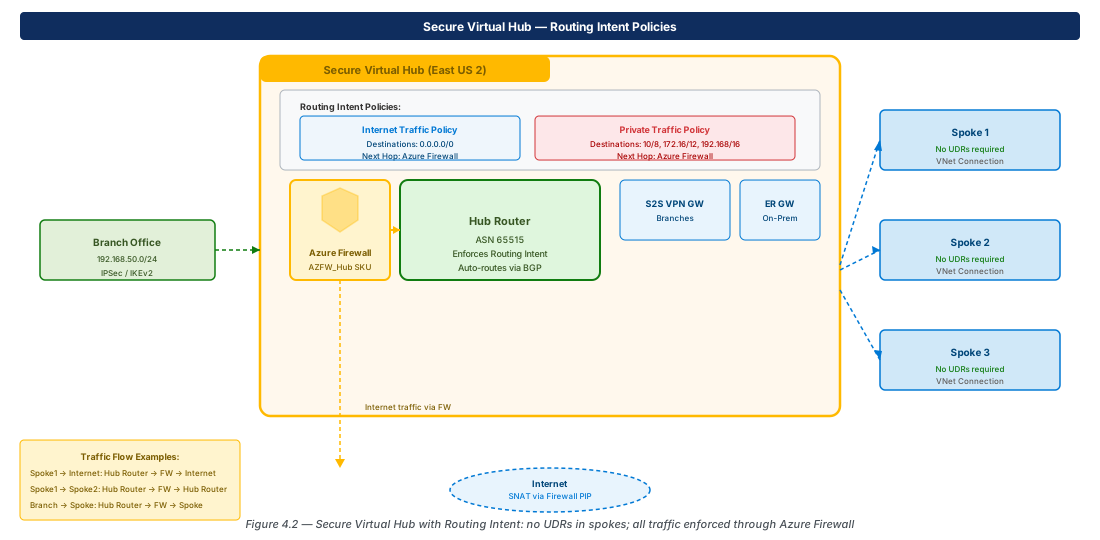
A Secure Virtual Hub is a Virtual Hub with Azure Firewall deployed inside it. The Firewall must use --sku AZFW_Hub — it cannot be the regular AZFW_VNet SKU. Azure Firewall Manager manages policy; the Hub Router enforces routing through the Firewall based on Routing Intent Policies.
# Deploy Azure Firewall into a Virtual Hub (must use AZFW_Hub SKU)
az network firewall create \
  --name afw-vhub-eastus2 \
  --resource-group rg-vwan \
  --sku AZFW_Hub \
  --vhub /subscriptions/.../vhub-eastus2 \
  --firewall-policy /subscriptions/.../fwpol-prod
Routing Intent Policies
Routing Intent replaces the manual 0.0.0.0/0 UDR approach. You declare policies at the hub level that tell the Hub Router to direct traffic categories through the Firewall:
- Internet Traffic Routing Policy: Routes 0.0.0.0/0 from all connections through Firewall. Spokes need no internet UDR.
- Private Traffic Routing Policy: Routes RFC 1918 (10/8, 172.16/12, 192.168/16) through Firewall. Enables spoke-to-spoke inspection and branch-to-spoke inspection without UDRs in spoke VNets.
Important
When Private Traffic Routing Policy is enabled, the Hub Router advertises RFC 1918 super-nets to all connected spoke VNets. Any existing 0.0.0.0/0 or RFC 1918 UDRs in spoke VNets will conflict. Remove spoke UDRs before enabling Routing Intent — the hub router supersedes them.
Custom Route Tables
Beyond Routing Intent, vWAN supports custom route tables for advanced workload segmentation. Each connection can be associated with one route table (determines which routes the connection uses) and propagate routes to multiple route tables (determines which hubs/connections learn about this connection's prefixes). Default, None, and custom labels provide flexible grouping.
Branch Connectivity
Site-to-Site VPN
vWAN S2S VPN auto-scales based on throughput demand — no gateway SKU selection required. Create a VPN Site for each branch, then create a connection from the hub's VPN Gateway to the site. The site's public IP and BGP ASN (if BGP is used) are configured on the VPN Site object.
ExpressRoute
ExpressRoute circuits connect to a Virtual Hub in the same way as to a standalone ER Gateway. vWAN adds automatic route propagation to all hub-connected VNets and branches without manual route advertisement — a significant operational advantage over manual hub-and-spoke at scale.
Monitoring vWAN
Use az network vhub get-effective-routes to inspect the hub's aggregated routing table. Azure Monitor Network Insights provides a vWAN topology map. Key metrics: TunnelBandwidthDrops, BGPPeerState, connection health percentages.
Lab: vWAN with Secure Hub and Routing Intent
Create vWAN, Hub, and Three Spoke Connections (CE-12)
# CE-12: Standard vWAN + Hub + 3 spoke connections
RG="rg-lab-ch04"; LOC="eastus2"
az group create --name "$RG" --location "$LOC"

az network vwan create --name vwan-lab --resource-group "$RG" \
  --location "$LOC" --type Standard

az network vhub create --name vhub-lab --resource-group "$RG" \
  --location "$LOC" --vwan vwan-lab \
  --address-prefix 10.0.0.0/23

for i in 1 2 3; do
  az network vnet create --name "vnet-spoke-00$i" --resource-group "$RG" \
    --location "$LOC" --address-prefixes "10.1$i.0.0/16" \
    --subnet-name snet-app --subnet-prefixes "10.1$i.1.0/24"
  SPOKE_ID=$(az network vnet show --resource-group "$RG" \
    --name "vnet-spoke-00$i" --query id -o tsv)
  az network vhub connection create \
    --name "conn-spoke-00$i" --resource-group "$RG" \
    --vhub-name vhub-lab --remote-vnet "$SPOKE_ID"
doneEnable Routing Intent for Internet Traffic (CE-13)
# CE-13: Deploy Firewall Policy, Firewall, enable Routing Intent
az network firewall policy create \
  --name fwpol-lab --resource-group "$RG" \
  --location "$LOC" --sku Premium

HUB_ID=$(az network vhub show --resource-group "$RG" --name vhub-lab --query id -o tsv)
FWP_ID=$(az network firewall policy show --resource-group "$RG" \
  --name fwpol-lab --query id -o tsv)

az network firewall create \
  --name afw-lab --resource-group "$RG" \
  --sku AZFW_Hub --vhub "$HUB_ID" --firewall-policy "$FWP_ID"

FW_ID=$(az network firewall show --resource-group "$RG" --name afw-lab --query id -o tsv)
az network vhub routing-intent create \
  --name ri-lab --resource-group "$RG" --vhub vhub-lab \
  --routing-policies '[{"name":"InternetTraffic","destinations":["Internet"],"nextHop":"'"$FW_ID"'"}]'

# Inspect effective routes after Routing Intent enabled
az network vhub get-effective-routes \
  --resource-group "$RG" --name vhub-lab \
  --resource-type VnetConnection \
  --resource-id "$(az network vhub connection show --resource-group "$RG" \
    --name conn-spoke-001 --vhub-name vhub-lab --query id -o tsv)"

az group delete --name "$RG" --yes --no-wait
Summary
| Concept | Key Fact |
|---|---|
| vWAN Basic vs Standard | Standard required for VNet transit, ExpressRoute, P2S, Firewall |
| Hub address space | Minimum /23; managed by Microsoft internally |
| Secure vHub | Uses AZFW_Hub SKU — different from AZFW_VNet |
| Routing Intent | Replaces manual UDRs; Internet and Private traffic policies |
| Any-to-any transit | Standard SKU only; automatic — no spoke UDRs needed |
| Hub-to-Hub | Standard SKU; provides global multi-region transit automatically |
| When to choose | Many branches, global transit, managed routing; not for granular NVA/UDR control |
Chapter 5 covers Azure VPN Gateway for hybrid connectivity — S2S IKEv2 tunnels, P2S for remote users, active-active configurations, and BGP over VPN for dynamic on-premises route exchange.
Chapter: 4 of 12 | Status: v0.1 Draft |