Book 01 — Azure Networking Deep Dive
Routing and Traffic Control
Every packet that leaves a NIC in Azure follows a routing decision. That decision is rarely visible when the network works correctly, but it becomes the first thing you investigate when traffic mysteriously disappears. Azure's routing model is layered: the platform installs system routes automatically, BGP advertises routes learned from gateways, and user-defined routes override both when you need explicit control. Chapter 1 introduced effective routes as a diagnostic tool; this chapter explains exactly how those routes get there and how you shape them.
How Azure Routes Traffic
Azure's routing system operates on a three-tier hierarchy. Understanding the tiers — and how they interact — is the key to predicting, debugging, and controlling traffic flow.
System Routes: Azure's Built-in Forwarding Table
When you create a VNet, Azure automatically installs a set of system routes in every subnet. These routes are not visible as Azure resources — you cannot create, edit, or delete them through ARM, CLI, or Bicep. They exist at the SDN layer and are enforced regardless of whether you have created any route tables.
| Address Prefix | Next Hop Type | Source |
|---|---|---|
| VNet address space (e.g., 10.10.0.0/22) | VirtualNetwork | Default |
| 0.0.0.0/0 | Internet | Default |
| 10.0.0.0/8 | None | Default |
| 172.16.0.0/12 | None | Default |
| 192.168.0.0/16 | None | Default |
| 100.64.0.0/10 | None | Default |
The VirtualNetwork next hop routes all traffic destined for addresses within the VNet's address space directly within the Azure SDN fabric — no gateway required. The Internet default route sends all unmatched traffic to Azure's internet edge. The four None routes covering the RFC 1918 blocks and CGNAT range are discard routes that prevent traffic from leaking out through the internet route when those addresses are not in the VNet.
Note
System routes are not a route table resource. They appear in the effective routes output (az network nic show-effective-route-table) with Source: Default. That is the only way to inspect them.
Optional System Routes
Azure adds additional system routes when specific features are enabled. VNet peering adds routes for the remote VNet's address prefixes with next hop type VNetPeering. A VPN or ExpressRoute gateway propagates on-premises prefixes as VirtualNetworkGateway routes. Service endpoints add routes for service public IP ranges via VirtualNetworkServiceEndpoint. These optional routes cannot be modified directly.
The Longest-Prefix Match Algorithm
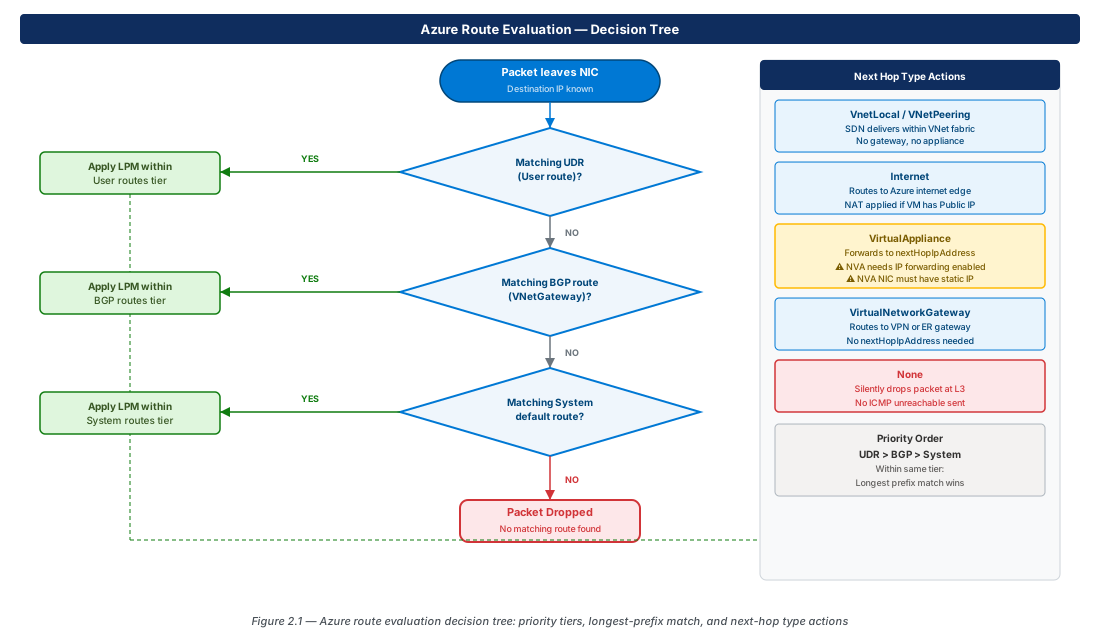
When Azure must decide which route to apply to an outbound packet, it uses longest-prefix match (LPM): the route with the most specific prefix wins. A /32 beats /24, which beats /16, which beats /0. When two routes share the same prefix length, the priority order applies: UDR (User) > BGP (VirtualNetworkGateway) > System (Default).
User-Defined Routes
User-defined routes (UDRs) are the primary mechanism to override system routes and direct traffic through specific next hops. They are the core building block of hub-and-spoke topologies, forced tunnelling, and NVA integration.
Anatomy of a Route Table and Route
A route table is an Azure resource (Microsoft.Network/routeTables) that contains one or more routes. A subnet can have at most one associated route table. Each route requires: addressPrefix (the CIDR to match), nextHopType (one of VirtualNetworkGateway, VnetLocal, Internet, VirtualAppliance, None), and nextHopIpAddress (required only when type is VirtualAppliance). The maximum routes per route table is 400.
Creating and Applying UDRs
// CE-bicep-02: Route table with forced-egress UDR (API version 2025-07-01)
resource routeTable 'Microsoft.Network/routeTables@2025-07-01' = {
  name: 'rt-spoke-prod-eus2-001'
  location: location
  properties: {
    disableBgpRoutePropagation: false   // false = BGP routes DO propagate (default)
    routes: [
      {
        name: 'udr-force-egress-firewall'
        properties: {
          addressPrefix: '0.0.0.0/0'
          nextHopType: 'VirtualAppliance'
          nextHopIpAddress: '10.10.64.4'   // Azure Firewall private IP (must be static)
        }
      }
    ]
  }
}Note
disableBgpRoutePropagation defaults to false, meaning BGP propagation is enabled. Set to true to block gateway-learned routes from appearing on subnets associated with this route table. The inverted name confuses most engineers: disable = false means "do not disable" (i.e., keep it enabled).
Common UDR Patterns
Force all egress through Azure Firewall. A single route with prefix 0.0.0.0/0, next hop type VirtualAppliance, and next hop IP set to the Azure Firewall's private IP. Apply to every spoke application subnet.
Spoke-to-spoke via hub NVA. Add routes in each spoke for the other spokes' prefixes, pointing to the NVA's IP in the hub. Achieves inspection of cross-spoke traffic independently of internet egress.
Black-hole a prefix. Set nextHopType: None to silently discard traffic matching a prefix — no ICMP unreachable or TCP RST is sent to the source.
Warning
Attaching a route table with a 0.0.0.0/0 → VirtualAppliance route to GatewaySubnet is not supported and breaks gateway functionality. Any UDRs on GatewaySubnet must use only specific on-premises prefixes.
Next-Hop Types Deep Dive
VirtualAppliance
Two prerequisites must be met: the appliance NIC must have a static private IP (so the next hop address never changes), and IP forwarding must be enabled on the appliance NIC: az network nic update --ip-forwarding true. Without IP forwarding, Azure drops packets whose destination IP doesn't match any IP in the NIC's configuration.
Important
VirtualAppliance does not perform SNAT by default. Return traffic from the destination must traverse the same appliance as the outbound flow, or the stateful connection fails. In hub-and-spoke, both spoke-to-internet and spoke-to-spoke routes must point to the same firewall for symmetric routing.
VirtualNetworkGateway
Does not require a nextHopIpAddress. Azure resolves the gateway endpoint internally. Use when you need to explicitly direct traffic toward the VPN or ExpressRoute gateway, overriding a system route. The disableBgpRoutePropagation property on the associated route table controls whether gateway-learned routes propagate to the subnet.
None
Silently drops matching packets at L3 before NSG evaluation. Unlike an NSG Deny, a None route sends no response to the sender. Use for coarse blocking of known-bad prefixes. Use NSG Deny when you need port-level specificity or a flow log record of the denial.
BGP and Gateway Route Propagation
When BGP Routes Appear
BGP routes appear in effective routes when a VPN Gateway has BGP enabled, an ExpressRoute Gateway is attached (always uses BGP), or Azure Route Server has a BGP peer established with an NVA. They appear with source VirtualNetworkGateway.
BGP Route Priority
Priority order: UDR > BGP > System. Within BGP paths, Azure selects by AS path length (shorter preferred), then MED (lower preferred). For active/active VPN and dual ExpressRoute, Azure performs ECMP when paths are equal-cost.
Azure Route Server
Route Server eliminates manual UDR maintenance for NVA integrations. The NVA establishes BGP sessions with Route Server (ASN 65515), advertises its reachable prefixes, and Route Server programs those routes into the VNet fabric. Route Server supports up to 8 BGP peers and ECMP across equal-cost NVA paths. Deploy it into the RouteServerSubnet (/27 minimum).
Note
Azure Route Server is not a router — it programs routes but does not forward packets. Actual forwarding still goes through the NVA. High availability for the NVA itself requires redundant NVA instances, not Route Server redundancy.
Forced Tunnelling
What Forced Tunnelling Does
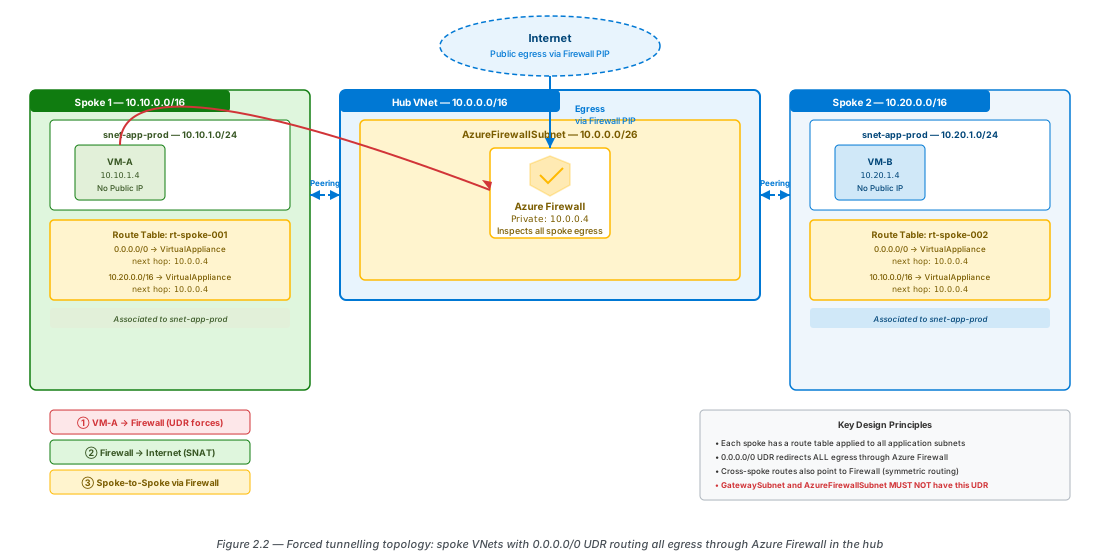
Forced tunnelling overrides the default 0.0.0.0/0 Internet route and redirects all egress through an inspection point. Two platform addresses must remain directly reachable through Azure's internal fabric — they are resolved before the UDR applies: 168.63.129.16 (Azure wire server — VM agent, health probes, Key Vault cert retrieval) and 169.254.169.254 (IMDS — managed identity tokens, instance metadata). Verify your NVA passes traffic to these before enabling forced tunnelling.
Configuring Forced Tunnelling
The recommended approach is a UDR on every spoke application subnet: 0.0.0.0/0 → VirtualAppliance → Firewall private IP. In Azure Firewall, configure application and network rules to permit required outbound traffic. Deny-by-default is the correct posture.
Important
AzureFirewallSubnet and GatewaySubnet cannot have a 0.0.0.0/0 UDR. Apply forced tunnelling route tables only to spoke application subnets. Azure Firewall's own forced tunnelling mode (using a separate management NIC and AzureFirewallManagementSubnet) must be configured at firewall creation time and cannot be added post-deployment.
Asymmetric Routing Risks
Asymmetric routing occurs when the outbound path traverses a different device than the return path. Stateful firewalls drop the return traffic because they have no session entry for an "unsolicited" packet. Detect asymmetry by comparing effective routes on both the source and destination NICs — if the return path skips the inspection device, you have asymmetry. The fix: ensure both directions of every spoke flow route through the same firewall instance. Chapter 3 covers the complete hub-and-spoke UDR layout for symmetric routing.
Lab: UDR to Route Egress Through Azure Firewall
Deploy Azure Firewall in Hub VNet
# CE-05: Deploy Azure Firewall Standard in hub VNet
RG="rg-lab-ch02"; LOC="eastus2"; HUB_VNET="vnet-lab-hub-001"

az network vnet create --name "$HUB_VNET" --resource-group "$RG" --location "$LOC" \
  --address-prefixes 10.99.64.0/22 --subnet-name AzureFirewallSubnet --subnet-prefixes 10.99.64.0/26

az network public-ip create --name pip-fw-hub-lab --resource-group "$RG" \
  --location "$LOC" --sku Standard --allocation-method Static

az network firewall policy create --name fwpol-lab-001 --resource-group "$RG" \
  --location "$LOC" --tier Standard

az network firewall create --name fw-hub-lab-001 --resource-group "$RG" \
  --location "$LOC" --firewall-policy fwpol-lab-001 --vnet-name "$HUB_VNET"

az network firewall ip-config create --firewall-name fw-hub-lab-001 \
  --name ipconfig-fw --resource-group "$RG" \
  --public-ip-address pip-fw-hub-lab --vnet-name "$HUB_VNET"

FW_PRIVATE_IP=$(az network firewall show --name fw-hub-lab-001 --resource-group "$RG" \
  --query "ipConfigurations[0].privateIPAddress" --output tsv)
echo "Firewall private IP: $FW_PRIVATE_IP"Create Route Table and UDR
# CE-06: Create route table; add 0.0.0.0/0 → Firewall
az network route-table create --name rt-spoke-lab-001 --resource-group "$RG" \
  --location "$LOC" --disable-bgp-route-propagation false

az network route-table route create --route-table-name rt-spoke-lab-001 \
  --resource-group "$RG" --name udr-force-egress \
  --address-prefix 0.0.0.0/0 --next-hop-type VirtualAppliance \
--next-hop-ip-address "$FW_PRIVATE_IP"Associate Route Table and Verify Effective Routes
# CE-07: Associate route table; verify effective routes
az network vnet subnet update --vnet-name vnet-lab-spoke-001 \
  --name snet-app-lab --resource-group "$RG" \
  --route-table rt-spoke-lab-001

az network nic show-effective-route-table --resource-group "$RG" \
  --name nic-vm-lab-001 --output table
# Confirm: 0.0.0.0/0 now shows NextHopType: VirtualApplianceAdd Firewall Rules and Test Traffic Flow
# CE-08: Add network rule to permit DNS + HTTPS from lab subnet
az network firewall policy rule-collection-group create \
  --policy-name fwpol-lab-001 --resource-group "$RG" \
  --name rcg-lab-allow --priority 200

az network firewall policy rule-collection-group collection add-filter-collection \
  --policy-name fwpol-lab-001 --resource-group "$RG" \
  --rule-collection-group-name rcg-lab-allow \
  --name rc-allow-outbound --collection-priority 100 \
  --action Allow --rule-name allow-dns-https \
  --rule-type NetworkRule --source-addresses "10.99.1.0/24" \
  --destination-ports 443 53 --protocols TCP UDP \
  --destination-addresses "*"

# From VM (Bastion / serial console):
#   curl -s https://ifconfig.me  → should return Firewall public IP, not VM IP
#
# Clean up:
az group delete --name "$RG" --yes --no-wait
Summary
| Concept | Key Rule |
|---|---|
| Route priority | UDR > BGP > System |
| Longest-prefix match | Most specific prefix (/32 before /24 before /0) wins |
| VirtualAppliance | Requires static IP on NVA NIC + IP forwarding enabled |
| GatewaySubnet UDR | Never use 0.0.0.0/0 UDR on GatewaySubnet |
disableBgpRoutePropagation | Default false (propagation enabled); set true to block gateway routes |
| Route Server ASN | 65515 (Azure-assigned) |
| Max routes per route table | 400 |
| Asymmetric routing | Both directions of a flow must traverse the same stateful device |
| Forced tunnelling scope | Only on spoke application subnets — not AzureFirewallSubnet or GatewaySubnet |
| Bicep API version | Microsoft.Network/routeTables@2025-07-01 |
Chapter 3 extends these UDR patterns into a complete hub-and-spoke topology, adding VNet peering, shared services placement, peering cost modelling, and the full symmetric routing layout that prevents asymmetric flow failures.
Chapter: 2 of 12 | Status: v0.1 Draft | Last updated: